

TL;DR: React for startups, flexibility, and content sites. Angular for enterprise, large teams, and long-term projects. Performance is now equivalent. Choose based on team experience and project constraints, not framework hype.
React captured 88.6% of startup funding in 2025, while Angular powers enterprise architectures at Google, Microsoft, and Deutsche Bank. The “which is better” debate is obsolete. The real question: which mental model matches your team’s constraints?
This guide covers Angular 19/20’s Signals versus React 19’s Compiler, hydration strategies, Server Components, and a pragmatic decision framework.
What Is Angular? What Is React?
Angular is a full-featured TypeScript framework; React is a focused UI library.
Angular (by Google) is “batteries-included”: routing, forms, HTTP client, and dependency injection built-in. Angular 19/20 introduced Signals for fine-grained reactivity and zoneless architecture.
React (by Meta) is a view-layer library. You compose your own stack. React 19 added the React Compiler for automatic memoization and Server Actions for data mutations.
| Aspect | Angular | React |
|---|---|---|
| Type | Full framework | UI library |
| Maintained by | Meta | |
| Language | TypeScript (required) | JavaScript/TypeScript |
| Architecture | Component-based with modules | Component-based |
| Release | 2016 (Angular 2+) | 2013 |
| Current version | Angular 19/20 | React 19 |
Angular vs React: 2026 Market Data
React dominates adoption; Angular dominates enterprise.
React leads with 20 million weekly npm downloads versus Angular’s 3.5 million (5.7x difference). Developer surveys show 42% use React compared to 18% for Angular.
An analysis of 334 startups (2024 founding, 2025 funding) revealed React captured $2.52B of $2.85B total (88.6%).
| Metric | React | Angular |
|---|---|---|
| Job positions | 300,000+ | 80,000+ |
| Weekly npm downloads | 20M | 3.5M |
| Developer satisfaction | 62.2% want to continue | 53.4% want to continue |
| GitHub stars | 210k+ | 90k+ |
| Typical environment | Startups, agencies, content sites | Enterprise, government, finance |
Data as of early 2026.
The New Reactivity Battle: Signals vs Compiler
Both frameworks now auto-optimize performance through different mechanisms.
Angular Signals: Fine-Grained Reactivity
Angular Signals are reactive primitives that track values and update only affected DOM nodes. Introduced in Angular 16, they’re simpler than RxJS and enable surgical re-renders.
import { Component, signal, computed } from "@angular/core";

@Component({
  selector: "app-counter",
  standalone: true,
  template: `
    <p>Count: {{ count() }}</p>
    <p>Doubled: {{ doubled() }}</p>
    <button (click)="increment()">Increment</button>
  `,
})
export class CounterComponent {
  // Writable signal
  count = signal(0);

  // Computed signal (derived state)
  doubled = computed(() => this.count() * 2);

  increment() {
    this.count.update((value) => value + 1);
  }
}
Signals provide three core primitives:
- signal(): Writable reactive value
- computed(): Derived value that updates when dependencies change
- effect(): Side effects that run when signals change
Why did Angular add Signals?
Zone.js change detection created performance overhead and debugging complexity. Signals enable:
- Surgical DOM updates: Only affected elements re-render
- Zoneless applications: Angular 20 supports apps without Zone.js
- Simpler mental model: Easier than RxJS for most state management
- Better performance: 30-40% faster initial renders in benchmarks
React Compiler: Automatic Memoization
The React 19 Compiler auto-memoizes components at build time, eliminating manual useMemo and useCallback.
// Before React Compiler: Manual optimization required
function ProductList({ products, onSelect }) {
  const sortedProducts = useMemo(
    () => products.sort((a, b) => a.price - b.price),
    [products],
  );

  const handleSelect = useCallback((id) => onSelect(id), [onSelect]);

  return sortedProducts.map((product) => (
    <ProductCard key={product.id} product={product} onSelect={handleSelect} />
  ));
}

// After React Compiler: Write naturally, compiler optimizes
function ProductList({ products, onSelect }) {
  const sortedProducts = products.sort((a, b) => a.price - b.price);

  return sortedProducts.map((product) => (
    <ProductCard
      key={product.id}
      product={product}
      onSelect={() => onSelect(product.id)}
    />
  ));
}
The compiler analyzes JavaScript semantics and React’s rules to determine safe memoization points.
Signals vs Compiler: Direct Comparison
| Aspect | Angular Signals | React Compiler |
|---|---|---|
| Optimization approach | Runtime fine-grained reactivity | Build-time automatic memoization |
| Developer effort | Explicit signal creation | Write normal code, compiler optimizes |
| Learning curve | New API to learn | Transparent (no new APIs) |
| Granularity | DOM node level | Component level |
| Adoption | Opt-in, coexists with RxJS | Opt-in, works with existing code |
| Maturity | Stable since Angular 17 | Production-ready in React 19 |
Both approaches reduce unnecessary re-renders. Angular’s Signals require learning new primitives but offer more explicit control. React’s Compiler works transparently but optimizes at the component level rather than individual DOM nodes.
Server-Side Rendering: Hydration Strategies
Angular defers hydration on triggers; React eliminates it entirely for Server Components.
Angular: Incremental Hydration
Incremental hydration defers component activation until user interaction or viewport entry. Angular 19+ uses @defer syntax for on-demand hydration.
@Component({
  selector: "app-product-page",
  template: `
    <app-header />

    <app-hero-banner />

    <!-- Hydrate when visible -->
    @defer (on viewport) {
      <app-product-gallery [products]="products" />
    } @placeholder {
      <div class="skeleton-gallery"></div>
    }

    <!-- Hydrate on interaction -->
    @defer (on interaction) {
      <app-reviews [productId]="productId" />
    } @placeholder {
      <button>Load Reviews</button>
    }

    <!-- Hydrate after idle -->
    @defer (on idle) {
      <app-recommendations />
    }
  `,
})
export class ProductPageComponent {
  products = input<Product[]>();
  productId = input<string>();
}
Angular 19 also introduced:
- Event replay: Captures user interactions during hydration and replays them once components are interactive
- Route-level render modes: Configure SSR, CSR, or prerendering per route
- Non-destructive hydration: Preserves server-rendered DOM instead of replacing it
React: Server Components
Server Components render on the server and send zero JavaScript to the client. Unlike SSR, they never hydrate.
// Server Component (default in Next.js App Router)
// This component runs ONLY on the server
async function ProductPage({ params }) {
  // Direct database access - no API needed
  const product = await db.products.findUnique({
    where: { id: params.id },
  });

  return (
    <div>
      <h1>{product.name}</h1>
      <p>{product.description}</p>

      {/* Client Component for interactivity */}
      <AddToCartButton productId={product.id} />

      {/* Server Component - no JS sent */}
      <ProductReviews productId={product.id} />
    </div>
  );
}

// Client Component (explicit opt-in)
("use client");

function AddToCartButton({ productId }) {
  const [loading, setLoading] = useState(false);

  async function handleClick() {
    setLoading(true);
    await addToCart(productId);
    setLoading(false);
  }

  return (
    <button onClick={handleClick} disabled={loading}>
      {loading ? "Adding..." : "Add to Cart"}
    </button>
  );
}
Server Components and Server Actions provide:
- Zero client JavaScript for static content (Islands Architecture)
- Direct backend access without APIs
- Server Actions for form mutations without API boilerplate
- Automatic code splitting at the component level
- Streaming with Suspense for better TTFB
See our React Server Components practical guide for implementation details.
SSR Strategy Comparison
| Feature | Angular (Incremental Hydration) | React (Server Components) |
|---|---|---|
| Hydration model | Deferred, trigger-based | Selective (server-only vs client) |
| JavaScript sent | Reduced, loaded on demand | Zero for Server Components |
| Interactivity timing | On viewport/interaction/idle | Immediate for Client Components |
| Data fetching | Services, HTTP client | Direct in Server Components |
| Framework | Angular Universal | Next.js, Remix |
| Complexity | Moderate (new @defer syntax) | Higher (server/client boundary) |
State Management Approaches
Angular provides built-in patterns; React offers ecosystem choice.
Angular’s Signals + Services eliminates decision fatigue. React requires evaluating libraries (Zustand, Jotai, Redux Toolkit). See our React state management guide.
Angular: Signals + Services
Combine Signals with injectable services for dependency injection, testability, and fine-grained reactivity.
import { Injectable, signal, computed } from "@angular/core";

interface CartItem {
  productId: string;
  quantity: number;
  price: number;
}

@Injectable({ providedIn: "root" })
export class CartService {
  // Private writable signal
  private items = signal<CartItem[]>([]);

  // Public read-only computed values
  readonly cartItems = this.items.asReadonly();
  readonly itemCount = computed(() =>
    this.items().reduce((sum, item) => sum + item.quantity, 0),
  );
  readonly total = computed(() =>
    this.items().reduce((sum, item) => sum + item.price * item.quantity, 0),
  );

  addItem(product: { id: string; price: number }) {
    this.items.update((items) => {
      const existing = items.find((i) => i.productId === product.id);
      if (existing) {
        return items.map((i) =>
          i.productId === product.id ? { ...i, quantity: i.quantity + 1 } : i,
        );
      }
      return [
        ...items,
        { productId: product.id, quantity: 1, price: product.price },
      ];
    });
  }

  removeItem(productId: string) {
    this.items.update((items) =>
      items.filter((i) => i.productId !== productId),
    );
  }
}
For complex applications, NgRx provides Redux-style state management. However, Signals reduce the need for external libraries in most cases.
React: Flexible Options
Built-in (useState, useContext)
// Simple local state
const [count, setCount] = useState(0);

// Shared state via Context
const CartContext = createContext();

function CartProvider({ children }) {
  const [items, setItems] = useState([]);

  const addItem = (product) => {
    setItems((prev) => [...prev, product]);
  };

  return (
    <CartContext.Provider value={{ items, addItem }}>
      {children}
    </CartContext.Provider>
  );
}
Zustand (minimal boilerplate)
import { create } from "zustand";

const useCartStore = create((set) => ({
  items: [],
  addItem: (product) =>
    set((state) => ({
      items: [...state.items, product],
    })),
  removeItem: (id) =>
    set((state) => ({
      items: state.items.filter((item) => item.id !== id),
    })),
  total: () => {
    const { items } = useCartStore.getState();
    return items.reduce((sum, item) => sum + item.price, 0);
  },
}));
React 19’s use() hook
// New in React 19: read promises during render
function ProductDetails({ productPromise }) {
  const product = use(productPromise);
  return <h1>{product.name}</h1>;
}

// Can be called conditionally (unlike other hooks)
function UserProfile({ userId, showDetails }) {
  if (showDetails) {
    const user = use(fetchUser(userId));
    return <Profile user={user} />;
  }
  return <BasicInfo userId={userId} />;
}
State Management Comparison
| Approach | Angular | React |
|---|---|---|
| Built-in | Signals + Services | useState, useContext |
| Simple global state | Signals in services | Zustand, Jotai |
| Complex/Redux-style | NgRx | Redux Toolkit, Recoil |
| Server state | HttpClient + Signals | TanStack Query, SWR |
| Learning curve | Moderate (Signals are new) | Varies by library choice |
Bundle Size and Performance
Angular’s larger baseline includes what React requires as add-ons.
Angular ships ~140KB gzipped; React ships ~45KB. But Angular includes routing, forms, and HTTP. React needs additional libraries to match.
| Metric | Angular | React + Ecosystem |
|---|---|---|
| Core library | ~140KB | ~45KB |
| With routing | Included | +15KB (React Router) |
| With forms | Included | +10KB (React Hook Form) |
| With HTTP/data | Included | +15KB (TanStack Query) |
| Realistic total | ~140KB | ~85-120KB |
Performance benchmarks (2025-2026)
Angular 20:
- 30-40% faster initial renders vs Angular 19
- 50% reduction in unnecessary re-renders with Signals
React 19 Compiler:
- Automatic elimination of re-render cascades
- Reduced JavaScript execution through memoization
For most applications, performance differences are negligible. Architecture, code splitting, and lazy loading matter more. See our React performance optimization guide.
Developer Experience Comparison
Angular enforces consistency; React enables flexibility.
Angular: Structured and Opinionated
Angular CLI
# Generate components, services, modules
ng generate component product-card
ng generate service cart
ng generate guard auth

# Build with optimizations
ng build --configuration=production

# Run tests
ng test
ng e2e
Built-in tooling
- Schematics for code generation
- Integrated testing (Jasmine, Karma, Protractor/Playwright)
- Strict mode for enhanced type checking
- Automatic migrations via
ng update
Opinionated structure
src/
├── app/
│   ├── core/           # Singleton services, guards
│   ├── shared/         # Reusable components, pipes
│   ├── features/       # Feature modules
│   │   ├── products/
│   │   └── cart/
│   └── app.component.ts
React: Flexible and Ecosystem-Driven
Meta-frameworks (recommended)
# Next.js (most popular)
npx create-next-app@latest

# Remix
npx create-remix@latest

# Vite + React
npm create vite@latest my-app -- --template react-ts
Ecosystem choices
- Routing: React Router, TanStack Router, or framework-built-in
- Forms: React Hook Form, Formik, or native
- Testing: React Testing Library, Vitest, Playwright
- Styling: Tailwind, CSS Modules, styled-components, Emotion
Flexible structure (no enforced convention)
src/
├── components/
├── hooks/
├── lib/
├── pages/ or app/
└── styles/
Component Libraries and UI
Both ecosystems have mature component libraries:
Angular
- Angular Material: Google’s Material Design implementation
- PrimeNG: Comprehensive enterprise component suite
- NG-ZORRO: Ant Design for Angular
- Taiga UI: Modern, customizable components
React
- Material UI (MUI): Most popular Material Design library
- Chakra UI: Accessible, customizable components
- Radix UI: Unstyled, accessible primitives
- shadcn/ui: Copy-paste components built on Radix
- Ant Design: Enterprise-focused component library
For animations, React has an edge with Framer Motion, though Angular Animations integrates well with the framework’s change detection.
When to Choose Angular
- Enterprise applications with 10+ developers where enforced conventions reduce code divergence
- Teams with TypeScript/OOP experience (Java, C#, .NET backgrounds). See our TypeScript for React developers guide
- Need built-in solutions for routing, forms, HTTP, and DI without evaluating libraries
- Long-term maintainability is critical - Angular’s structure pays dividends over years
- Regulated industries (finance, healthcare, government) where enterprise adoption matters
Angular excels for: Large-scale enterprise, opinionated architecture, comprehensive tooling, existing Angular teams.
When to Choose React
- Ecosystem flexibility - choose best-in-class libraries for each concern
- Content-heavy sites with Next.js or Astro for SSR/SSG
- Functional programming preference - composition over inheritance
- React Native needed for mobile with shared code
- Hiring speed matters - larger talent pool (300,000+ positions)
React excels for: Startups/MVPs, content sites with SEO, cross-platform, architectural freedom, Server Components.
Decision Framework
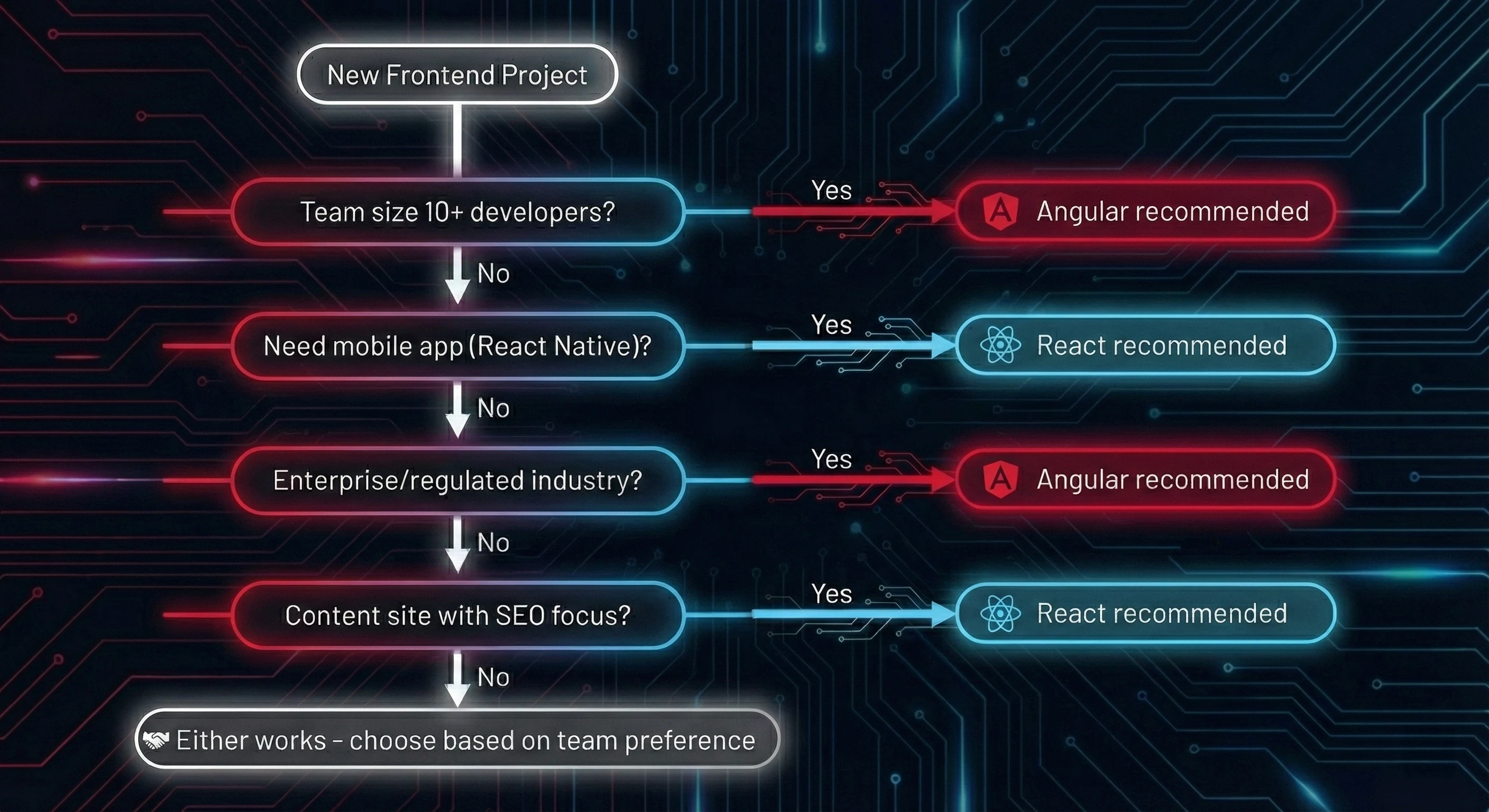
| Factor | Choose Angular | Choose React |
|---|---|---|
| Team size | 10+ developers | Any size |
| Project duration | 3+ years | Any duration |
| Architecture preference | Opinionated, structured | Flexible, composable |
| TypeScript | Required (comfortable) | Optional (preferred) |
| Mobile needs | Ionic, NativeScript | React Native |
| SSR approach | Angular Universal, incremental hydration | Next.js, Server Components |
| State complexity | High (NgRx available) | Any (many options) |
| Hiring priority | Enterprise talent | Startup/agency talent |
Still unsure? Consider these tiebreakers:
- If your team has no framework experience, React’s gentler learning curve helps
- If you’re replacing an existing Angular app, staying with Angular reduces migration risk
- If you’re building a content site, React + Next.js has the strongest ecosystem
- If you’re in enterprise with Java/.NET teams, Angular’s patterns feel familiar
- If you’re vibe coding with AI tools, React wins. LLMs have seen more React code, generate better React snippets, and the ecosystem’s flexibility works well with AI-assisted development. Angular’s strict patterns can fight against AI suggestions.
Migration Considerations
Yes, you can migrate, but expect a rewrite. Angular uses classes and DI; React uses functions and composition.
Common approaches:
- Strangler pattern: Build new features in the target framework while maintaining existing code
- Micro-frontends: Run both frameworks in different parts of the application
- Full rewrite: Replace the entire application (highest risk)
Plan 3-6 months for medium-sized applications.
The Contrarian Take
“Angular is dying” is a myth. Angular maintains a solid enterprise niche. The 18% market share represents intentional, scaled adoption. Companies that chose Angular five years ago are still shipping efficiently because consistency compounds.
React’s flexibility introduces decision fatigue. Every project requires architectural choices (routers, state management, forms) that can slow momentum. Angular’s “batteries included” approach lets teams focus on business logic immediately.
Neither framework is universally “better.” They optimize for different constraints.
Key Takeaways
- React dominates startups (88.6% of funding) and job market (300,000+ positions); Angular dominates enterprise and regulated industries
- Performance is now equivalent. Angular Signals and React Compiler both auto-optimize. Architecture matters more than framework choice
- Angular = structure + consistency; React = flexibility + ecosystem choice. Pick based on team preference, not hype
- SSR strategies differ fundamentally: Angular’s incremental hydration defers activation; React’s Server Components eliminate client JS entirely
- The skills transfer: Component thinking, state management, and performance optimization apply to both frameworks
Conclusion
Choose Angular for structure; choose React for flexibility. The “wrong” choice is analysis paralysis.
Angular: structure, comprehensive tooling, enterprise-grade patterns. Best for large teams and long-term projects.
React: flexibility, ecosystem choice, largest community. Best for startups, content sites, and cross-platform development.
The skills you develop (component architecture, state management, performance optimization) transfer between frameworks. Your choice today doesn’t lock you in forever.
Next step: Build the same small feature in both. You’ll know within a few hours which mental model clicks.
Related Resources:
- React Hooks: The Complete Guide - Master React’s fundamental patterns
- React Server Components - Understand React’s server-side architecture
- React State Management - Choose the right state library
- React Performance Optimization - Build fast React applications
- Building Design Systems - Component architecture for either framework
- TypeScript for React Developers - Type-safe React patterns