

Your Markdown frontmatter is a liability. One missing field, one wrong date format, and your build fails silently or, worse, deploys broken pages to production. When I migrated our enterprise documentation site from legacy APIs to Astro 6, the sheer volume of undocumented frontmatter edge-cases nearly halted our deployment until we fully embraced Content Collections.
Astro content collections are Astro’s typed content system for Markdown, MDX, JSON, YAML, and remote data. The big shift now is not just “use the Content Layer API.” In Astro 6, you need to understand the split between build content collections for static content (which utilize Incremental builds to speed up subsequent deployments) and live content collections for request-time data.
As of March, 2026, Astro 6.0.2 is the latest stable release. That matters because Astro 6 removes legacy collections by default, deprecates z from astro:content in favor of astro/zod, and adds stable live content collections for API-backed data.
This guide covers the current setup for Astro 6, while still showing the migration path from Astro 2-5 projects.
TL;DR - 7 Things You Need to Know
- Astro 6 is current - Latest stable is
astro@6.0.2, and the content docs now separate build and live collections. - Build content collections still power blogs and docs - Use
src/content.config.tswithdefineCollection(),glob(), andfile(). - Live content collections are now stable - Use
src/live.config.tswithdefineLiveCollection()when data must stay fresh without rebuilds. - Use
astro/zodfor schemas - Astro 6 deprecates importingzfromastro:content. - Legacy collections are off by default - Migrate from
type: "content"andtype: "data", or temporarily enablelegacy.collectionsBackwardsCompat. - Runtime requirements changed too - Astro 6 upgrades to Node.js 22.12+ and Vite 7.
- What does npx astro sync do? The
npx astro synccommand generates TypeScript definitions for your Astro content collections. You should run it whenever you modify yourZodSchemainference insrc/content.config.tsor add new content files to ensure your IDE provides accurate autocomplete and type-checking.
What Are Astro Content Collections?
Content collections are Astro’s built-in way to manage sets of related content—blog posts, documentation pages, product listings, author profiles—with automatic validation and type inference. They replace manual file imports with a structured, type-safe API.
Here’s what content collections provide:
| Feature | Without Collections | With Collections |
|---|---|---|
| File Loading | Manual import.meta.glob() |
getCollection() API |
| Frontmatter Validation | None (runtime errors) | Zod schema (build-time errors) |
| TypeScript Support | No type inference | Full auto-generated types |
| Error Detection | Production/runtime | Development/build time |
| Content Caching | Manual implementation | Built-in optimization |
| Remote Content | Custom fetch logic | Pluggable loaders |
What is the Astro Content Layer API?
The Astro Content Layer API is a unified system introduced in Astro 5 and refined in Astro 6 that allows developers to define, validate, and query content collections. It uses Zod schemas to enforce frontmatter shape at build time and supports both local files via the glob loader and remote data sources. For the official documentation, see the Astro Content Collections Guide and the Astro 6 upgrade guide.
- Loaders replace type declarations — Instead of
type: "content", you useloader: glob()orloader: file() - Content lives anywhere — No longer restricted to
src/content/; store files anywhere on your filesystem - Live content collections are stable in Astro 6 — Remote data can now stay fresh at request time via
src/live.config.ts - Schema imports changed — New Astro 6 examples should import
zfromastro/zod - Legacy collections are deprecated out of the box — Old
src/content/config.tsprojects need migration or a temporary compatibility flag - Content Layer performance remains the foundation — The original build-time gains from Astro 5 still apply to modern build collections
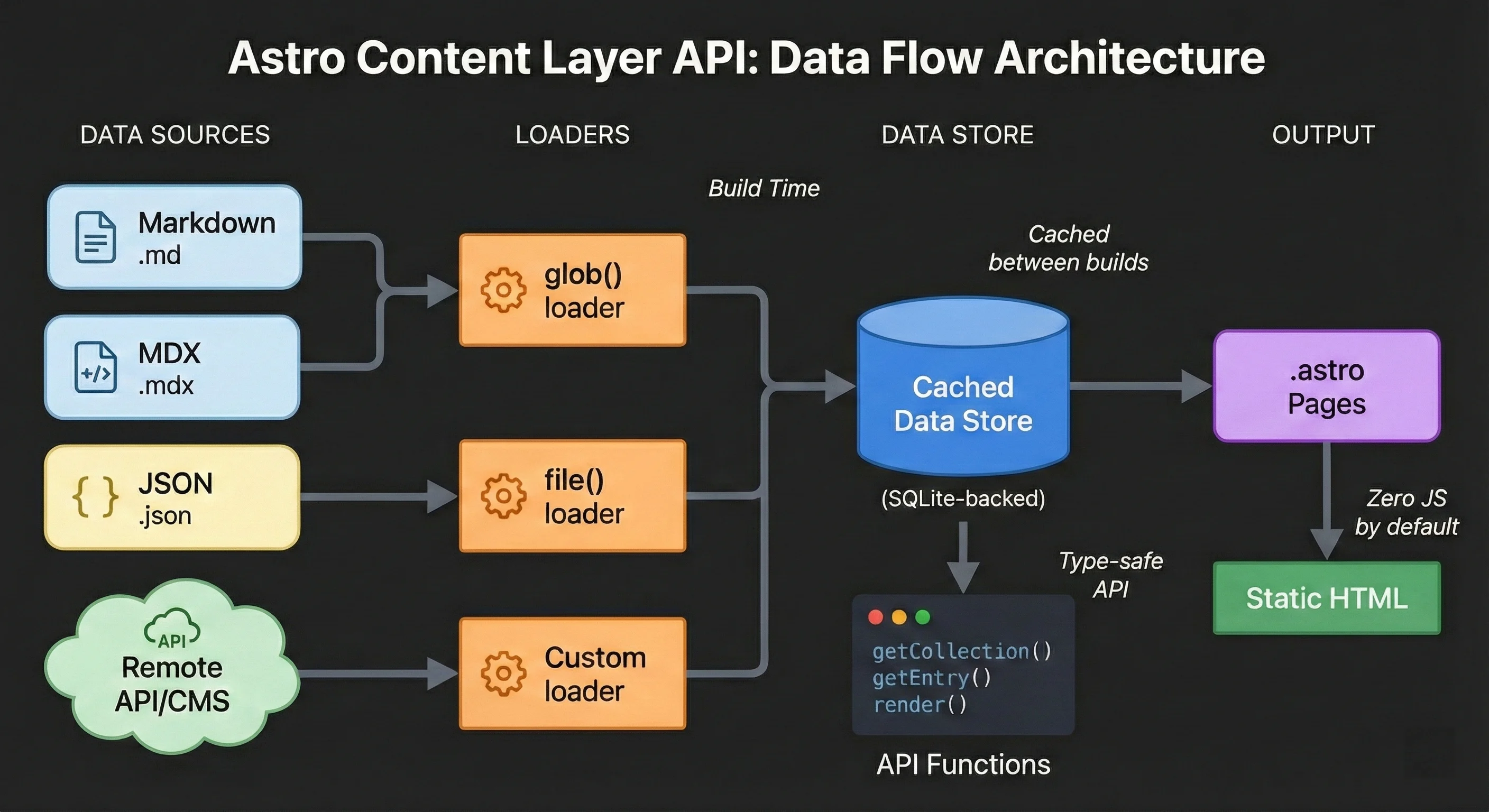
Content Layer architecture: Sources → Loaders → Cached Data Store → Static Output
Migrating from Astro 2-5? The config file location changed from
src/content/config.tstosrc/content.config.ts, and Astro 6 disables legacy collections unless you explicitly opt into compatibility. See the migration section below.
Build Collections vs Live Collections
This is the biggest source of confusion in current Astro docs, so keep the split clear:
| Mode | Config File | Best For | Main APIs | Current Caveats |
|---|---|---|---|---|
| Build content collections | src/content.config.ts |
Blogs, docs, MDX, local files, static data | defineCollection(), getCollection(), getEntry() |
Data updates require a rebuild |
| Live content collections | src/live.config.ts |
API data, read-heavy remote content | defineLiveCollection(), getLiveCollection() |
No MDX rendering or image() helper support yet |
Note on Querying: It is crucial to understand
getCollectionvsgetEntryvsgetLiveCollection. UsegetCollectionto fetch all build-time items (like an index page),getEntryto fetch a single build-time item efficiently without fetching the whole collection, andgetLiveCollectionspecifically for request-time, API-backed data. For strict typing of single items across your components, use the TypeScript genericimport type { CollectionEntry } from "astro:content";and type your props asCollectionEntry<"blog">.
If your content is authored in Markdown or MDX, stay with build collections. Reach for live collections when the source of truth is remote and freshness matters more than build-time caching.
Setting Up Your First Content Collection
Let’s build a blog collection from scratch using the current Astro 6 build-collection API.
Step 1: Create the Content Config
Create src/content.config.ts (note: this is in src/, not src/content/):
// src/content.config.ts
import { defineCollection } from "astro:content";
import { glob } from "astro/loaders";
import { z } from "astro/zod";

const blog = defineCollection({
  // Load all .md and .mdx files from the blog directory
  loader: glob({ pattern: "**/*.{md,mdx}", base: "./src/content/blog" }),
  schema: z.object({
    title: z.string().min(10).max(100),
    description: z.string().max(160), // SEO-optimized length
    pubDate: z.coerce.date(),
    updatedDate: z.coerce.date().optional(),
    author: z.string().default("Anonymous"),
    heroImage: z.string().optional(),
    tags: z.array(z.string()).default([]),
    draft: z.boolean().default(false),
  }),
});

export const collections = { blog };
What’s happening here:
glob()loads files matching the pattern from the specified base directoryz.coerce.date()converts date strings (like2024-11-09) to JavaScript Date objects.default()provides fallback values for optional fields.max(160)on description enforces SEO-friendly meta description length
Step 2: Create Your Content Directory
Create the directory structure for your blog posts:
src/
├── content.config.ts          # Collection definitions
└── content/
    └── blog/
        ├── my-first-post.mdx
        ├── astro-tips.md
        └── tutorials/
            └── advanced-routing.mdx
The glob() loader with **/*.{md,mdx} pattern will find files in subdirectories too, so you can organize content however you like. MDX files let you embed interactive UI components directly in your content.
Step 3: Write Your First Content File
Create src/content/blog/my-first-post.mdx:
---
title: "Building My First Astro Site"
description: "A walkthrough of creating a blazing-fast static site with Astro"
pubDate: 2024-11-09
author: "Your Name"
heroImage: "/images/first-post.jpg"
tags: ["astro", "tutorial", "web-development"]
---

Welcome to my blog! This post was validated by Zod at build time.

## Why Astro?

Astro ships zero JavaScript by default, making it perfect for content sites...
If any required field is missing or has the wrong type, Astro shows a clear error during astro dev or astro build—not in production.
Step 4: Query Content in Your Pages
Create a blog index at src/pages/blog/index.astro:
---
import { getCollection } from "astro:content";
import Layout from "../../layouts/Layout.astro";

// Fetch all blog posts, filtering out drafts in production
const posts = await getCollection("blog", ({ data }) => {
  return import.meta.env.PROD ? !data.draft : true;
});

// Sort by publication date (newest first)
const sortedPosts = posts.sort(
  (a, b) => b.data.pubDate.getTime() - a.data.pubDate.getTime(),
);
---

<Layout title="Blog">
  <h1>Latest Posts</h1>
  <ul role="list">
    {
      sortedPosts.map((post) => (
        <li>
          <a href={`/blog/${post.id}`}>
            <h2>{post.data.title}</h2>
            <p>{post.data.description}</p>
            <time datetime={post.data.pubDate.toISOString()}>
              {post.data.pubDate.toLocaleDateString("en-US", {
                year: "numeric",
                month: "long",
                day: "numeric",
              })}
            </time>
          </a>
        </li>
      ))
    }
  </ul>
</Layout>
Notice post.data is fully typed—your editor knows exactly what fields exist and their types. This type safety is similar to what you get with React Hooks when using TypeScript.
Step 5: Create Dynamic Post Pages
For individual posts, create src/pages/blog/[...slug].astro:
---
import { getCollection, render } from "astro:content";
import Layout from "../../layouts/Layout.astro";

export async function getStaticPaths() {
  const posts = await getCollection("blog");
  return posts.map((post) => ({
    params: { slug: post.id },
    props: { post },
  }));
}

const { post } = Astro.props;
const { Content, headings } = await render(post);
---

<Layout title={post.data.title} description={post.data.description}>
  <article>
    <header>
      <h1>{post.data.title}</h1>
      <p class="description">{post.data.description}</p>
      {
        post.data.heroImage && (
          <img
            src={post.data.heroImage}
            alt=""
            width="1200"
            height="630"
            loading="eager"
          />
        )
      }
      <div class="meta">
        <span>By {post.data.author}</span>
        <time datetime={post.data.pubDate.toISOString()}>
          {post.data.pubDate.toLocaleDateString()}
        </time>
      </div>
    </header>

    <Content />

    {
      post.data.tags.length > 0 && (
        <footer>
          <p>Tags: {post.data.tags.join(", ")}</p>
        </footer>
      )
    }
  </article>
</Layout>
The render() function returns a Content component for your Markdown/MDX and a headings array for building table of contents.
Understanding Loaders: glob() vs file()
Astro’s build collections still ship with two built-in local loaders:
The glob() Loader
Creates one entry per file. Best for content that renders as individual pages.
import { defineCollection } from "astro:content";
import { glob } from "astro/loaders";
import { z } from "astro/zod";

const blog = defineCollection({
  loader: glob({
    pattern: "**/*.md", // Glob pattern for files
    base: "./src/content/blog", // Base directory
  }),
  schema: z.object({
    /* ... */
  }),
});
Use glob() for: Blog posts, documentation pages, portfolio projects, case studies.
The file() Loader
Creates multiple entries from a single file. Best for structured data.
import { defineCollection } from "astro:content";
import { file } from "astro/loaders";
import { z } from "astro/zod";

const authors = defineCollection({
  loader: file("src/data/authors.json"),
  schema: z.object({
    id: z.string(),
    name: z.string(),
    bio: z.string(),
    avatar: z.string(),
    twitter: z.string().optional(),
  }),
});
Your authors.json would look like:
[
  {
    "id": "jane-doe",
    "name": "Jane Doe",
    "bio": "Frontend developer and technical writer",
    "avatar": "/images/authors/jane.jpg",
    "twitter": "@janedoe"
  },
  {
    "id": "john-smith",
    "name": "John Smith",
    "bio": "Full-stack engineer specializing in Astro",
    "avatar": "/images/authors/john.jpg"
  }
]
Use file() for: Author profiles, navigation menus, site configuration, product catalogs, team members.
Advanced Schema Patterns with Zod
Zod is the validation library powering content collections. Here are production-ready patterns.
Cross-Collection References
Link entries between collections using reference():
import { defineCollection, reference } from "astro:content";
import { glob, file } from "astro/loaders";
import { z } from "astro/zod";

const authors = defineCollection({
  loader: file("src/data/authors.json"),
  schema: z.object({
    id: z.string(),
    name: z.string(),
    bio: z.string(),
  }),
});

const blog = defineCollection({
  loader: glob({ pattern: "**/*.md", base: "./src/content/blog" }),
  schema: z.object({
    title: z.string(),
    author: reference("authors"), // Single reference
    relatedPosts: z.array(reference("blog")).optional(), // Array of references
  }),
});

export const collections = { authors, blog };
In your frontmatter, reference by ID:
---
title: "Understanding Astro Islands"
author: jane-doe
relatedPosts:
  - my-first-post
  - astro-tips
---
Query the referenced data in your component:
---
import { getEntry } from "astro:content";

const post = await getEntry("blog", "understanding-astro-islands");
const author = await getEntry(post.data.author);
---

<p>Written by {author.data.name}</p>
Flexible Date Handling
Handle dates from different sources (CMS calendars vs manual entry):
schema: z.object({
  pubDate: z.union([
    z.coerce.date(), // Handles "2024-11-09" strings
    z.date(), // Handles Date objects from CMS
    z.string().transform((s) => new Date(s)), // Custom parsing
  ]),
});
Discriminated Unions for Content Types
Different content types with different required fields:
const content = defineCollection({
  loader: glob({ pattern: "**/*.md", base: "./src/content" }),
  schema: z.discriminatedUnion("type", [
    z.object({
      type: z.literal("article"),
      title: z.string(),
      author: z.string(),
      readingTime: z.number(),
    }),
    z.object({
      type: z.literal("video"),
      title: z.string(),
      videoUrl: z.string().url(),
      duration: z.string(),
    }),
    z.object({
      type: z.literal("podcast"),
      title: z.string(),
      audioUrl: z.string().url(),
      guests: z.array(z.string()),
    }),
  ]),
});
Image Validation
Validate images with dimension requirements:
import { defineCollection } from "astro:content";
import { z } from "astro/zod";

const blog = defineCollection({
  loader: glob({ pattern: "**/*.md", base: "./src/content/blog" }),
  schema: ({ image }) =>
    z.object({
      title: z.string(),
      cover: image().refine((img) => img.width >= 1200, {
        message: "Cover image must be at least 1200px wide",
      }),
      thumbnail: image().optional(),
    }),
});
Loading Remote Content at Build Time with Custom Loaders
For data you can fetch during a build, the Content Layer API still lets you load remote content from any source.
Basic Inline Loader
For simple API calls, use an inline async function:
const countries = defineCollection({
  loader: async () => {
    const response = await fetch("https://restcountries.com/v3.1/all");
    const data = await response.json();

    // Must return array with id property on each entry
    return data.map((country) => ({
      id: country.cca3,
      name: country.name.common,
      capital: country.capital?.[0],
      population: country.population,
      region: country.region,
    }));
  },
  schema: z.object({
    id: z.string(),
    name: z.string(),
    capital: z.string().optional(),
    population: z.number(),
    region: z.string(),
  }),
});
Advanced Loader with Caching
For production, build a loader object with incremental updates:
import type { Loader } from "astro/loaders";

export function cmsLoader(options: { apiUrl: string; token: string }): Loader {
  return {
    name: "cms-loader",
    load: async ({ store, meta, logger }) => {
      // Check for cached sync token
      const lastSync = meta.get("lastSync");

      const headers = {
        Authorization: `Bearer ${options.token}`,
        ...(lastSync && { "If-Modified-Since": lastSync }),
      };

      const response = await fetch(options.apiUrl, { headers });

      // Skip update if content hasn't changed
      if (response.status === 304) {
        logger.info("Content unchanged, using cache");
        return;
      }

      const data = await response.json();

      // Store sync token for next build
      meta.set("lastSync", response.headers.get("Last-Modified"));

      // Clear and repopulate store
      store.clear();
      for (const item of data.entries) {
        store.set({
          id: item.slug,
          data: item,
        });
      }

      logger.info(`Loaded ${data.entries.length} entries from CMS`);
    },
  };
}
Use it in your config:
import { cmsLoader } from "./loaders/cms";

const articles = defineCollection({
  loader: cmsLoader({
    apiUrl: "https://api.your-cms.com/articles",
    token: import.meta.env.CMS_TOKEN,
  }),
  schema: z.object({
    /* ... */
  }),
});
Community Loaders
Popular CMS platforms already have official loaders:
- Storyblok:
@storyblok/astro - Contentful:
@contentful/astro - Sanity:
@sanity/astro - Notion:
notion-astro-loader - WordPress:
astro-wp-loader
import { storyblokLoader } from "@storyblok/astro";

const stories = defineCollection({
  loader: storyblokLoader({
    accessToken: import.meta.env.STORYBLOK_TOKEN,
    version: "published",
  }),
});
Live Content Collections in Astro 6
Astro 6 makes live content collections stable. Use them when data changes often enough that rebuilds become the wrong abstraction.
The mental model is simple:
- Build collections are for authored content you own.
- Live collections are for remote content you read.
- SSR is still the right tool when the output depends on auth, per-user state, or writes.
Live collections live in src/live.config.ts and are queried with getLiveCollection() or getLiveEntry(). They are a better fit than build-time custom loaders for dashboards, inventory, pricing, status feeds, or other data that must stay fresh on request.
At the time of writing, they still have trade-offs: no MDX rendering, no image() helper support, and a hard dependency on the remote source being available when the page renders.
Astro vs. Next.js for Content Sites
Choosing between Astro and Next.js for content-heavy sites? Here’s a direct comparison. For a broader look at how Astro stacks up against React-based frameworks for different use cases, see our React vs Next.js vs Astro comparison.
| Aspect | Astro | Next.js |
|---|---|---|
| Default JavaScript | Zero JS shipped | React runtime required |
| Content Pipeline | Optimized for static and hybrid content | Broader app-oriented routing model |
| Content Type Safety | Built-in with Zod | Manual setup required |
| Learning Curve | Lower (HTML-first) | Higher (React knowledge needed) |
| Interactive Components | Islands architecture | Full hydration or RSC |
| Best For | Blogs, docs, marketing | Apps, dashboards, e-commerce |
| SSR Support | Yes (on-demand) | Yes (default) |
| Edge Runtime | Yes | Yes |
| Image Optimization | Built-in | Built-in |
| MDX Support | Native | Plugin required |
Choose Astro when:
- Content is the primary focus (blogs, documentation, portfolios)
- Performance is critical (Core Web Vitals matter for SEO)
- You want minimal client-side JavaScript
- Your team includes non-React developers
Choose Next.js when:
- Building highly interactive applications
- You need complex client-side state management
- Your team is already React-focused
- You’re building a full-stack application with API routes
For a deeper dive into React-based frameworks, see our React Server Components guide.
Performance and Scale
The defensible performance story is this:
- Astro’s official Content Layer rollout reported up to 5x faster Markdown builds than the legacy API.
- The same rollout reported up to 2x faster MDX builds.
- Memory usage dropped by 25% to 50% versus legacy collections.
- Current Astro docs position build collections as suitable for tens of thousands of content entries, because parsed data is cached between builds.
Those are strong baseline improvements, but they are not a substitute for benchmarking your own repo. MDX plugins, image transforms, remote loaders, CI hardware, and your route count will dominate the actual result.
When to Use Build Content Collections (And When Not To)
Build content collections still are not the right choice for every data source. Here’s the current decision framework:
✅ Use Build Content Collections When:
| Scenario | Why Collections Work |
|---|---|
| Blog with any number of posts | Type safety, fast builds, zero runtime JS |
| Documentation site | Pairs perfectly with Starlight, supports versioning |
| Portfolio/case studies | Structured data with consistent fields |
| E-commerce catalog | Webhook-triggered rebuilds on product changes |
| Marketing pages | Content team edits, dev team deploys |
| Multi-language content | One collection per locale, shared schema |
For teams with design engineers, content collections provide the structured foundation that bridges design systems with content management.
❌ Avoid Build Content Collections When:
| Scenario | Better Alternative |
|---|---|
| Real-time data (stock prices, live scores) | Live collections or SSR |
| Personalized content per user | Server-side rendering with auth |
| Data changing every few minutes | Live collections |
| User-generated content | Database + SSR |
| A/B testing variants | Edge middleware or Server Islands |
🔄 Hybrid Approach: Build Collections + Dynamic Data
Combine static build collections with dynamic sections when the page shell is stable but some data must stay fresh. This pattern is similar to React Server Components, where you mix static and dynamic rendering:
---
import { getEntry, render } from "astro:content";

const post = await getEntry("blog", Astro.params.slug);
const { Content } = await render(post);
---

<Layout>
  <!-- Static: rendered at build time from collection -->
  <article>
    <Content />
  </article>

  <!-- Dynamic: rendered on each request -->
  <aside server:defer>
    <RelatedPosts postId={post.id} />
    <Comments postId={post.id} />
  </aside>
</Layout>
This gives you the performance of static content with the flexibility of dynamic features. In Astro 6, live collections give you another option when that dynamic section is read-only remote data rather than fully personalized output.
Performance Optimization
Content collections are already optimized, but here’s how to maximize performance.
Filter Early, Not Late
Always filter in getCollection(), not after:
// ✅ Good: filters during fetch
const published = await getCollection("blog", ({ data }) => !data.draft);

// ❌ Avoid: fetches everything, then filters
const all = await getCollection("blog");
const published = all.filter((post) => !post.data.draft);
Use getEntry() for Single Items
When you only need one entry:
import { getEntry } from "astro:content";

// ✅ Efficient: fetches only what you need
const post = await getEntry("blog", "specific-post-id");

// ❌ Wasteful: fetches entire collection
const posts = await getCollection("blog");
const post = posts.find((p) => p.id === "specific-post-id");
Lazy Load Content Rendering
Only call render() when displaying full content:
// List page: just use metadata
const posts = await getCollection("blog");
posts.forEach((post) => {
  console.log(post.data.title); // ✅ No rendering needed
});

// Single page: render content
const { Content } = await render(post); // Only here
Leverage Build Caching
The Content Layer caches parsed content between builds. To maximize cache hits:
- Don’t modify content files unnecessarily
- Use
generateDigest()in custom loaders for change detection - Store sync tokens in
metafor incremental API updates
Common Patterns and Recipes
Tag Pages with Dynamic Routes
Create src/pages/tags/[tag].astro:
---
import { getCollection } from "astro:content";
import Layout from "../../layouts/Layout.astro";

export async function getStaticPaths() {
  const posts = await getCollection("blog", ({ data }) => !data.draft);

  // Extract unique tags
  const tags = [...new Set(posts.flatMap((post) => post.data.tags))];

  return tags.map((tag) => ({
    params: { tag },
    props: {
      tag,
      posts: posts.filter((post) => post.data.tags.includes(tag)),
    },
  }));
}

const { tag, posts } = Astro.props;
---

<Layout title={`Posts tagged "${tag}"`}>
  <h1>#{tag}</h1>
  <p>{posts.length} post{posts.length !== 1 ? "s" : ""}</p>
  <ul>
    {
      posts.map((post) => (
        <li>
          <a href={`/blog/${post.id}`}>{post.data.title}</a>
        </li>
      ))
    }
  </ul>
</Layout>
RSS Feed Generation
Create src/pages/rss.xml.ts:
import rss from "@astrojs/rss";
import { getCollection } from "astro:content";
import type { APIContext } from "astro";

export async function GET(context: APIContext) {
  const posts = await getCollection("blog", ({ data }) => !data.draft);

  const sortedPosts = posts.sort(
    (a, b) => b.data.pubDate.getTime() - a.data.pubDate.getTime(),
  );

  return rss({
    title: "My Blog",
    description: "Articles about web development and Astro",
    site: context.site!,
    items: sortedPosts.map((post) => ({
      title: post.data.title,
      pubDate: post.data.pubDate,
      description: post.data.description,
      link: `/blog/${post.id}/`,
      categories: post.data.tags,
    })),
    customData: `<language>en-us</language>`,
  });
}
Sitemap with Content Collections
Astro’s @astrojs/sitemap integration automatically includes collection pages. For custom control:
// astro.config.mjs
import { defineConfig } from "astro/config";
import sitemap from "@astrojs/sitemap";

export default defineConfig({
  site: "https://example.com",
  integrations: [
    sitemap({
      filter: (page) => !page.includes("/draft/"),
      changefreq: "weekly",
      priority: 0.7,
    }),
  ],
});
Search Index Generation
Create src/pages/search.json.ts for client-side search:
import { getCollection } from "astro:content";
import type { APIContext } from "astro";

export async function GET(context: APIContext) {
  const posts = await getCollection("blog", ({ data }) => !data.draft);

  const searchIndex = posts.map((post) => ({
    id: post.id,
    title: post.data.title,
    description: post.data.description,
    tags: post.data.tags,
    url: `/blog/${post.id}/`,
  }));

  return new Response(JSON.stringify(searchIndex), {
    headers: {
      "Content-Type": "application/json",
      "Cache-Control": "public, max-age=3600",
    },
  });
}
Table of Contents from Headings
The render() function returns parsed headings:
---
import { getEntry, render } from "astro:content";

const post = await getEntry("blog", Astro.params.slug);
const { Content, headings } = await render(post);
---

<nav class="toc">
  <h2>Table of Contents</h2>
  <ul>
    {
      headings
        .filter((h) => h.depth <= 3)
        .map((heading) => (
          <li style={`margin-left: ${(heading.depth - 1) * 1}rem`}>
            <a href={`#${heading.slug}`}>{heading.text}</a>
          </li>
        ))
    }
  </ul>
</nav>

<Content />
Migrating from Legacy Content Collections
If you’re upgrading from Astro 2.x-5.x, here’s the migration path. Astro 5 let many legacy projects keep running. Astro 6 is less forgiving: the old API is disabled by default.
Config File Location
- src/content/config.ts
+ src/content.config.ts
Schema Definition Changes
// Before (Astro 2-4)
const blog = defineCollection({
-  type: "content",
  schema: z.object({ /* ... */ }),
});

// After (Astro 5+ / Astro 6 current)
+ import { glob } from "astro/loaders";
+ import { z } from "astro/zod";

const blog = defineCollection({
+  loader: glob({ pattern: "**/*.md", base: "./src/content/blog" }),
  schema: z.object({ /* ... */ }),
});
Data Collections Migration
// Before
const authors = defineCollection({
-  type: "data",
  schema: z.object({ /* ... */ }),
});

// After
+ import { file } from "astro/loaders";
+ import { z } from "astro/zod";

const authors = defineCollection({
+  loader: file("src/content/authors/authors.json"),
  schema: z.object({ /* ... */ }),
});
Slug vs ID
In the legacy API, entries often relied on slug. In modern build collections, use id:
// Before
- <a href={`/blog/${post.slug}`}>

// After
+ <a href={`/blog/${post.id}`}>
Temporary Compatibility Flag in Astro 6
If you need a short migration window after upgrading Astro itself, Astro 6 provides a temporary compatibility escape hatch:
// astro.config.mjs
import { defineConfig } from "astro/config";

export default defineConfig({
  legacy: {
    collectionsBackwardsCompat: true,
  },
});
Use this only to unblock the upgrade. Do not treat it as the long-term target state.
Regenerate Types
After migrating, regenerate TypeScript types:
npx astro syncCommon Migration Mistakes
Avoid these pitfalls when upgrading to Astro 6:
1. Wrong config file location
❌ src/content/config.ts (old location)
✅ src/content.config.ts (new location)
2. Forgetting to update imports
// ❌ Old import
import { defineCollection, z } from "astro:content";

// ✅ Current Astro 6 import style
import { defineCollection } from "astro:content";
import { glob, file } from "astro/loaders";
import { z } from "astro/zod";
3. Using slug instead of id
// ❌ Old API
<a href={`/blog/${post.slug}`}>
  // ✅ New API
  <a href={`/blog/${post.id}`}></a></a
>
4. Not running astro sync after schema changes
Always run npx astro sync after modifying your schema. TypeScript errors about missing properties usually mean stale types.
5. Forgetting Astro 6 disables legacy collections by default
If you upgrade the framework first and the project suddenly cannot find collections, you are probably still on src/content/config.ts or type: "content". Migrate immediately, or temporarily set legacy.collectionsBackwardsCompat: true.
6. Incorrect glob patterns
// ❌ Won't find files in subdirectories
loader: glob({ pattern: "*.md", base: "./src/content/blog" });

// ✅ Recursive pattern
loader: glob({ pattern: "**/*.md", base: "./src/content/blog" });
7. Missing base path
// ❌ Relative to project root, might not find files
loader: glob({ pattern: "**/*.md", base: "content/blog" });

// ✅ Explicit path from project root
loader: glob({ pattern: "**/*.md", base: "./src/content/blog" });
Troubleshooting Common Issues
“Collection not found” Error
Cause: Config file in wrong location, collection not exported, or Astro 6 is still running with legacy collections disabled.
Fix:
- Ensure config is at
src/content.config.ts(notsrc/content/config.ts) - Verify collection is exported:
export const collections = { blog }; - If you upgraded Astro before migrating collections, temporarily enable
legacy.collectionsBackwardsCompat: true - Run
npx astro sync
Schema Validation Errors
Cause: Frontmatter doesn’t match schema.
Fix:
- Check required fields are present
- Use
YYYY-MM-DDformat for dates - Ensure arrays use proper YAML syntax:
tags: ["a", "b"] - Check for typos in field names
TypeScript Errors After Schema Changes
Cause: Generated types are stale.
Fix:
npx astro syncRun this after any schema modification.
z Deprecation Warning in Astro 6
Cause: Your project or copied snippets still import z from astro:content.
Fix:
import { defineCollection } from "astro:content";
import { z } from "astro/zod";
Keep defineCollection() in astro:content, but move schema imports to astro/zod.
Empty Collection in Production
Cause: Draft filter excluding all posts, or glob pattern not matching files.
Fix:
- Check your filter function:
({ data }) => !data.draft - Verify glob pattern matches your file extensions
- Ensure base path is correct relative to project root
Live Collection Request Failures
Cause: The remote API is down, rate-limited, or timing out at request time.
Fix:
- Add defensive fallbacks in the page UI
- Cache upstream responses where possible
- Prefer build collections when the data does not need request-time freshness
Dev Server Hanging
Cause: Known issue with large collections in some Astro versions.
Fix:
- Update to latest Astro version
- Press
s + Enterin terminal to manually refresh - Check for circular references in your schema
Editor Integration and DX
JSON Schema for Data Files
Astro auto-generates JSON schemas in .astro/collections/. Configure VS Code to use them:
// .vscode/settings.json
{
  "json.schemas": [
    {
      "fileMatch": ["src/content/authors/*.json"],
      "url": "./.astro/collections/authors.schema.json"
    }
  ]
}
YAML Schema Support
Install the Red Hat YAML extension, then add to your YAML files:
# yaml-language-server: $schema=../../.astro/collections/blog.schema.json
---
title: "My Post"
pubDate: 2024-11-09
---
VS Code Snippets for Frontmatter
Create .vscode/astro.code-snippets:
{
  "Blog Post Frontmatter": {
    "prefix": "blogfront",
    "scope": "markdown,mdx",
    "body": [
      "---",
      "title: \"$1\"",
      "description: \"$2\"",
      "pubDate: ${CURRENT_YEAR}-${CURRENT_MONTH}-${CURRENT_DATE}",
      "author: \"${3:Your Name}\"",
      "tags: [\"$4\"]",
      "draft: ${5:false}",
      "---",
      "",
      "$0"
    ]
  }
}
SEO and Structured Data
Content collections pair perfectly with structured data for SEO.
JSON-LD for Blog Posts
Create a reusable component:
---
// src/components/BlogPostSchema.astro
interface Props {
  title: string;
  description: string;
  pubDate: Date;
  updatedDate?: Date;
  author: string;
  image?: string;
  url: string;
}

const { title, description, pubDate, updatedDate, author, image, url } =
  Astro.props;

const schema = {
  "@context": "https://schema.org",
  "@type": "BlogPosting",
  headline: title,
  description: description,
  datePublished: pubDate.toISOString(),
  dateModified: (updatedDate || pubDate).toISOString(),
  author: {
    "@type": "Person",
    name: author,
  },
  ...(image && { image }),
  mainEntityOfPage: {
    "@type": "WebPage",
    "@id": url,
  },
};
---

<script type="application/ld+json" set:html={JSON.stringify(schema)} />
Use in your blog post template:
---
import BlogPostSchema from "../components/BlogPostSchema.astro";
---

<head>
  <BlogPostSchema
    title={post.data.title}
    description={post.data.description}
    pubDate={post.data.pubDate}
    updatedDate={post.data.updatedDate}
    author={post.data.author}
    image={post.data.heroImage}
    url={Astro.url.href}
  />
</head>
FAQ Schema from Collection Data
If your frontmatter includes FAQs (like this article), generate FAQ schema:
---
const faqSchema = {
  "@context": "https://schema.org",
  "@type": "FAQPage",
  mainEntity: post.data.faqs?.map((faq) => ({
    "@type": "Question",
    name: faq.question,
    acceptedAnswer: {
      "@type": "Answer",
      text: faq.answer,
    },
  })),
};
---

{
  post.data.faqs && (
    <script type="application/ld+json" set:html={JSON.stringify(faqSchema)} />
  )
}
Quick Reference
Essential Commands
| Command | Purpose |
|---|---|
npx astro sync |
Regenerate TypeScript types after schema changes |
npx astro dev |
Start dev server with hot reload for content |
npx astro build |
Build site, validates all content against schemas |
npx astro check |
Type-check your project including content types |
Key Files
| File | Purpose |
|---|---|
src/content.config.ts |
Define collections, loaders, and schemas |
src/live.config.ts |
Define live collections for request-time data |
.astro/types.d.ts |
Auto-generated types (don’t edit) |
.astro/collections/*.schema.json |
JSON schemas for editor integration |
API Functions
| Function | Import | Purpose |
|---|---|---|
getCollection() |
astro:content |
Fetch all entries in a build collection |
getEntry() |
astro:content |
Fetch one build-collection entry by ID |
getLiveCollection() |
astro:content |
Fetch all entries in a live collection |
getLiveEntry() |
astro:content |
Fetch one live-collection entry |
render() |
astro:content |
Render Markdown/MDX from build collections |
reference() |
astro:content |
Create cross-collection references |
defineCollection() |
astro:content |
Define a build collection |
defineLiveCollection() |
astro:content |
Define a live collection |
z |
astro/zod |
Define schemas in Astro 6 |
glob() |
astro/loaders |
Load files from a directory |
file() |
astro/loaders |
Load entries from a single file |
Key Takeaways
Before diving into the FAQ, here’s what you should remember:
-
Astro 6 changes the framing, not the fundamentals — Build collections still power blogs, docs, and MDX, but live collections are now stable for request-time remote data.
-
Type safety still eliminates bugs — Zod schemas validate frontmatter at build time, not runtime. In Astro 6, import
zfromastro/zod. -
The Content Layer gains are real — Astro officially reported up to 5x faster Markdown builds, up to 2x faster MDX builds, and 25-50% lower memory versus legacy collections.
-
Remote content now has two paths — Use build-time custom loaders when rebuilds are acceptable; use live collections when freshness matters.
-
Do not force every data problem into build collections — Personalized output still belongs in SSR, and fast-changing remote data usually belongs in live collections.
-
Migration is stricter on Astro 6 — Legacy collections are disabled by default, though
legacy.collectionsBackwardsCompatcan buy you a short migration window. -
Always run
npx astro sync— After any schema change, regenerate types to keep TypeScript and editor tooling in sync.
Next Steps
You now have everything needed to build production-ready content collections. Here’s where to go next:
- Build a blog — Start with the basic setup, add tags and RSS
- Explore Starlight — Astro’s documentation framework built on content collections
- Integrate a CMS — Try Storyblok, Contentful, or Sanity loaders for team workflows
- Add search — Generate a search index and implement client-side search with Pagefind or Fuse.js
For complex content architectures, consider combining collections with design systems for consistent, maintainable component libraries. If you’re adding interactive elements to your content, check out our guide on building interactive UI components.
For teams managing state across content-heavy applications, our React state management comparison covers the best approaches for 2026.
Last updated: March 11, 2026. Verified against Astro 6.0.2 stable and the Astro 6 docs.