

React Hooks are functions that let you use state and lifecycle features in functional components. Since React 16.8, they are the standard API for React apps.
This guide covers React 19.x (March 2026). Check react.dev for the latest API changes.
This guide covers all essential hooks: useState, use(), useMemo, and practical useEffect patterns.
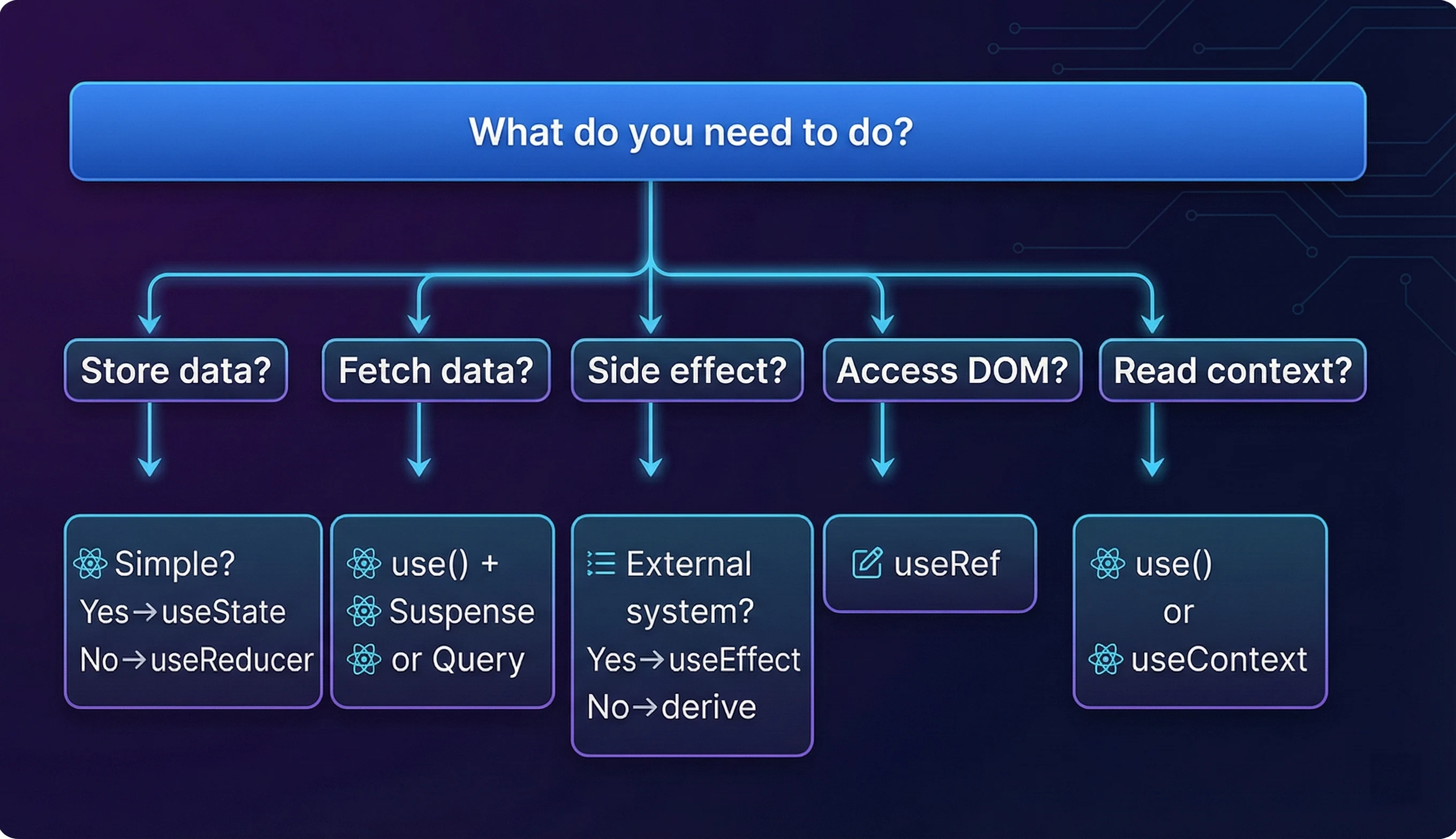
TL;DR - React Hooks in 2026:
- Use
useStatefor simple state,useReducerfor complex state- Use
use()+ Suspense for data fetching (notuseEffect)- Use
useReffor DOM access and mutable values that don’t trigger re-renders- Use
useMemo/useCallbacksparingly-React Compiler will handle most cases- Server Components can’t use hooks-add
'use client'for interactivity
React Hooks Quick Reference
| Hook | Purpose | When to Use | Docs |
|---|---|---|---|
useState |
Add state to components | Simple state: booleans, strings, numbers | Reference |
use |
Read Promises/Context | Data fetching, conditional context | Reference |
useEffect |
Sync with external systems | Subscriptions, event listeners, non-React code | Reference |
useContext |
Access context values | Theme, auth, or any shared state | Reference |
useReducer |
Complex state logic | Multiple sub-values, state machines | Reference |
useRef |
Mutable references | DOM access, storing values without re-renders | Reference |
useMemo |
Memoize values | Expensive calculations | Reference |
useCallback |
Memoize functions | Callbacks passed to optimized children | Reference |
useLayoutEffect |
Synchronous DOM effects | Measurements before browser paint | Reference |
useImperativeHandle |
Customize ref exposure | Exposing methods to parent components | Reference |
useDebugValue |
DevTools labels | Debugging custom hooks | Reference |
useSyncExternalStore |
Subscribe to external stores | Redux, Zustand, browser APIs | Reference |
useInsertionEffect |
Inject styles before paint | CSS-in-JS libraries only | Reference |
React Hooks Visual Overview
Which Hook Should I Use? Decision Flowchart
The Rules of Hooks
- Only call Hooks at the top level. Never call Hooks inside loops, conditions, or nested functions.
- Only call Hooks from React functions. Call them from functional components or custom Hooks-not regular JavaScript functions.
Why these rules exist: React relies on the call order to map state to the correct useState calls. Changing the order via conditions breaks this mapping, causing bugs.
function Profile({ isLoggedIn }) {
  if (isLoggedIn) {
    const [user, setUser] = useState(null); // Position varies!
  }
  const [theme, setTheme] = useState("dark"); // Wrong state assigned
}

// ✅ Correct: Condition inside Hook logic
function Profile({ isLoggedIn }) {
  const [user, setUser] = useState(null); // Always position 0
  const [theme, setTheme] = useState("dark"); // Always position 1

  // Conditional logic after Hook calls
  if (!isLoggedIn) return <LoginPrompt />;
  return <Dashboard user={user} theme={theme} />;
}
npm install eslint-plugin-react-hooks --save-devWhat is useState in React?
useState is a React Hook that adds state management to functional components. It accepts an initial value and returns an array containing the current state and a setter function.
| Aspect | Details |
|---|---|
| Purpose | Add reactive state to functional components |
| Syntax | const [value, setValue] = useState(initialValue) |
| Returns | Array: [currentState, setterFunction] |
| Re-renders | Yes, when setter is called with different value |
| When to use | Simple state: booleans, strings, numbers, independent values |
import { useState } from "react";

function Counter() {
  const [count, setCount] = useState(0);

  return (
    <div>
      <p>You clicked {count} times</p>
    </div>
  );
}
Functional Updates: Avoiding Stale State
When the next state depends on the previous state, pass a function to the setter:
setCount(count + 1);
setCount(count + 1); // Both read same 'count', only increments by 1

// ✅ Guaranteed to use latest state
setCount((prev) => prev + 1);
Lazy Initialization
// ❌ Runs expensive computation every render
const [data, setData] = useState(expensiveComputation());

// ✅ Only runs once on mount
The use() Hook: React 19’s Game Changer
use() is a React API that reads the value of a Promise or Context. Unlike traditional hooks, use() can be called inside loops and conditionals.
| Aspect | Details |
| Purpose | Read Promises and Context values |
| Syntax | const value = use(promiseOrContext) |
| Can call in loops/conditions | ✅ Yes (unlike other hooks) |
| Suspense integration | ✅ Suspends until Promise resolves |
| When to use | Data fetching, conditional context reading |
Data Fetching with use() and Suspense
import { use, Suspense } from "react";

function fetchUser(id) {
}

function UserProfile({ userPromise }) {
  // use() suspends until the promise resolves
  const user = use(userPromise);

  return (
    <div>
      <h1>{user.name}</h1>
      <p>{user.email}</p>
    </div>
  );
}

// Parent component handles Suspense boundary
function App({ userId }) {
  const userPromise = fetchUser(userId);

  return (
    <Suspense fallback={<Skeleton />}>
      <UserProfile userPromise={userPromise} />
    </Suspense>
  );
}
Conditional Context with use()
Unlike useContext, use() can read context conditionally:
import { use } from "react";

function StatusMessage({ showTheme }) {
  // ✅ Can call use() inside a condition
  if (showTheme) {
    const theme = use(ThemeContext);
  }

  return <p>Default message</p>;
}
use() vs useEffect for Data Fetching
| Pattern | use() + Suspense | useEffect |
|---|---|---|
| Loading state | Handled by Suspense boundary | Manual isLoading state |
| Race conditions | Automatic (Suspense handles) | Manual cleanup required |
| Code complexity | Minimal | Significant boilerplate |
| Server Components | Works seamlessly | Client-only |
When to use each:
- use(): New projects, data fetching, reading context conditionally
- useEffect: Subscriptions, event listeners, synchronizing with non-React code
You Might Not Need useEffect
Common useEffect Anti-Patterns (And What to Use Instead)
| Anti-Pattern | Problem | Better Approach |
|---|---|---|
| Data fetching | Race conditions, cleanup complexity | use() + Suspense, TanStack Query, Server Components |
| Resetting state on prop change | Effect runs after render | key prop to reset component |
| Event handlers | Stale closures | Event handlers directly |
❌ Anti-Pattern: Derived State in useEffect
// ❌ Bad: useEffect for derived state
function FilteredList({ items, filter }) {
  const [filteredItems, setFilteredItems] = useState([]);

  useEffect(() => {
  }, [items, filter]);

  return <List items={filteredItems} />;
}

// ✅ Good: Compute during render
function FilteredList({ items, filter }) {
  const filteredItems = items.filter((i) => i.includes(filter));
  return <List items={filteredItems} />;
}

// ✅ Good: useMemo for expensive computations
function FilteredList({ items, filter }) {
  const filteredItems = useMemo(
    () => items.filter((i) => i.includes(filter)),
    [items, filter],
  );
  return <List items={filteredItems} />;
}
❌ Anti-Pattern: Resetting State on Prop Change
// ❌ Bad: useEffect to reset state
function Profile({ userId }) {
  const [user, setUser] = useState(null);

  useEffect(() => {
    setUser(null); // Reset on userId change
    fetchUser(userId).then(setUser);
  }, [userId]);
}

// ✅ Good: Use key to reset entire component
function App({ userId }) {
  return <Profile key={userId} userId={userId} />;
}
When You Actually Need useEffect
useEffect is for synchronizing with external systems-code that runs outside React’s rendering cycle. Use it for:
- Subscriptions (WebSocket, browser APIs)
- Third-party libraries (D3, maps, analytics)
useEffect Execution Model
Dependency Array Behavior
| Dependency Array | When Effect Runs | Use Case |
|---|---|---|
[dep1, dep2] |
When any dependency changes | Most effects |
[] (empty) |
Once on mount, cleanup on unmount | Subscriptions, event listeners |
Legitimate useEffect Example: WebSocket Subscription
import { useState, useEffect } from "react";

function ChatRoom({ roomId }) {
  const [messages, setMessages] = useState([]);

  useEffect(() => {
    // Connect to external system (WebSocket)
    const connection = createConnection(roomId);

    connection.on("message", (msg) => {
      setMessages((prev) => [...prev, msg]);
    });

    connection.connect();

    // Cleanup: disconnect when roomId changes or component unmounts
    return () => {
      connection.disconnect();
    };
  }, [roomId]);

  return <MessageList messages={messages} />;
}
Legitimate useEffect Example: Window Event Listener
import { useState, useEffect } from "react";

function useWindowSize() {

  useEffect(() => {
    function handleResize() {
    }

    handleResize(); // Set initial size

  }, []);

  return size;
}
Handling Race Conditions in useEffect
// ❌ Bug: Race condition - older fetch might resolve after newer one
function UserProfile({ userId }) {
  const [user, setUser] = useState(null);

  useEffect(() => {
  }, [userId]);

  return <Profile user={user} />;
}

// ✅ Fix: Use a cancelled flag to ignore stale responses
function UserProfile({ userId }) {
  const [user, setUser] = useState(null);

  useEffect(() => {
    let cancelled = false;

    fetchUser(userId).then((data) => {
      if (!cancelled) {
        setUser(data); // Only update if this effect is still active
      }
    });

    return () => {
      cancelled = true; // Mark as stale when userId changes or unmount
    };
  }, [userId]);

  return <Profile user={user} />;
}

// ✅ Better: Use AbortController to cancel the actual request
function UserProfile({ userId }) {
  const [user, setUser] = useState(null);

  useEffect(() => {
    const controller = new AbortController();

      .then((res) => res.json())
      .then(setUser)
      .catch((err) => {
        if (err.name !== "AbortError") {
          console.error(err);
        }
      });

    return () => controller.abort();
  }, [userId]);

  return <Profile user={user} />;
}
Best practice: For data fetching, prefer use() + Suspense or TanStack Query-they handle race conditions automatically.
What is useRef in React?
useRef is a React Hook that creates a mutable reference object persisting across renders. Unlike state, changing a ref does not trigger a re-render.
| useState | useRef |
| Returns [value, setter] | Returns { current: value } |
| For UI state that affects rendering | For DOM refs, timers, previous values |
| Immutable between renders | Mutable anytime |
Use Case 1: Accessing DOM Elements
import { useRef, useEffect } from "react";

function SearchInput() {
  const inputRef = useRef(null);

  useEffect(() => {
    // Focus input on mount
    inputRef.current.focus();
  }, []);

  return <input ref={inputRef} type="search" placeholder="Search..." />;
}
Use Case 2: Storing Mutable Values (Timer IDs)
import { useRef, useState, useEffect } from "react";

function Stopwatch() {
  const [time, setTime] = useState(0);
  const [isRunning, setIsRunning] = useState(false);
  const intervalRef = useRef(null); // Persists across renders

  useEffect(() => {
    if (isRunning) {
      intervalRef.current = setInterval(() => {
        setTime((t) => t + 10);
      }, 10);
    }
    return () => clearInterval(intervalRef.current);
  }, [isRunning]);

  const reset = () => {
    clearInterval(intervalRef.current);
    setIsRunning(false);
    setTime(0);
  };

  return (
    <div>
      <span>{(time / 1000).toFixed(2)}s</span>
        {isRunning ? "Stop" : "Start"}
      </button>
      <button onClick={reset}>Reset</button>
    </div>
  );
}
Use Case 3: Tracking Previous Values
function usePrevious(value) {
  const ref = useRef();

  useEffect(() => {
    ref.current = value;
  }, [value]);

  return ref.current; // Returns value from previous render
}

// Usage
function PriceDisplay({ price }) {
  const prevPrice = usePrevious(price);

  return (
    <span>
      {trend} ${price}
    </span>
  );
}
What is useContext in React?
useContext is a React Hook that reads and subscribes to context from any component. It eliminates prop drilling by providing direct access to shared values anywhere in the component tree.
// 1. Create context with default value
const AuthContext = createContext(null);

// 2. Provider component (typically at app root)
export function AuthProvider({ children }) {
  const [user, setUser] = useState(null);

  const login = async (credentials) => {
    const user = await api.login(credentials);
    setUser(user);
  };

  const logout = () => {
    setUser(null);
  };

  return (
    <AuthContext.Provider value={{ user, login, logout }}>
      {children}
    </AuthContext.Provider>
  );
}

// 3. Custom hook for cleaner consumption
export function useAuth() {
  const context = useContext(AuthContext);
  if (!context) {
  }
  return context;
}

// 4. Usage in any nested component
function UserMenu() {
  const { user, logout } = useAuth();

  if (!user) return <LoginButton />;
  return (
    <div>
      <span>Welcome, {user.name}</span>
      <button onClick={logout}>Logout</button>
    </div>
  );
}
Performance note: All components consuming a context re-render when its value changes.
useState vs useReducer: When to Use Each
useReducer is a React Hook for managing complex state logic through a reducer function. It’s inspired by Redux and excels when state has multiple sub-values or complex update logic.
| Criteria | useState | useReducer |
|---|---|---|
| State shape | Primitive or simple object | Object with multiple related fields |
| Next state depends on | New value directly | Previous state + action type |
| Testing | Inline, harder to isolate | Reducer is pure function, easy to test |
| Debugging | Scattered updates | Centralized, action-based logging |
Production Example: Multi-Step Form with Validation
import { useReducer } from "react";

// State shape
const initialState = {
  step: 1,
  data: { name: "", email: "", plan: "free" },
  errors: {},
  isSubmitting: false,
};

// Reducer: all state transitions in one place
function formReducer(state, action) {
  switch (action.type) {
    case "SET_FIELD":
      return {
        ...state,
        data: { ...state.data, [action.field]: action.value },
        errors: { ...state.errors, [action.field]: null }, // Clear error on edit
      };

    case "SET_ERRORS":
      return { ...state, errors: action.errors };

    case "NEXT_STEP":
      return { ...state, step: state.step + 1 };

    case "PREV_STEP":
      return { ...state, step: state.step - 1 };

    case "SUBMIT_START":
      return { ...state, isSubmitting: true };

    case "SUBMIT_SUCCESS":
      return { ...initialState, step: 4 }; // Reset to success state

    case "SUBMIT_ERROR":
      return {
        ...state,
        isSubmitting: false,
        errors: { submit: action.error },
      };

    default:
      return state;
  }
}

function SignupWizard() {

  const validateStep = () => {
    const newErrors = {};
    if (step === 1 && !data.name.trim()) {
      newErrors.name = "Name is required";
    }
    if (step === 2 && !/^[^\s@]+@[^\s@]+\.[^\s@]+$/.test(data.email)) {
      newErrors.email = "Valid email required";
    }

    if (Object.keys(newErrors).length > 0) {
      return false;
    }
    return true;
  };

  const handleNext = () => {
    if (validateStep()) {
      dispatch({ type: "NEXT_STEP" });
    }
  };

  const handleSubmit = async () => {
    if (!validateStep()) return;

    dispatch({ type: "SUBMIT_START" });
    try {
      await api.createAccount(data);
      dispatch({ type: "SUBMIT_SUCCESS" });
    } catch (err) {
    }
  };

  return (
    <form>
      {step === 1 && (
        <input
          value={data.name}
          onChange={(e) =>
            dispatch({
              type: "SET_FIELD",
              field: "name",
              value: e.target.value,
            })
          }
          placeholder="Name"
        />
      )}
      {step === 2 && (
        <input
          value={data.email}
          onChange={(e) =>
            dispatch({
              type: "SET_FIELD",
              field: "email",
              value: e.target.value,
            })
          }
          placeholder="Email"
        />
      )}
      {step === 3 && (
        <select
          value={data.plan}
          onChange={(e) =>
            dispatch({
              type: "SET_FIELD",
              field: "plan",
              value: e.target.value,
            })
          }
        >
          <option value="free">Free</option>
          <option value="pro">Pro ($10/mo)</option>
        </select>
      )}

      {errors.submit && <p className="error">{errors.submit}</p>}

      <div>
        {step > 1 && (
          <button type="button" onClick={() => dispatch({ type: "PREV_STEP" })}>
            Back
          </button>
        )}
        {step < 3 ? (
          <button type="button" onClick={handleNext}>
            Next
          </button>
        ) : (
          <button type="button" onClick={handleSubmit} disabled={isSubmitting}>
          </button>
        )}
      </div>
    </form>
  );
}
Why useReducer wins here:
- Easy to add logging:
console.log('Action:', action) - Reducer is a pure function-easy to unit test
- Complex validation logic stays organized
useMemo vs useCallback: Performance Optimization
| Hook | What it Memoizes | Returns | Primary Use Case |
| useMemo | Computed values | The cached result | Expensive calculations, derived data |
| useCallback | Function definitions | The cached function | Callbacks passed to memo children |
What is useMemo?
import { useMemo, useState } from "react";

function ProductList({ products, filters }) {

  // Only recalculates when products, filters, or sortOrder change
  const displayedProducts = useMemo(() => {

    return products
      .filter((p) => {
        if (filters.category && p.category !== filters.category) return false;
        if (filters.maxPrice && p.price > filters.maxPrice) return false;
        return true;
      })
      .sort((a, b) => {
        return 0;
      });
  }, [products, filters, sortOrder]);

  return (
    <ul>
      {displayedProducts.map((p) => (
        <li key={p.id}>
          {p.name} - ${p.price}
        </li>
      ))}
    </ul>
  );
}
What is useCallback?
import { useCallback, useState, memo } from "react";

// Child wrapped in memo - only re-renders if props change
const ExpensiveList = memo(function ExpensiveList({ items, onItemClick }) {
  console.log("ExpensiveList rendered");
  return (
    <ul>
      {items.map((item) => (
        <li key={item.id} onClick={() => onItemClick(item.id)}>
          {item.name}
        </li>
      ))}
    </ul>
  );
});

function Dashboard({ items }) {
  const [filter, setFilter] = useState("");

  // With useCallback: same reference → ExpensiveList skips re-render
  const handleItemClick = useCallback((id) => {
    setSelectedId(id);
    analytics.track("item_selected", { id });
  }, []); // Empty deps: function never changes

  return (
    <div>
      <input
        value={filter}
        onChange={(e) => setFilter(e.target.value)}
        placeholder="Filter..."
      />
      {selectedId && <ItemDetail id={selectedId} />}
    </div>
  );
}
When NOT to Use These Hooks
- ✅ Calculation is genuinely expensive (filtering 10,000+ items)
- ✅ Passing callbacks to
memo-wrapped children - ✅ Value is a dependency of another Hook
- ❌ Simple calculations (adding two numbers)
- ❌ Components that always re-render anyway
- ❌ Premature optimization without measuring
Measure first with React DevTools Profiler before adding memoization.
The Future: React Compiler (React Forget)
The React Compiler automatically memoizes your components and hooks. When enabled, you won’t need to manually write useMemo, useCallback, or React.memo in most cases-the compiler handles it.
function ProductList({ products, onSelect }) {
  const sorted = useMemo(
    [products],
  );

  const handleSelect = useCallback(
    (id) => {
      onSelect(id);
    },
    [onSelect],
  );

  return <List items={sorted} onItemClick={handleSelect} />;
}

// With React Compiler: write naturally, compiler optimizes
function ProductList({ products, onSelect }) {
  const sorted = [...products].sort((a, b) => a.price - b.price);

  const handleSelect = (id) => {
    onSelect(id);
  };

}
Until you adopt the compiler: Continue using useMemo and useCallback for performance-critical paths.
useLayoutEffect vs useEffect: What’s the Difference?
| Hook | Fires | Use Case |
|---|---|---|
useEffect |
After browser paint (async) | Data fetching, subscriptions, analytics |
useLayoutEffect |
Before browser paint (sync) | DOM measurements, scroll position, tooltips |
import { useLayoutEffect, useRef, useState } from "react";

function Tooltip({ children, content }) {
  const ref = useRef();

  // Measure before paint to avoid tooltip "jumping"
  useLayoutEffect(() => {
    const rect = ref.current.getBoundingClientRect();
    setPosition({
      top: rect.bottom + 8,
      left: rect.left + rect.width / 2,
    });
  }, []);

  return (
    <>
      <span ref={ref}>{children}</span>
      <div
        className="tooltip"
        style={{ position: "fixed", top: position.top, left: position.left }}
      >
        {content}
      </div>
    </>
  );
}
Warning: useLayoutEffect blocks the browser from painting. Keep logic fast to avoid jank. For SSR, it logs warnings-use useEffect or check typeof window !== 'undefined'.
The Stale Closure Problem
The Problem
function BrokenCounter() {
  const [count, setCount] = useState(0);

  useEffect(() => {
    const id = setInterval(() => {
      console.log("Count:", count); // Always logs 0
      setCount(count + 1); // Always sets to 1
    }, 1000);

    return () => clearInterval(id);

}
Three Solutions
useEffect(() => {
  const id = setInterval(() => {
    setCount(count + 1);
  }, 1000);
  return () => clearInterval(id);
}, [count]); // Re-runs every time count changes
2. Use functional update (recommended for this case):
useEffect(() => {
  const id = setInterval(() => {
    setCount((c) => c + 1); // Always uses current value
  }, 1000);
  return () => clearInterval(id);
}, []); // Safe: no external dependencies needed
3. Use useRef for mutable values:
function Counter() {
  const [count, setCount] = useState(0);
  const countRef = useRef(count);

  // Keep ref in sync
  useEffect(() => {
    countRef.current = count;
  }, [count]);

  useEffect(() => {
    const id = setInterval(() => {
      console.log("Current count:", countRef.current); // Always current
      setCount((c) => c + 1);
    }, 1000);
    return () => clearInterval(id);
  }, []);

  return <p>{count}</p>;
}
Detecting Stale Closures
The eslint-plugin-react-hooks exhaustive-deps rule catches most cases:
// eslint.config.js (ESLint v9+ flat config)

export default [
  {
    plugins: { "react-hooks": reactHooks },
    rules: {
      "react-hooks/rules-of-hooks": "error",
      "react-hooks/exhaustive-deps": "warn",
    },
  },
];
Additional Hooks: useImperativeHandle and useDebugValue
useImperativeHandle
useImperativeHandle customizes the instance value exposed to parent components when using ref. Use it to expose specific methods rather than the entire DOM node.
function VideoPlayer({ src, ref }) {
  const videoRef = useRef();

  // Expose only play/pause methods, not the entire video element
  useImperativeHandle(
    ref,
    () => ({
      play: () => videoRef.current.play(),
      pause: () => videoRef.current.pause(),
      seek: (time) => {
        videoRef.current.currentTime = time;
      },
    }),
    [],
  );

  return <video ref={videoRef} src={src} />;
}

// Parent component
function App() {
  const playerRef = useRef();

  return (
    <div>
      <VideoPlayer ref={playerRef} src="/video.mp4" />
      <button onClick={() => playerRef.current.seek(30)}>Skip to 0:30</button>
    </div>
  );
}
React 19 update:
forwardRefis no longer needed.
useDebugValue
useDebugValue displays a label in React DevTools for custom Hooks.
function useOnlineStatus() {
  const [isOnline, setIsOnline] = useState(navigator.onLine);

  useDebugValue(isOnline ? "Online" : "Offline");

  useEffect(() => {
    const handleOnline = () => setIsOnline(true);
    const handleOffline = () => setIsOnline(false);

    window.addEventListener("online", handleOnline);
    window.addEventListener("offline", handleOffline);

    return () => {
    };
  }, []);

  return isOnline;
}
For expensive formatting, pass a formatter function (only called when DevTools is open):
useDebugValue(date, (date) => date.toISOString());useSyncExternalStore: Subscribing to External Data
useSyncExternalStore subscribes to an external store in a way that’s compatible with concurrent rendering. Use it when you need to read data from sources outside React-like browser APIs, third-party state libraries, or custom stores.
| Aspect | Details |
|---|---|
| Purpose | Subscribe to external data sources safely |
| Syntax | useSyncExternalStore(subscribe, getSnapshot, getServerSnapshot?) |
| Concurrent-safe | ✅ Prevents tearing (inconsistent UI) |
| When to use | Browser APIs, Redux/Zustand internals, custom stores |
Why not just useEffect? In concurrent rendering, useEffect subscriptions can cause “tearing”-where different parts of the UI show inconsistent data.
Example: Online Status Hook
import { useSyncExternalStore } from "react";

function subscribe(callback) {
  window.addEventListener("online", callback);
  window.addEventListener("offline", callback);
  return () => {
    window.removeEventListener("online", callback);
    window.removeEventListener("offline", callback);
  };
}

function getSnapshot() {
  return navigator.onLine;
}

function getServerSnapshot() {
  return true; // Assume online during SSR
}

function useOnlineStatus() {
  return useSyncExternalStore(subscribe, getSnapshot, getServerSnapshot);
}

// Usage
function StatusIndicator() {
  const isOnline = useOnlineStatus();
  return <span>{isOnline ? "🟢 Online" : "🔴 Offline"}</span>;
}
Example: Custom Global Store
// Simple store implementation
function createStore(initialState) {
  let state = initialState;
  const listeners = new Set();

  return {
    getState: () => state,
    setState: (newState) => {
      listeners.forEach((listener) => listener());
    },
    subscribe: (listener) => {
      listeners.add(listener);
      return () => listeners.delete(listener);
    },
  };
}

const counterStore = createStore({ count: 0 });

// Hook to use the store
function useStore(store, selector) {
  const getSnapshot = useCallback(
    () => selector(store.getState()),
    [store, selector],
  );
  return useSyncExternalStore(store.subscribe, getSnapshot, getSnapshot);
}

// Usage
function Counter() {

  return (
    <div>
      <p>Count: {count}</p>
      <button
      >
        Increment
      </button>
    </div>
  );
}
When to use useSyncExternalStore:
- ✅ Building state management libraries
- ✅ Integrating with non-React data sources
- ❌ Server data (use
use()+ Suspense or TanStack Query)
useInsertionEffect: For CSS-in-JS Libraries Only
useInsertionEffect: Effect runs → DOM mutations → useLayoutEffect → Paint → useEffectYou probably don’t need this hook. Unless you’re building a CSS-in-JS library, use useEffect or useLayoutEffect instead.
// Only for CSS-in-JS library internals
useInsertionEffect(() => {
  // Inject <style> tags here, before DOM reads
}, []);
React 19 Hooks and APIs
React 19 brings significant improvements to hooks, including the new use() API (covered above) and enhanced concurrent features. Here’s the complete picture:
React 19 Hooks: Quick Decision Guide
| If you need to… | Use this hook |
|---|---|
| Show optimistic UI | useOptimistic |
| Track form submission | useFormStatus |
| Defer expensive renders | useTransition or useDeferredValue |
| Generate SSR-safe IDs | useId |
All React 19 Hooks
| Hook/API | Purpose | When to Use |
|---|---|---|
use |
Read Promises/Context | Data fetching, conditional context |
useFormStatus |
Form submission state | Disable buttons, show spinners during submit |
useOptimistic |
Optimistic UI updates | Instant feedback before server confirms |
useActionState |
Form action state | Server Actions, progressive enhancement |
useTransition |
Mark updates as non-urgent | Large list filtering, tab switching |
useDeferredValue |
Defer updating a value | Derived values from urgent state |
useId |
Generate unique IDs | Form labels, ARIA attributes (SSR-safe) |
React 19 New Features Deep Dive
useFormStatus: Form Submission State (React 19)
import { useFormStatus } from "react-dom";

function SubmitButton() {
  const { pending } = useFormStatus();

  return (
    <button type="submit" disabled={pending}>
      {pending ? "Submitting..." : "Submit"}
    </button>
  );
}

function ContactForm() {
  async function handleSubmit(formData) {
    "use server";
    await saveContact(formData);
  }

  return (
    <form action={handleSubmit}>
      <input name="email" type="email" required />
      <input name="message" required />
      <SubmitButton /> {/* Automatically knows form is submitting */}
    </form>
  );
}
Key points:
- Must be used in a component that’s a child of
<form> - Returns
{ pending, data, method, action }
useOptimistic: Instant UI Feedback (React 19)
useOptimistic shows a different state while an async action is in progress. The UI updates immediately, then reconciles when the action completes.
import { useOptimistic } from "react";

function TodoList({ todos, addTodo }) {
    todos,
    (state, newTodo) => [...state, { ...newTodo, pending: true }],
  );

  async function handleSubmit(formData) {
    const newTodo = { id: Date.now(), text: formData.get("text") };

    // Immediately show the new todo (optimistic)
    addOptimisticTodo(newTodo);

    // Actually save it (this might fail)
    await addTodo(newTodo);
  }

  return (
    <form action={handleSubmit}>
      <input name="text" />
      <button type="submit">Add</button>
      <ul>
        {optimisticTodos.map((todo) => (
            {todo.text}
          </li>
        ))}
      </ul>
    </form>
  );
}
useTransition: Keep UI Responsive During Heavy Updates
import { useState, useTransition } from "react";

function SearchResults({ items }) {
  const [query, setQuery] = useState("");
  const [isPending, startTransition] = useTransition();

  const handleSearch = (value) => {
    // Urgent: update input immediately (user sees typing)
    setQuery(value);

    startTransition(() => {
      const filtered = items.filter((item) =>
        item.name.toLowerCase().includes(value.toLowerCase()),
      );
      setFilteredItems(filtered);
    });
  };

  return (
    <div>
      <input
        value={query}
        onChange={(e) => handleSearch(e.target.value)}
        placeholder="Search 10,000 items..."
      />
      {isPending && <span className="spinner">Filtering...</span>}
      <ul style={{ opacity: isPending ? 0.7 : 1 }}>
        {filteredItems.map((item) => (
          <li key={item.id}>{item.name}</li>
        ))}
      </ul>
    </div>
  );
}
useDeferredValue: Defer Expensive Derived Values
import { useState, useDeferredValue, memo } from "react";

  // Expensive render
  return (
    <ul>
      {items.map((i) => (
        <li key={i}>{i}</li>
      ))}
    </ul>
  );
});

function Search() {
  const [query, setQuery] = useState("");
  const deferredQuery = useDeferredValue(query);

  // Input updates immediately, SlowList uses deferred (stale) value
  const isStale = query !== deferredQuery;

  return (
    <div>
      <input value={query} onChange={(e) => setQuery(e.target.value)} />
      <div style={{ opacity: isStale ? 0.7 : 1 }}>
        <SlowList query={deferredQuery} />
      </div>
    </div>
  );
}
useId: SSR-Safe Unique IDs
import { useId } from "react";

function FormField({ label }) {
  const id = useId(); // Generates same ID on server and client

  return (
    <div>
      <label htmlFor={id}>{label}</label>
      <input id={id} />
    </div>
  );
}

// For multiple related IDs
function PasswordField() {
  const id = useId();

  return (
    <>
      <label htmlFor={`${id}-password`}>Password</label>
      <input
        id={`${id}-password`}
        type="password"
        aria-describedby={`${id}-hint`}
      />
      <p id={`${id}-hint`}>Must be 8+ characters</p>
    </>
  );
}
Hooks and Server Components (React 19)
Server Components cannot use Hooks. They run on the server without React’s client-side runtime. This is a fundamental architectural decision in React 19’s App Router.
| Component Type | Can Use Hooks? | Runs On | Best For |
|---|---|---|---|
| Server Component (default) | ❌ No | Server only | Data fetching, static content |
Client Component ('use client') |
✅ Yes | Client (hydrated) | Interactivity, state, effects |
// app/page.js - Server Component (no hooks, direct async/await)
export default async function Page() {
  // Fetch data directly-no useEffect needed!
  const user = await fetchUser();
  const posts = await fetchPosts(user.id);

  return (
    <div>
      <h1>{user.name}</h1>
      <ClientPostList initialPosts={posts} />
    </div>
  );
}

// app/ClientPostList.js - Client Component (hooks allowed)
("use client");

import { useState } from "react";

export function ClientPostList({ initialPosts }) {
  const [posts, setPosts] = useState(initialPosts);
  const [filter, setFilter] = useState("");

  const filteredPosts = posts.filter((p) =>
  );

  return (
    <div>
      <input
        value={filter}
        placeholder="Filter posts..."
      />
      <ul>
        {filteredPosts.map((post) => (
          <li key={post.id}>{post.title}</li>
        ))}
      </ul>
    </div>
  );
}
React 19 pattern: Fetch data in Server Components (no hooks needed), pass to Client Components for interactivity.
Building Custom Hooks
A custom Hook is a JavaScript function starting with “use” that calls other Hooks. Custom Hooks let you extract and share stateful logic between components without changing component hierarchy.
Custom Hook: useFetch with Caching
function useFetch(url, options = {}) {
  const [data, setData] = useState(null);
  const [error, setError] = useState(null);
  const [status, setStatus] = useState("idle");

  // Cache responses
  const cache = useRef(new Map());

  useEffect(() => {
    if (!url) return;

    let cancelled = false;
    const controller = new AbortController();

    async function fetchData() {
      // Check cache first
      const cached = cache.current.get(url);
      if (cached && !options.skipCache) {
        setData(cached);
        setStatus("success");
        return;
      }

      setStatus("loading");
      setError(null);

      try {
        const res = await fetch(url, {
          ...options,
          signal: controller.signal,
        });

        if (!res.ok) {
          throw new Error(`HTTP ${res.status}`);
        }

        const json = await res.json();

        if (!cancelled) {
          cache.current.set(url, json);
          setData(json);
          setStatus("success");
        }
      } catch (err) {
        if (!cancelled && err.name !== "AbortError") {
          setError(err);
          setStatus("error");
        }
      }
    }

    fetchData();

    return () => {
      cancelled = true;
      controller.abort();
    };
  }, [url, options.skipCache]);

}

// Usage
function UserProfile({ userId }) {
  const { data: user, isLoading, error } = useFetch(`/api/users/${userId}`);

  if (isLoading) return <Skeleton />;
  if (error) return <Error message={error.message} />;
  return <Profile user={user} />;
}
Custom Hook: useLocalStorage
import { useState, useEffect } from "react";

function useLocalStorage(key, initialValue) {
  // Lazy initialization from localStorage
  const [value, setValue] = useState(() => {
    if (typeof window === "undefined") return initialValue; // SSR safety

    try {
      const stored = localStorage.getItem(key);
    } catch {
      return initialValue;
    }
  });

  // Sync to localStorage
  useEffect(() => {
    try {
      localStorage.setItem(key, JSON.stringify(value));
    } catch (err) {
    }
  }, [key, value]);

  // Listen for changes in other tabs
  useEffect(() => {
    const handleStorage = (e) => {
      if (e.key === key && e.newValue) {
        setValue(JSON.parse(e.newValue));
      }
    };

    window.addEventListener("storage", handleStorage);
  }, [key]);

  return [value, setValue];
}

// Usage
function Settings() {

  return (
    <div>
      <select value={theme} onChange={(e) => setTheme(e.target.value)}>
        <option value="light">Light</option>
        <option value="dark">Dark</option>
      </select>
      <input
        type="range"
        min={12}
        max={24}
        value={fontSize}
      />
    </div>
  );
}
Custom Hook: useMediaQuery
import { useState, useEffect } from "react";

function useMediaQuery(query) {
  const [matches, setMatches] = useState(() => {
    if (typeof window === "undefined") return false;
    return window.matchMedia(query).matches;
  });

  useEffect(() => {
    const mediaQuery = window.matchMedia(query);
    const handler = (e) => setMatches(e.matches);

    // Modern browsers
    mediaQuery.addEventListener("change", handler);

    // Set initial value
    setMatches(mediaQuery.matches);

    return () => mediaQuery.removeEventListener("change", handler);
  }, [query]);

  return matches;
}

// Usage
function ResponsiveNav() {
  const prefersDark = useMediaQuery("(prefers-color-scheme: dark)");

  return isMobile ? (
    <MobileNav dark={prefersDark} />
  ) : (
    <DesktopNav dark={prefersDark} />
  );
}
For animation hooks, Framer Motion provides useAnimate, useScroll, and useMotionValue that integrate with these patterns.
Testing Custom Hooks
Testing with renderHook
import { useCounter } from "./useCounter";

// Simple hook to test
function useCounter(initialValue = 0) {
  const increment = () => setCount((c) => c + 1);
  const decrement = () => setCount((c) => c - 1);
  return { count, increment, decrement };
}

// Tests
describe("useCounter", () => {
  it("initializes with default value", () => {
    const { result } = renderHook(() => useCounter());
    expect(result.current.count).toBe(0);
  });

  it("initializes with custom value", () => {
    const { result } = renderHook(() => useCounter(10));
    expect(result.current.count).toBe(10);
  });

  it("increments count", () => {

    act(() => {
      result.current.increment();
    });

    expect(result.current.count).toBe(1);
  });

  it("decrements count", () => {
    const { result } = renderHook(() => useCounter(5));

    act(() => {
      result.current.decrement();
    });

    expect(result.current.count).toBe(4);
  });
});
Testing Async Hooks
import { useFetch } from "./useFetch";

// Mock fetch
global.fetch = jest.fn();

describe("useFetch", () => {
  beforeEach(() => {
    fetch.mockClear();
  });

  it("fetches data successfully", async () => {
    const mockData = { id: 1, name: "Test User" };
    fetch.mockResolvedValueOnce({
      ok: true,
      json: () => Promise.resolve(mockData),
    });

    const { result } = renderHook(() => useFetch("/api/user"));

    // Initially loading
    expect(result.current.status).toBe("loading");

    // Wait for fetch to complete
    await waitFor(() => {
      expect(result.current.status).toBe("success");
    });

    expect(result.current.data).toEqual(mockData);
    expect(result.current.error).toBeNull();
  });

  it("handles fetch errors", async () => {


    await waitFor(() => {
      expect(result.current.status).toBe("error");
    });

    expect(result.current.error.message).toBe("Network error");
    expect(result.current.data).toBeNull();
  });
});
Testing Hooks with Context
import { renderHook } from "@testing-library/react";
import { useAuth, AuthProvider } from "./auth";

describe("useAuth", () => {
  it("throws error when used outside provider", () => {
    // Suppress console.error for this test
    const spy = jest.spyOn(console, "error").mockImplementation(() => {});

    expect(() => {
      renderHook(() => useAuth());

    spy.mockRestore();
  });

  it("returns auth context when inside provider", () => {


    expect(result.current).toHaveProperty("user");
  });
});
Hook Testing Best Practices
| Practice | Why |
|---|---|
Use act() for state updates |
Ensures React processes updates before assertions |
Use waitFor() for async operations |
Waits for async state changes to complete |
| Test behavior, not implementation | Focus on what the hook returns, not internal state |
| Provide wrapper for context-dependent hooks | Ensures hooks have required providers |
| Mock external dependencies | Isolates hook logic from network/browser APIs |
For more on testing interactive components, see Building Interactive UI Components.
Hooks in Next.js and Remix
Next.js App Router (React Server Components)
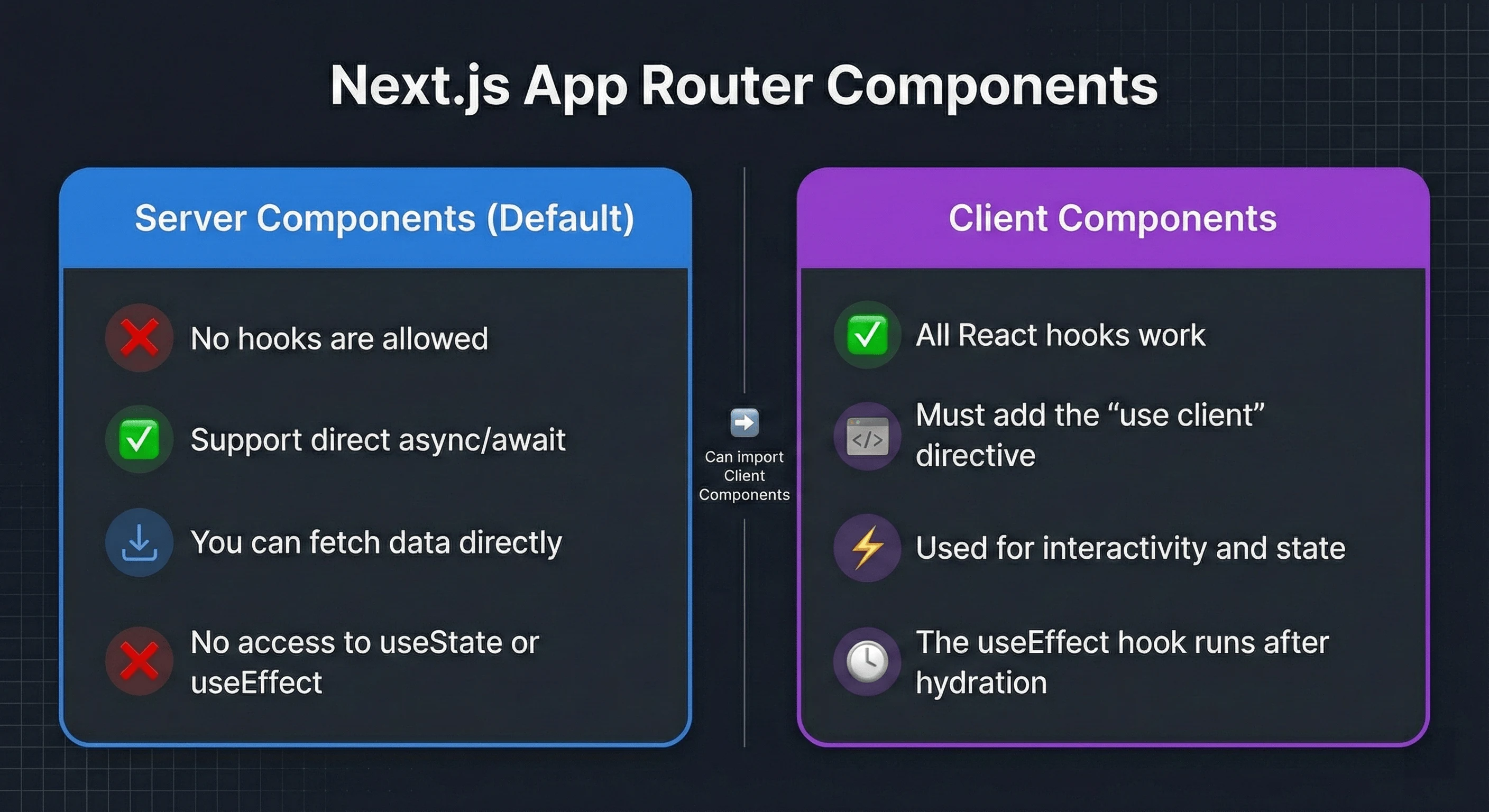
Key patterns for Next.js:
// app/page.js - Server Component (default)
// ❌ Cannot use hooks here
export default async function Page() {
  // ✅ Fetch directly - no useEffect needed
    r.json(),
  );

  return (
    <div>
      <h1>{data.title}</h1>
      <InteractiveWidget initialData={data} />
    </div>
  );
}

// app/InteractiveWidget.js - Client Component
("use client"); // Required for hooks

import { useState, useEffect } from "react";

export function InteractiveWidget({ initialData }) {
  const [data, setData] = useState(initialData);
  const [isEditing, setIsEditing] = useState(false);

  // useEffect only runs on client after hydration
  useEffect(() => {
    // Safe to access browser APIs here
    if (saved) setData(JSON.parse(saved));
  }, []);

  return (
    <div>
        {isEditing ? "Save" : "Edit"}
      </button>
      {/* ... */}
    </div>
  );
}
Next.js hook gotchas:
| —————————– | –––––––––––––––––––––––––––– |
| useLayoutEffect SSR warning | Use useEffect or check typeof window !== 'undefined' |
| Hooks in Server Components | Move to Client Component with 'use client' |
| Hydration mismatch | Ensure server/client render same initial content |
| Router hooks (useRouter) | Only in Client Components |
Remix
Remix handles data fetching via loaders, reducing the need for useEffect data fetching:
// routes/users.$userId.jsx
import { useLoaderData, useFetcher } from "@remix-run/react";
import { useState } from "react";

// Loader runs on server - no hooks needed
export async function loader({ params }) {
  const user = await db.user.findUnique({ where: { id: params.userId } });
  return json({ user });
}

// Component can use hooks for client-side interactivity
export default function UserProfile() {
  const { user } = useLoaderData();
  const [isEditing, setIsEditing] = useState(false);
  const fetcher = useFetcher();

  return (
    <div>
      <h1>{user.name}</h1>

      {/* Client-side state for UI */}
      <button onClick={() => setIsEditing(!isEditing)}>
        {isEditing ? "Cancel" : "Edit"}
      </button>

      {/* Remix fetcher for mutations */}
      <fetcher.Form method="post">
        <button type="submit">Save</button>
      </fetcher.Form>
    </div>
  );
}
Remix hook patterns:
| Remix Hook | Replaces | Purpose |
|---|---|---|
useLoaderData() |
useEffect fetch |
Get server-loaded data |
useFetcher() |
useEffect + useState |
Client-side data mutations |
useNavigation() |
Loading state | Track navigation/submission status |
Framework-Agnostic Best Practices
- Minimize client-side data fetching - Use framework loaders (Next.js Server Components, Remix loaders) instead of
useEffect - Guard browser APIs - Always check
typeof window !== 'undefined'in hooks that access browser APIs - Provide SSR fallbacks - Use
getServerSnapshotinuseSyncExternalStorefor SSR - Mark client components explicitly - Use
'use client'in Next.js for any component with hooks
Common Mistakes and How to Avoid Them
| Mistake | Symptom | Solution |
| Missing dependencies | Stale values, bugs | Use eslint-plugin-react-hooks |
| Omitting dependency array | Infinite loops | Always include [] or [deps] |
| Object/array literal in deps | Effect runs every render | Memoize with useMemo or define outside |
| Calling Hooks conditionally | “Rendered more hooks than previous render” | Move conditions inside Hook logic |
| Overusing useMemo/useCallback | Unnecessary overhead | Only optimize measured bottlenecks |
| Mutating state directly | UI doesn’t update | Always use setter with new reference |
| Forgetting cleanup | Memory leaks, stale subscriptions | Return cleanup function from useEffect |
Why Does My useEffect Run Twice in Development?
// This runs twice in dev (Strict Mode), once in production
useEffect(() => {
  console.log("Effect ran");
  return () => console.log("Cleanup ran");
}, []);
Fix: Ensure your effect has proper cleanup.
Object Dependencies Anti-Pattern
// ❌ Bug: new object every render → effect runs infinitely
useEffect(() => {
  fetchData(options);
}, [{ page: 1, limit: 10 }]); // New object reference each render!

// ✅ Fix 1: Primitive dependencies
useEffect(() => {
  fetchData({ page, limit });
}, [page, limit]);

// ✅ Fix 2: Memoize the object
useEffect(() => {
  fetchData(options);
}, [options]);

// ✅ Fix 3: Define outside component (if static)
const OPTIONS = { page: 1, limit: 10 };
function Component() {
  useEffect(() => {
    fetchData(OPTIONS);
  }, []); // OPTIONS reference never changes
}
Migration Guide: Modernizing Legacy Hook Patterns
If you’re maintaining a codebase with heavy useEffect usage, here’s a systematic approach to modernize it for React 19.
Step 1: Audit Your useEffect Usage
Categorize each useEffect in your codebase:
| Category | Action | Priority |
|---|---|---|
| Data fetching | Replace with use() + Suspense or TanStack Query |
High |
| Third-party library sync | Keep useEffect | Keep |
| State reset on prop change | Replace with key prop |
Medium |
Step 2: Replace Data Fetching Patterns
// ❌ Legacy: useEffect for data fetching
function UserProfile({ userId }) {
  const [user, setUser] = useState(null);
  const [loading, setLoading] = useState(true);
  const [error, setError] = useState(null);

  useEffect(() => {
    let cancelled = false;
    setLoading(true);

    fetchUser(userId)
      .then((data) => !cancelled && setUser(data))
      .catch((err) => !cancelled && setError(err))
      .finally(() => !cancelled && setLoading(false));

    return () => {
      cancelled = true;
    };
  }, [userId]);

  if (loading) return <Spinner />;
  if (error) return <Error />;
  return <Profile user={user} />;
}

// ✅ Modern: use() + Suspense (React 19)
function UserProfile({ userPromise }) {
  const user = use(userPromise);
  return <Profile user={user} />;
}

function App({ userId }) {
  return (
    <ErrorBoundary fallback={<Error />}>
      <Suspense fallback={<Spinner />}>
        <UserProfile userPromise={fetchUser(userId)} />
      </Suspense>
    </ErrorBoundary>
  );
}

// ✅ Alternative: TanStack Query (works with any React version)
function UserProfile({ userId }) {
  const {
    data: user,
    isLoading,
    error,
  } = useQuery({
    queryKey: ["user", userId],
    queryFn: () => fetchUser(userId),
  });

  if (isLoading) return <Spinner />;
  if (error) return <Error />;
  return <Profile user={user} />;
}
Step 3: Eliminate Derived State
// ❌ Legacy: useEffect for derived state
function SearchResults({ items, query }) {
  const [filtered, setFiltered] = useState([]);

  useEffect(() => {
    setFiltered(items.filter((i) => i.name.includes(query)));
  }, [items, query]);

  return <List items={filtered} />;
}

// ✅ Modern: compute during render
function SearchResults({ items, query }) {
  const filtered = items.filter((i) => i.name.includes(query));
  return <List items={filtered} />;
}

// ✅ If expensive, use useMemo
function SearchResults({ items, query }) {
  const filtered = useMemo(
    [items, query],
  );
  return <List items={filtered} />;
}
Step 4: Adopt React 19 Form Patterns
// ❌ Legacy: useState + onChange + onSubmit
function ContactForm() {
  const [email, setEmail] = useState("");
  const [message, setMessage] = useState("");
  const [submitting, setSubmitting] = useState(false);

  async function handleSubmit(e) {
    e.preventDefault();
    setSubmitting(true);
    await submitForm({ email, message });
    setSubmitting(false);
  }

  return (
    <form onSubmit={handleSubmit}>
      <input value={email} onChange={(e) => setEmail(e.target.value)} />
      <textarea value={message} onChange={(e) => setMessage(e.target.value)} />
      <button disabled={submitting}>
        {submitting ? "Sending..." : "Send"}
      </button>
    </form>
  );
}

// ✅ Modern: Server Actions + useFormStatus (React 19)
function ContactForm() {
  async function submitAction(formData) {
    "use server";
    await submitForm({
      email: formData.get("email"),
      message: formData.get("message"),
    });
  }

  return (
    <form action={submitAction}>
      <input name="email" type="email" required />
      <textarea name="message" required />
      <SubmitButton />
    </form>
  );
}

function SubmitButton() {
  const { pending } = useFormStatus();
  return <button disabled={pending}>{pending ? "Sending..." : "Send"}</button>;
}
Migration Checklist
- Install
eslint-plugin-react-hooksand fix all warnings - Identify all
useEffectcalls that fetch data - Replace data fetching with
use()+ Suspense or TanStack Query - Remove
useEffectcalls that compute derived state - Replace state-reset-on-prop-change patterns with
keyprop - Keep
useEffectonly for external system synchronization
If you’re working with accessible components, our accessibility guide covers WCAG 2.2 patterns that complement these hook patterns.
React Hooks Interview Questions
Common questions asked in React interviews, with concise answers:
What are the Rules of Hooks?
React enforces two rules for hooks:
- Only call hooks at the top level (not in loops, conditions, or nested functions)
What’s the difference between useMemo and useCallback?
useMemo memoizes a computed value; useCallback memoizes a function definition. Use useMemo for expensive calculations, useCallback for callbacks passed to memoized children.
When should I use useReducer instead of useState?
Use useReducer when state has multiple sub-values, complex update logic, or when the next state depends on the previous state. It centralizes state transitions and makes them easier to test.
How do you prevent infinite loops in useEffect?
Always include a dependency array. If the effect updates state that’s in the dependency array, use functional updates (setState(prev => ...)) or restructure to avoid the cycle.
What causes the stale closure problem?
The stale closure problem occurs when a callback captures an outdated value from a previous render. Fix by adding the value to dependencies, using functional updates, or storing in a ref.
Can hooks be used in Server Components?
No. Server Components run on the server without React’s runtime. Use 'use client' directive to mark components that need hooks.
What’s the difference between useEffect and useLayoutEffect?
useEffect runs asynchronously after paint; useLayoutEffect runs synchronously before paint. Use useLayoutEffect only for DOM measurements that must happen before the user sees the update.
How do you share stateful logic between components?
Create a custom hook-a function starting with “use” that calls other hooks. Custom hooks encapsulate and reuse stateful logic without changing component hierarchy.
What is useSyncExternalStore for?
useSyncExternalStore subscribes to external data sources (browser APIs, state libraries) in a way that’s safe with concurrent rendering.
How do you test custom hooks?
Use renderHook from @testing-library/react. Wrap state updates in act(), use waitFor() for async operations, and provide wrapper components for context-dependent hooks.
React 19 Form Hooks in Depth: useActionState
useActionState manages form state with Server Actions. It replaces the common pattern of managing form state, errors, and submission status manually.
import { useActionState } from "react";

async function createUser(previousState, formData) {
  "use server";

  const name = formData.get("name");
  if (!name) {
    return { error: "Name is required", success: false };
  }

  await db.user.create({ data: { name } });
  return { error: null, success: true };
}

function CreateUserForm() {
  const [state, formAction, isPending] = useActionState(createUser, {
    error: null,
    success: false,
  });

  return (
    <form action={formAction}>
      <input name="name" />
      {state.error && <p className="error">{state.error}</p>}
      {state.success && <p className="success">User created!</p>}
      <button disabled={isPending}>
        {isPending ? "Creating..." : "Create User"}
      </button>
    </form>
  );
}
Key differences from manual form handling:
- Progressive enhancement: Works without JavaScript (form submits to server)
- Automatic state management: No manual
useStatefor errors, loading, success - Server Actions integration: Runs server-side logic directly from the form
- Type-safe: Full TypeScript support for form state shape
| Manual Approach | useActionState |
|---|---|
| 3-5 useState calls | Single hook |
| Manual error handling | Built-in error state |
| Client-only | Progressive enhancement |
| Custom loading logic | isPending flag |
Next Steps
Start by auditing your useEffect calls using the migration checklist above. Identify data fetching patterns that can move to use() + Suspense, and derived state that should be computed during render.
- React Server Components: React Server Components Practical Guide for the complete RSC architecture
- Hands-on playground: React Hooks Explorer to test hook behavior with interactive visualizations
- Modern data fetching: TanStack Query provides
useQueryanduseMutationwith caching, background refetching, and optimistic updates-the production-ready alternative touseEffectfetching - Build a design system using these patterns: Building Design Systems from Scratch
- Add animations with Framer Motion’s hooks: Framer Motion Complete Guide
- Interactive components: Building Interactive UI Components with React and Tailwind
- Framework comparison: Angular vs React Deep Dive if you’re evaluating options
- Career path: The Modern Design Engineer for bridging UI/UX and code
- State management: Zustand and Jotai offer hook-based APIs that integrate naturally with React 19
- React Compiler: react.dev/learn/react-compiler for automatic memoization
- Official documentation: react.dev/reference/react for the complete Hooks API reference