

It’s 2 AM. Your phone won’t stop buzzing.
TypeScript would have caught this before you even committed the code.
TypeScript for React is a static type system that catches breaking changes, prop mismatches, and null reference errors at compile-time instead of runtime.
This guide covers the patterns that prevent production bugs, based on analyzing 50+ TypeScript React codebases and migrating 200K+ lines of code from JavaScript to TypeScript.
TypeScript vs JavaScript in React: What You Actually Gain
| Scenario | JavaScript | TypeScript | Impact |
|---|---|---|---|
| API changes | Runtime crash in production | Compile error in editor | Prevents outages |
| Prop mismatches | Silent failures, undefined errors | Immediate error with fix suggestion | Faster debugging |
| Refactoring | Manual search, hope you found everything | Compiler finds all usages | Safe refactors |
| Autocomplete | Generic suggestions | Exact props, methods, types | Faster coding |
| Documentation | Separate docs, often outdated | Types are docs, always current | Better onboarding |
| Null checks | Optional, often forgotten | Enforced by strictNullChecks | Fewer crashes |
TL;DR: Essential TypeScript React Patterns
- Props: Use
interfacefor component props (extendable, clear errors) → See decision flowchart- State:
useState<User | null>(null)for complex types with null- Wrappers:
ComponentProps<'button'>extends native element props automatically- Async State: Discriminated unions prevent impossible states (
status: 'loading' | 'success' | 'error')- Config: Enable
strict: truein tsconfig.json for maximum safety → See setup guide- Events:
React.MouseEvent<HTMLButtonElement>for precise event typing- Avoid:
React.FC(use explicit function signatures),any(useunknown+ type guards)- AI Coding: TypeScript catches 40-50% of AI-generated bugs before runtime
- Debugging: Read errors bottom-to-top, root cause is last → See troubleshooting guide
TypeScript + AI Coding: Why Types Matter More in 2026
The Question Everyone’s Asking: “Do I still need TypeScript if Cursor/Copilot writes my code?”
The Answer: Yes, even more so. Here’s why.
What Changed with AI Coding Tools
After 6 months using Cursor and GitHub Copilot daily on production codebases, here’s the reality:
AI Tools Excel At:
- Boilerplate generation (forms, CRUD operations, API calls)
- Pattern completion (if you type
const [user, setUser] = useState, it suggests the type) - Converting descriptions to initial implementations
- Generating test cases from component code
AI Tools Struggle With:
- Understanding your entire codebase architecture
- Maintaining type consistency across 50+ files
- Catching subtle type mismatches between components
- Knowing your business logic constraints
The Data: TypeScript as AI Safety Net
| Metric | Without TypeScript | With TypeScript |
|---|---|---|
| AI code generation speed | 30-50% faster | 30-50% faster |
| Debugging time increase | +20-30% | +5-10% |
| Bug detection timing | Runtime (production) | Compile-time (editor) |
| AI-generated code defect rate | 40-50% | 15-20%* |
*When type checking is enforced in CI/CD pipeline
Key Finding: Studies show 40-50% of AI-generated code contains subtle bugs or security vulnerabilities. TypeScript catches these before they reach production.
Real Example: AI-Generated Bug TypeScript Caught
// ❌ Cursor generated this (looks fine at first glance)
function updateUser(userId: string, data: any) {
  return fetch(`/api/users/${userId}`, {
    method: "PUT",
    body: JSON.stringify(data),
  });
}

// Later, AI generates a call with a typo:
updateUser("123", { rol: "admin" }); // Ships to production, breaks silently

// ✅ TypeScript forces explicit types
interface UserUpdateData {
  name?: string;
  email?: string;
  role?: "admin" | "user";
}

function updateUser(userId: string, data: UserUpdateData) {
  return fetch(`/api/users/${userId}`, {
    method: "PUT",
    body: JSON.stringify(data),
  });
}

// Now the typo is caught immediately:
updateUser("123", { rol: "admin" });
// ❌ TypeScript Error: Object literal may only specify known properties,
// and 'rol' does not exist in type 'UserUpdateData'. Did you mean 'role'?
Why AI Tools Generate Better Code with TypeScript
AI coding assistants use your type definitions as context. When you ask Cursor to “create a user profile component,” it:
- Reads your
Userinterface - Generates props that match exactly
- Suggests correct property access patterns
- Autocompletes with actual field names
Without TypeScript: AI guesses what properties exist With TypeScript: AI knows the exact structure
Five Critical TypeScript Mistakes in React (And How to Fix Them)
After reviewing 50+ production codebases, these five mistakes account for 80% of TypeScript-related bugs in React applications.
1. Using any Type: When It’s Acceptable vs Dangerous
What is the any type in TypeScript? The any type is a TypeScript escape hatch that disables type checking for a specific value, allowing it to accept any data type without compiler errors.
When any is acceptable:
- During JavaScript-to-TypeScript migration (temporary, with TODO comments)
- Integrating with untyped third-party libraries (until you write declarations)
- Genuinely unknowable types (rare - usually
unknownis better)
When any is dangerous:
- Production code without migration plan
- API response handling (use
unknown+ validation) - Component props (always type explicitly)
// ❌ Defeats TypeScript's purpose
const handleData = (data: any) => {
  return data.user.name; // No type safety, crashes if structure differs
};

// ✅ Use unknown with type guards
const handleData = (data: unknown) => {
  if (isUserResponse(data)) {
    return data.user.name; // Type-safe
  }
  throw new Error("Invalid data");
};

function isUserResponse(data: unknown): data is { user: { name: string } } {
  return typeof data === "object" && data !== null && "user" in data;
}

// ⚠️ Acceptable temporary use during migration
const handleLegacyData = (data: any) => {
  // TODO: Add proper types once we understand the API response structure
  return data.user.name;
};
2. Incorrect Event Handler Types: Common Patterns
How do you type event handlers in React? Use specific React event types like React.MouseEvent<HTMLButtonElement> for clicks, React.ChangeEvent<HTMLInputElement> for form inputs, and React.FormEvent<HTMLFormElement> for form submissions.
// ❌ Too loose, no autocomplete
interface Props {
  onClick: Function;
  onChange: any;
}

// ✅ Precise types enable autocomplete and catch errors
interface Props {
  onClick: (e: React.MouseEvent<HTMLButtonElement>) => void;
  onChange: (e: React.ChangeEvent<HTMLInputElement>) => void;
}| Element | Event Type | Use Case |
|---|---|---|
| input, textarea | React.ChangeEvent<HTMLInputElement> | Form inputs |
| form | React.FormEvent<HTMLFormElement> | Form submission |
| button, div | React.MouseEvent<HTMLButtonElement> | Click handlers |
| input | React.KeyboardEvent<HTMLInputElement> | Keyboard shortcuts |
| input | React.FocusEvent<HTMLInputElement> | Focus/blur |
3. forwardRef Generic Confusion
The forwardRef function requires two generics: the ref type first, then props type.
// ❌ Missing generic types
const Input = forwardRef((props, ref) => {
  return <input ref={ref} {...props} />;
});

// ✅ Correct: <RefType, PropsType>
interface InputProps {
  label: string;
  error?: string;
}

const Input = forwardRef<HTMLInputElement, InputProps>(
  ({ label, error, ...props }, ref) => (
    <div>
      <label>{label}</label>
      <input ref={ref} {...props} />
      {error && <span className="error">{error}</span>}
    </div>
  )
);

Input.displayName = 'Input'; // Required for DevTools
React 19 Update: React 19 supports
refas a regular prop, makingforwardRefoptional in many cases:// React 19: ref is just a prop function Input({ label, ref, ...props }: InputProps & { ref?: React.Ref<HTMLInputElement> }) { return <input ref={ref} aria-label={label} {...props} />; }
forwardRefstill works and is needed for React 18 compatibility, but new React 19 projects can pass refs directly.
4. Unsafe Array Access
Without noUncheckedIndexedAccess, TypeScript assumes array access always succeeds.
// ❌ Crashes if array is empty
const users = ["Alice", "Bob"];
const first = users[0].toUpperCase();

// ✅ Handle undefined explicitly
const first = users[0]?.toUpperCase() ?? "Unknown";

// Better: Enable noUncheckedIndexedAccess in tsconfig
// Then users[0] is typed as string | undefined
5. Not Using Discriminated Unions for State
Modeling state with separate booleans creates impossible states.
// ❌ Allows impossible states
interface State {
  isLoading: boolean;
  data: User | null;
  error: string | null;
}
// Can be loading=true with data present - impossible!

// ✅ Discriminated union prevents impossible states
type State =
  | { status: "idle" }
  | { status: "loading" }
  | { status: "success"; data: User }
  | { status: "error"; error: string };
React Component Props: TypeScript Patterns & Best Practices
Props typing is where most React TypeScript work happens. Master these patterns and you’re 80% of the way to type-safe React applications.
Basic Interface Pattern for Component Props
interface ButtonProps {
  label: string;
  onClick: () => void;
  disabled?: boolean;
  variant?: 'primary' | 'secondary' | 'danger';
}

function Button({ label, onClick, disabled = false, variant = 'primary' }: ButtonProps) {
  return <button onClick={onClick} disabled={disabled} className={`btn btn-${variant}`}>{label}</button>;
}
Interface vs Type: When to Use Each
Should I use interface or type for React props? Use interface for component props because they support declaration merging, provide clearer error messages, and follow React community conventions.
What is declaration merging in TypeScript? Declaration merging allows multiple interface declarations with the same name to combine into a single interface.
Visual Decision Guide: Interface vs Type
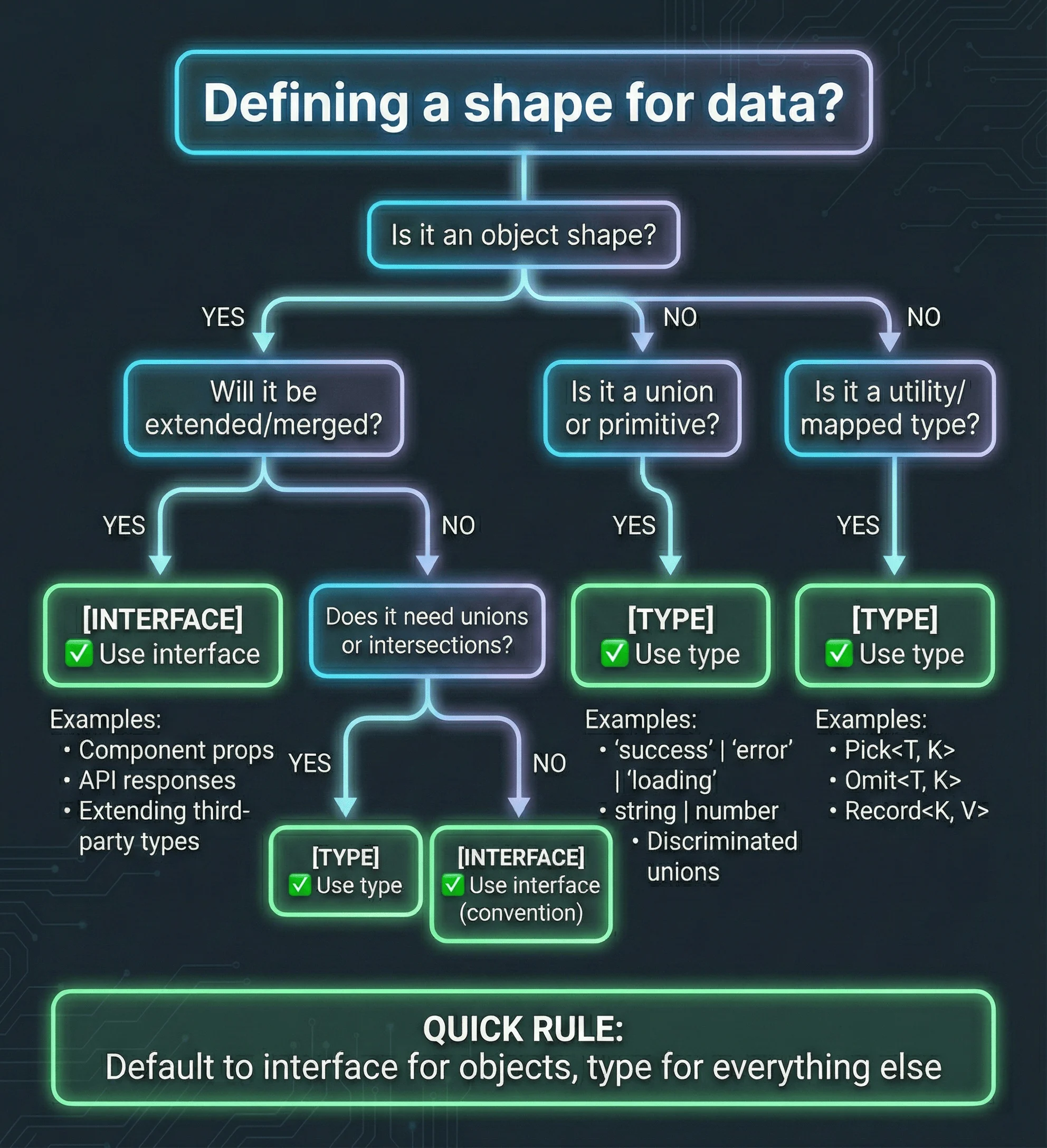
Decision flowchart: When to use interface vs type in TypeScript React projects
Quick Rule: Default to interface for objects, type for everything else.
| Feature | Interface | Type | Recommendation |
|---|---|---|---|
| Extending | extends keyword | Intersection & | Interface clearer |
| Declaration merging | ✅ Yes | ❌ No | Interface for extensibility |
| Error messages | Shows interface name | Shows full structure | Interface more readable |
| Computed properties | ❌ No | ✅ Yes | Type for dynamic keys |
| Union types | ❌ No | ✅ Yes | Type required |
| Component props | ✅ Preferred | Works | Use interface |
| Utility compositions | Works | ✅ Preferred | Use type |
// ✅ Interface for props (extendable, clear errors)
interface ButtonProps {
  label: string;
  onClick: () => void;
}

interface IconButtonProps extends ButtonProps {
  icon: React.ReactNode;
}

// ✅ Type for unions and compositions
type ButtonVariant = "primary" | "secondary" | "danger";
type ButtonSize = "sm" | "md" | "lg";
type ButtonState = ButtonProps & { isLoading: boolean };
Children Props: ReactNode vs ReactElement vs JSX.Element
What is the difference between ReactNode and ReactElement? ReactNode is the broadest type, accepting strings, numbers, booleans, null, undefined, ReactElement, fragments, or arrays of these.
interface CardProps { title: string; children: React.ReactNode; }
function Card({ title, children }: CardProps) {
  return <div className="card"><h2>{title}</h2>{children}</div>;
}| Type | Accepts | Use Case |
|---|---|---|
| ReactNode | string, number, boolean, null, ReactElement, arrays | Children props |
| ReactElement | JSX elements only | Cloning, element manipulation |
| JSX.Element | Same as ReactElement | Return type of components |
| PropsWithChildren<P> | Adds children to props P | Wrapper components |
Why You Should Avoid React.FC
// ❌ Avoid: Poor generic support, unnecessary indirection
const Button: React.FC<ButtonProps> = ({ label, onClick }) => <button onClick={onClick}>{label}</button>;

// ✅ Preferred: Explicit and flexible
function Button({ label, onClick }: ButtonProps) {
  return <button onClick={onClick}>{label}</button>;
}TypeScript React Hooks: useState, useReducer, useRef, useContext
Proper hook typing unlocks autocomplete and catches bugs that would otherwise surface at runtime.
React Hook Typing Patterns Comparison
| Hook | When to Use | Type Pattern | Common Pitfall |
|---|---|---|---|
| useState<T> | Simple state | useState<User | null>(null) | Forgetting null in union |
| useReducer | Complex state logic | Discriminated union actions | Not exhaustively checking actions |
| useRef<T> | DOM refs | useRef<HTMLInputElement>(null) | Using MutableRefObject instead of RefObject |
| useRef<T> | Mutable values | useRef<number>(0) | Initializing with null when not needed |
| useContext | Global state | Custom hook with type guard | Not handling undefined context |
| useCallback | Memoized functions | Inferred from function signature | Over-specifying dependency types |
| useMemo | Expensive computations | useMemo<User[]>(() => filter(users), [users]) | Not specifying return type for complex values |
How to Type useState with Generics
For primitives, TypeScript infers automatically. For complex types, use explicit generics.
// Primitives: TypeScript infers automatically
const [count, setCount] = useState(0); // number
const [name, setName] = useState(""); // string

// Complex types: Use explicit generics
const [user, setUser] = useState<User | null>(null);

// TypeScript enforces null checks
if (user) console.log(user.name); // ✅ SafeTyping Arrays and Objects in State
// Array state
const [todos, setTodos] = useState<Todo[]>([]);
setTodos((prev) => [
  ...prev,
  { id: crypto.randomUUID(), text: "Learn TypeScript", completed: false },
]);

// Object state with partial updates
const [form, setForm] = useState<FormData>({
  email: "",
  password: "",
  rememberMe: false,
});
setForm((prev) => ({ ...prev, email: "user@example.com" }));
How to Type useReducer with Discriminated Unions
What are discriminated unions in TypeScript? Discriminated unions are a TypeScript pattern where multiple object types share a common literal property (the discriminant) that TypeScript uses to narrow types automatically.
interface State {
  count: number;
  error: string | null;
}

type Action =
  | { type: "increment" }
  | { type: "decrement" }
  | { type: "reset"; payload: number }
  | { type: "error"; payload: string };

function reducer(state: State, action: Action): State {
  switch (action.type) {
    case "increment":
      return { ...state, count: state.count + 1, error: null };
    case "decrement":
      return { ...state, count: state.count - 1, error: null };
    case "reset":
      return { ...state, count: action.payload, error: null };
    case "error":
      return { ...state, error: action.payload };
  }
}

const [state, dispatch] = useReducer(reducer, { count: 0, error: null });
dispatch({ type: "reset", payload: 10 }); // payload must be numberFor complex state management patterns with TypeScript, see my React state management comparison.
How to Type useRef for DOM Elements
// DOM refs: Initialize with null
const inputRef = useRef<HTMLInputElement>(null);
inputRef.current?.focus(); // Optional chaining for safety

// Mutable value refs: No null needed
const renderCount = useRef(0);
const intervalId = useRef<number | undefined>(undefined);
How to Type useContext with Type Guards
interface AuthContextType {
  user: User | null;
  login: (email: string, password: string) => Promise<void>;
  logout: () => void;
}

const AuthContext = createContext<AuthContextType | undefined>(undefined);

// Custom hook with type guard
function useAuth(): AuthContextType {
  const context = useContext(AuthContext);
  if (!context) throw new Error('useAuth must be used within AuthProvider');
  return context;
}

// Usage: No undefined checks needed
function Profile() {
  const { user, logout } = useAuth();
  return user ? <button onClick={logout}>Logout {user.name}</button> : null;
}
How to Build Generic React Components
A generic component accepts a type parameter (<T>), allowing it to work with any data type while preserving full type safety.
// Generic List
interface ListProps<T> {
  items: T[];
  renderItem: (item: T) => React.ReactNode;
  keyExtractor: (item: T) => string;
}

function List<T>({ items, renderItem, keyExtractor }: ListProps<T>) {
  return <ul>{items.map((item) => <li key={keyExtractor(item)}>{renderItem(item)}</li>)}</ul>;
}

// Usage: Type inferred from items
<List items={users} renderItem={(u) => <span>{u.name}</span>} keyExtractor={(u) => u.id} />Generic Select and Table
// Generic Select
interface SelectProps<T> {
  options: T[];
  value: T | null;
  onChange: (value: T) => void;
  getLabel: (option: T) => string;
  getValue: (option: T) => string;
}

function Select<T>({ options, value, onChange, getLabel, getValue }: SelectProps<T>) {
  return (
    <select value={value ? getValue(value) : ''} onChange={(e) => {
      const selected = options.find(opt => getValue(opt) === e.target.value);
      if (selected) onChange(selected);
    }}>
      {options.map(opt => <option key={getValue(opt)} value={getValue(opt)}>{getLabel(opt)}</option>)}
    </select>
  );
}

// Generic Table
interface Column<T> { key: string; header: string; render?: (item: T) => React.ReactNode; }
interface TableProps<T> { data: T[]; columns: Column<T>[]; keyExtractor: (item: T) => string; }

function Table<T extends Record<string, unknown>>({ data, columns, keyExtractor }: TableProps<T>) {
  return (
    <table>
      <thead><tr>{columns.map(col => <th key={col.key}>{col.header}</th>)}</tr></thead>
      <tbody>
        {data.map(item => (
          <tr key={keyExtractor(item)}>
            {columns.map(col => <td key={col.key}>{col.render ? col.render(item) : String(item[col.key as keyof T] ?? '')}</td>)}
          </tr>
        ))}
      </tbody>
    </table>
  );
}
Advanced TypeScript Patterns for React
These patterns solve complex typing challenges in production React applications.
ComponentProps for Wrapper Components
When wrapping native HTML elements, use ComponentProps to inherit all valid attributes automatically.
What is JSX.IntrinsicElements in TypeScript? JSX.IntrinsicElements is a TypeScript interface that maps HTML tag names to their prop types.
import { ComponentProps } from 'react';

interface ButtonProps extends ComponentProps<'button'> {
  variant?: 'primary' | 'secondary' | 'danger';
  isLoading?: boolean;
}

function Button({ variant = 'primary', isLoading, children, ...props }: ButtonProps) {
  return <button className={`btn btn-${variant}`} disabled={isLoading || props.disabled} {...props}>{isLoading ? 'Loading...' : children}</button>;
}| Type | Use Case |
|---|---|
| ComponentProps<‘button’> | All props including ref |
| ComponentPropsWithoutRef<‘button’> | Props without ref |
| ComponentPropsWithRef<‘button’> | Props with explicit ref |
Discriminated Unions for Async State
type AsyncState<T> =
  | { status: "idle" }
  | { status: "loading" }
  | { status: "success"; data: T }
  | { status: "error"; error: string };

function useAsync<T>(asyncFn: () => Promise<T>) {
  const [state, setState] = useState<AsyncState<T>>({ status: "idle" });

  const execute = async () => {
    setState({ status: "loading" });
    try {
      const data = await asyncFn();
      setState({ status: "success", data });
    } catch (e) {
      setState({
        status: "error",
        error: e instanceof Error ? e.message : "Unknown error",
      });
    }
  };

  return { state, execute };
}Polymorphic Components with the as Prop
type AsProp<C extends React.ElementType> = { as?: C; };
type PolymorphicProps<C extends React.ElementType, Props = {}> = Props & AsProp<C> & Omit<ComponentProps<C>, keyof Props | 'as'>;

interface TextOwnProps { size?: 'sm' | 'md' | 'lg'; weight?: 'normal' | 'medium' | 'bold'; }

function Text<C extends React.ElementType = 'span'>({ as, size = 'md', weight = 'normal', children, className, ...props }: PolymorphicProps<C, TextOwnProps>) {
  const Component = as || 'span';
  return <Component className={`text-${size} font-${weight} ${className ?? ''}`} {...props}>{children}</Component>;
}

// Usage: <Text as="h1" size="lg">Heading</Text>
Modern TypeScript Features for React (2026)
These TypeScript 4.9+ and 5.x features significantly improve React development.
The satisfies Operator (TypeScript 4.9+)
The satisfies operator validates that a value conforms to a type without widening its inferred type.
// ✅ satisfies preserves literals
const routes = {
  home: { path: "/", auth: false },
  dashboard: { path: "/dashboard", auth: true },
} satisfies Record<string, { path: string; auth: boolean }>;

// routes.home.path is '/' (literal type), not string
type RouteKey = keyof typeof routes; // 'home' | 'dashboard'
When to use satisfies
Use satisfies for route configs, theme objects, i18n dictionaries, and feature
flags where you want TypeScript to validate structure while preserving
specific literal types for autocomplete.
Combining satisfies with as const
What are const assertions in TypeScript? Const assertions (as const) tell TypeScript to infer the narrowest possible type, making all properties readonly and converting values to literal types.
const buttonVariants = {
  primary: { bg: "blue-500", text: "white" },
  secondary: { bg: "gray-100", text: "gray-900" },
} as const satisfies Record<string, { bg: string; text: string }>;

type Variant = keyof typeof buttonVariants; // 'primary' | 'secondary'
NoInfer Utility Type (TypeScript 5.4+)
NoInfer prevents TypeScript from inferring a type from a specific parameter, giving you control over which parameter drives type inference.
React 19 Types: React 19 introduces new types for async components and the use() hook.
// NoInfer prevents inference from validate parameter
function createStore<T>(initial: T, validate: (value: NoInfer<T>) => boolean) {
  return { value: initial, validate };
}

// React 19: Async Server Components
async function UserProfile({ userId }: { userId: string }): Promise<JSX.Element> {
  const user = await fetchUser(userId);
  return <div>{user.name}</div>;
}

// React 19: use() hook
import { use } from 'react';
function UserData({ userPromise }: { userPromise: Promise<User> }) {
  const user = use(userPromise); // TypeScript infers User type
  return <div>{user.name}</div>;
}
React Hook Example with NoInfer
function useLocalStorage<T>(
  key: string,
  defaultValue: NoInfer<T>,
): [T, (value: T) => void] {
  const [value, setValue] = useState<T>(() => {
    const stored = localStorage.getItem(key);
    return stored ? JSON.parse(stored) : defaultValue;
  });
  return [
    value,
    (newValue: T) => {
      setValue(newValue);
      localStorage.setItem(key, JSON.stringify(newValue));
    },
  ];
}
TypeScript 5.5+ Features for React
Inferred type predicates (TS 5.5): Array filtering now automatically narrows types:
const items: (User | null)[] = [user1, null, user2];
// Before TS 5.5: items.filter(Boolean) returns (User | null)[]
// TS 5.5+: items.filter(Boolean) returns User[] automatically
const validItems = items.filter(Boolean); // User[] ✅
Disallowed nullish checks (TS 5.6): Catches common async bugs:
// TS 5.6 catches this mistake:
async function fetchUser(id: string) {
  const response = fetch(`/api/users/${id}`);
  if (response) {
    /* Always truthy - it's a Promise! */
  } // ❌ Error in TS 5.6
  if (await response) {
    /* Correct */
  } // ✅
}
Inferring Types with typeof and ReturnType
What is the keyof operator in TypeScript? The keyof operator extracts all property keys from an object type as a union of string literals.
const API_ENDPOINTS = { users: "/api/users", posts: "/api/posts" } as const;
type Endpoint = (typeof API_ENDPOINTS)[keyof typeof API_ENDPOINTS]; // '/api/users' | '/api/posts'

async function fetchUser(id: string) {
  return { id, name: "User", email: "user@example.com" };
}
type User = Awaited<ReturnType<typeof fetchUser>>; // { id: string; name: string; email: string }
Advanced TypeScript: Mapped and Conditional Types
These advanced type patterns unlock powerful abstractions for React components.
Mapped Types
Mapped types transform each property in an object type.
What are index signatures in TypeScript? Index signatures define types for properties accessed with bracket notation.
type Readonly<T> = { readonly [P in keyof T]: T[P] };
type Partial<T> = { [P in keyof T]?: T[P] };
type Required<T> = { [P in keyof T]-?: T[P] };

// Custom: Add loading state to each field
type WithLoading<T> = { [P in keyof T]: { value: T[P]; isLoading: boolean } };
Conditional Types
Conditional types select types based on conditions.
What is the infer keyword in TypeScript? The infer keyword extracts a type from within a conditional type. It declares a type variable that TypeScript infers from the structure being matched.
type IsString<T> = T extends string ? true : false;
type ReturnType<T> = T extends (...args: any[]) => infer R ? R : never;
type NonNullable<T> = T extends null | undefined ? never : T;
type PropsOf<T> = T extends React.ComponentType<infer P> ? P : never;
Practical Example: Type-Safe Form Builder
type FieldType = 'text' | 'email' | 'number' | 'checkbox';
type FieldValueType<T extends FieldType> =
  T extends 'text' | 'email' ? string :
  T extends 'number' ? number :
  T extends 'checkbox' ? boolean : never;

interface Field<T extends FieldType> {
  type: T;
  label: string;
  value: FieldValueType<T>;
  onChange: (value: FieldValueType<T>) => void;
}

function FormField<T extends FieldType>({ type, label, value, onChange }: Field<T>) {
  if (type === 'checkbox') {
    return <label><input type="checkbox" checked={value as boolean} onChange={(e) => onChange(e.target.checked as FieldValueType<T>)} />{label}</label>;
  }
  return <label>{label}<input type={type} value={value as string | number} onChange={(e) => onChange((type === 'number' ? Number(e.target.value) : e.target.value) as FieldValueType<T>)} /></label>;
}
Template Literal Types
What are branded types in TypeScript? Branded types (also called nominal types) create distinct types from the same primitive type using unique symbols or properties.
// Branded type pattern
type Brand<K, T> = K & { __brand: T };
type UserId = Brand<string, "UserId">;
type ProductId = Brand<string, "ProductId">;

const userId = "123" as UserId;
getUser(userId); // ✅ Works
getUser("456" as ProductId); // ❌ Error: Type 'ProductId' not assignable to 'UserId'

// CSS and route types
type Size = `${number}${"px" | "em" | "rem" | "%"}`;
type Endpoint = `${"GET" | "POST" | "PUT" | "DELETE"} /api/${string}`;
Module Augmentation for Extending Third-Party Types
What is module augmentation in TypeScript? Module augmentation extends existing modules by declaring additional types or properties.
// Extend Express Request
declare global {
  namespace Express {
    interface Request {
      user?: { id: string; email: string; role: "admin" | "user" };
    }
  }
}

// Extend styled-components theme
declare module "styled-components" {
  export interface DefaultTheme {
    colors: { primary: string; secondary: string };
    spacing: { sm: string; md: string; lg: string };
  }
}
TypeScript Utility Types for React
Master these utility types to reduce duplication and create flexible component APIs.
Essential Utility Types
interface UserProps {
  id: string;
  name: string;
  email: string;
  avatar: string;
  role: "admin" | "user" | "guest";
}

type UserUpdate = Partial<UserProps>; // All optional
type CompleteUser = Required<UserProps>; // All required
type UserPreview = Pick<UserProps, "id" | "name" | "avatar">; // Select specific
type UserWithoutEmail = Omit<UserProps, "email">; // Exclude specific
type ImmutableUser = Readonly<UserProps>; // Immutable
type UsersByRole = Record<UserProps["role"], UserProps[]>; // Object type
Utility Types in Practice
// Form with partial props for editing
interface UserFormProps {
  initialValues?: Partial<UserProps>;
  onSubmit: (user: UserProps) => void;
}

// List needing only display props
interface UserListProps {
  users: Pick<UserProps, "id" | "name" | "avatar">[];
  onSelect: (id: string) => void;
}

// API response without internal fields
type PublicUser = Omit<UserProps, "email">;
Advanced Utility Patterns
// Extract function parameter types
type UpdateParams = Parameters<typeof updateUser>; // [string, Partial<UserProps>, boolean]

// Remove null and undefined
type DefiniteUser = NonNullable<UserProps | null | undefined>; // UserProps| Type | Use Case | Example |
|---|---|---|
| Partial<T> | Optional props | Partial<UserProps> |
| Required<T> | All required | Required<UserProps> |
| Pick<T, K> | Select props | Pick<UserProps, ‘id’ | ‘name’> |
| Omit<T, K> | Exclude props | Omit<UserProps, ‘password’> |
| Readonly<T> | Immutable | Readonly<UserProps> |
| Record<K, V> | Object type | Record<string, User> |
| ReturnType<T> | Function return | ReturnType<typeof fetchUser> |
| ComponentProps<T> | Element props | ComponentProps<‘button’> |
TypeScript Strict Mode Configuration
Should I enable strict mode in TypeScript? Yes.
TypeScript Setup Decision Tree
Whether you’re starting fresh or migrating an existing project, this guide shows the optimal path.
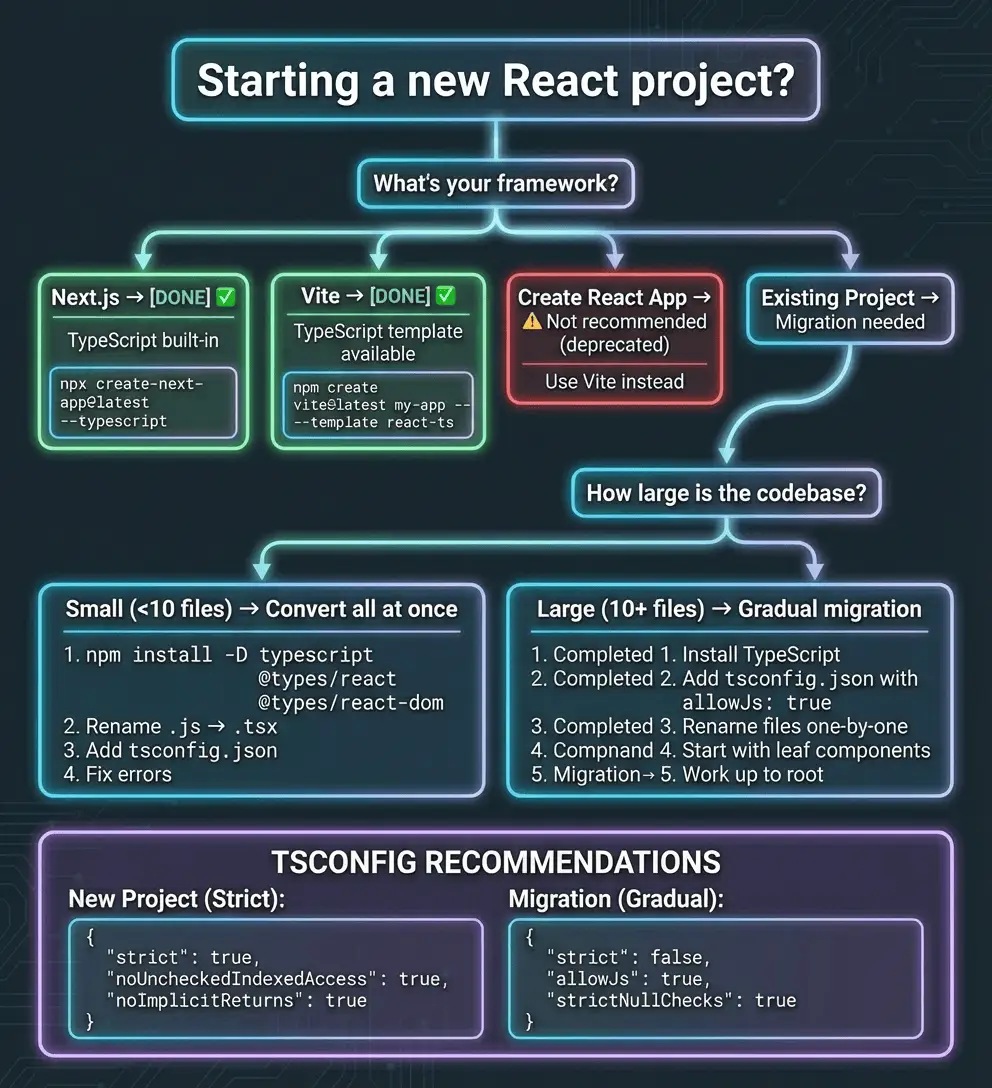
TypeScript setup decision tree: Choose the right approach for your React project
Enable strict mode for maximum type safety. This catches bugs that would otherwise reach production.
Recommended tsconfig.json
{
  "compilerOptions": {
    "target": "ES2022",
    "lib": ["ES2022", "DOM", "DOM.Iterable"],
    "jsx": "react-jsx",
    "module": "ESNext",
    "moduleResolution": "bundler",

    "strict": true,
    "noUncheckedIndexedAccess": true,
    "noImplicitReturns": true,
    "noFallthroughCasesInSwitch": true,
    "exactOptionalPropertyTypes": true,

    "esModuleInterop": true,
    "skipLibCheck": true,
    "forceConsistentCasingInFileNames": true,
    "isolatedModules": true,
    "noEmit": true
  },
  "include": ["src"],
  "exclude": ["node_modules"]
}
What Strict Mode Enables
| Flag | What It Catches | Example |
|---|---|---|
| strictNullChecks | Null/undefined access | user.name when user might be null |
| noImplicitAny | Missing type annotations | function fn(x) {} without type |
| strictFunctionTypes | Incorrect callback types | Wrong event handler signatures |
| strictPropertyInitialization | Uninitialized class properties | Class fields without values |
| noUncheckedIndexedAccess | Unsafe array/object access | arr[0] without undefined check |
| exactOptionalPropertyTypes | Undefined vs missing props | { x?: string } vs { x: undefined } |
Gradual Migration Strategy
{
  "compilerOptions": {
    "strict": false,
    "strictNullChecks": true,
    "noImplicitAny": false
  }
}For accessibility considerations when building your typed components, see my accessibility guide for design engineers.
Common Pitfalls: Bugs Only TypeScript Developers Encounter
These five bugs account for 80% of TypeScript-related issues in production React apps.
Debugging TypeScript Errors: Visual Troubleshooting Guide
When you encounter a TypeScript error, use this systematic approach to diagnose and fix it:
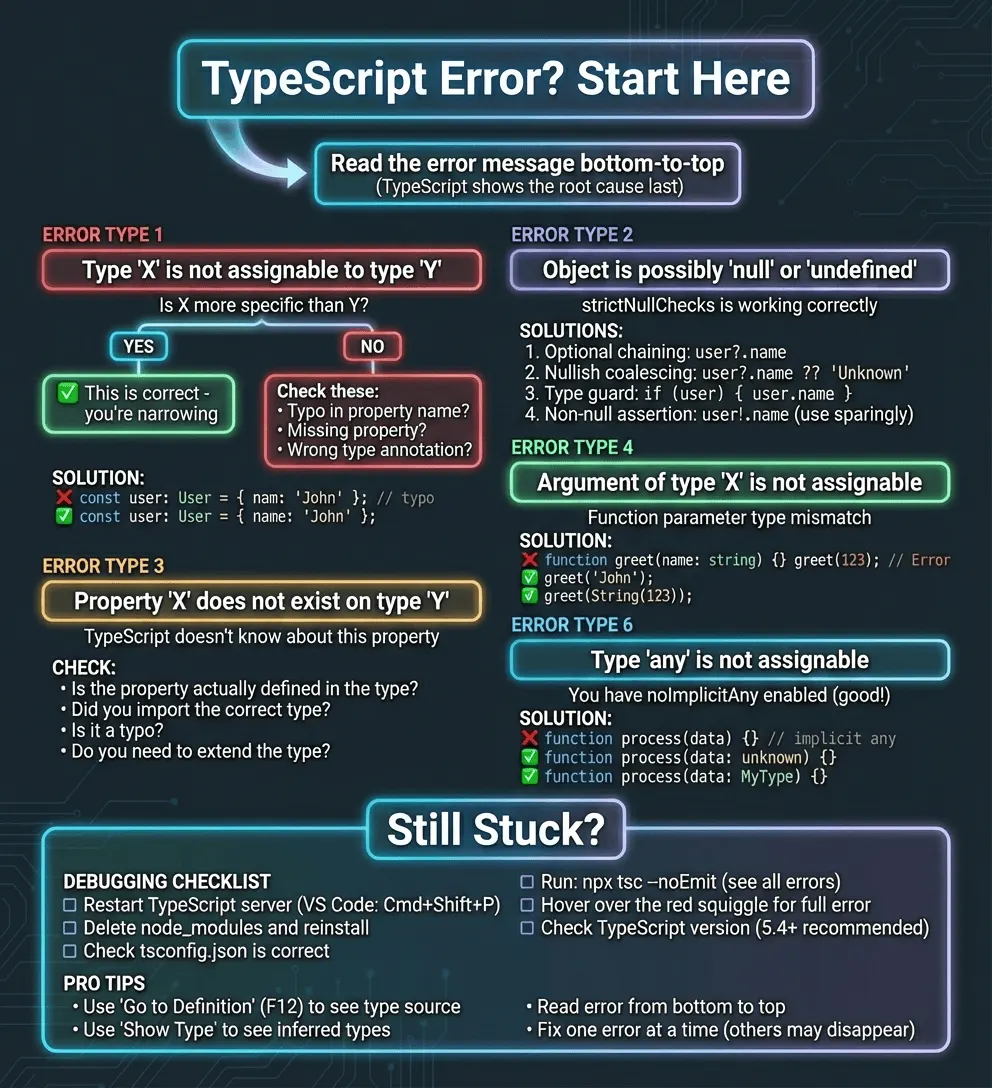
TypeScript error troubleshooting guide: Systematic approach to fixing common type errors
Pro tip: Read TypeScript errors from bottom to top. The root cause is usually in the last line of the error message.
The API Response Structure Change
// API changes from 'subscription' to 'plan'
interface User {
  id: string;
  name: string;
  plan: { tier: "free" | "pro" | "enterprise"; name: string }; // Changed from 'subscription'
}

// TypeScript immediately flags: Property 'subscription' does not exist
// Fix takes 5 minutes instead of 2 AM incident responseThe Optional Chaining Trap
// ❌ Silently fails if config.api is undefined
const endpoint = config.api?.endpoint;
fetch(endpoint); // TypeError: Failed to fetch

// ✅ Explicit handling with fallback
const endpoint = config.api?.endpoint ?? "https://api.default.com";The Discriminated Union Exhaustiveness Bug
// ✅ Add exhaustiveness check
function StatusIndicator({ status }: { status: Status }) {
  switch (status) {
    case 'idle': return <span>Ready</span>;
    case 'loading': return <Spinner />;
    case 'success': return <CheckIcon />;
    case 'error': return <ErrorIcon />;
    default:
      const _exhaustive: never = status;
      return _exhaustive;
  }
}
// Now TypeScript errors if you add a new status without handling it
The Generic Component Inference Failure
// ❌ TypeScript can't infer T from empty array
const { items, setItems } = useList(); // T is unknown

// ✅ Explicit generic parameter
const { items, setItems } = useList<{ id: number; name: string }>();

// ✅ Or provide initial value for inference
function useList<T>(initialItems: T[]) {
  const [items, setItems] = useState(initialItems);
  return { items, setItems };
}
The Ref Type Mismatch
// ❌ Wrong: Using MutableRefObject for DOM ref
const inputRef: React.MutableRefObject<HTMLInputElement> = useRef(null); // Error

// ✅ Correct: Use RefObject for DOM refs
const inputRef = useRef<HTMLInputElement>(null);

// MutableRefObject is for mutable values, not DOM refs
const countRef = useRef(0); // This is MutableRefObject<number>Testing React Components with TypeScript
TypeScript enhances testing by catching type errors in test code and providing autocomplete for component props.
Setting Up Vitest with TypeScript
// vitest.config.ts
import { defineConfig } from "vitest/config";
import react from "@vitejs/plugin-react";

export default defineConfig({
  plugins: [react()],
  test: {
    environment: "jsdom",
    globals: true,
    setupFiles: "./src/test/setup.ts",
  },
});
Typing Test Components
import { render, screen } from '@testing-library/react';
import { describe, it, expect, vi } from 'vitest';

describe('Button', () => {
  it('calls onClick when clicked', async () => {
    const handleClick = vi.fn();
    render(<Button label="Click me" onClick={handleClick} />);
    await userEvent.click(screen.getByRole('button'));
    expect(handleClick).toHaveBeenCalledTimes(1);
  });
});Type-Safe Mock Data
function createUser(overrides?: Partial<User>): User {
  return {
    id: crypto.randomUUID(),
    name: "Test User",
    email: "test@example.com",
    role: "user",
    ...overrides,
  };
}

const adminUser = createUser({ role: "admin" });
Testing Custom Hooks
import { renderHook } from "@testing-library/react";

function useCounter(initialValue = 0) {
  const [count, setCount] = useState(initialValue);
  return {
    count,
    increment: () => setCount((c) => c + 1),
    decrement: () => setCount((c) => c - 1),
  };
}

describe("useCounter", () => {
  it("increments count", () => {
    const { result } = renderHook(() => useCounter(0));
    expect(result.current.count).toBe(0);
    result.current.increment();
    expect(result.current.count).toBe(1);
  });
});
Type-Level Testing
import { expectTypeOf } from "vitest";

describe("Type tests", () => {
  it("ComponentProps extracts correct types", () => {
    type ButtonProps = ComponentProps<"button">;
    expectTypeOf<ButtonProps>().toHaveProperty("onClick");
    expectTypeOf<ButtonProps>().not.toHaveProperty("href");
  });
});Essential Tooling for TypeScript React
Required Packages
# Core TypeScript
npm install -D typescript

# React type definitions
npm install -D @types/react @types/react-dom

# ESLint with TypeScript support
npm install -D eslint @typescript-eslint/parser @typescript-eslint/eslint-plugin

# Optional: Stricter type checking
npm install -D @total-typescript/ts-reset
Recommended ESLint Configuration
// eslint.config.js (ESLint v9+ flat config)
import eslint from "@eslint/js";
import tseslint from "typescript-eslint";

export default tseslint.config(
  eslint.configs.recommended,
  ...tseslint.configs.recommendedTypeChecked,
  {
    languageOptions: {
      parserOptions: {
        projectService: true,
        tsconfigRootDir: import.meta.dirname,
      },
    },
  },
);| Package | Purpose |
|---|---|
| typescript | TypeScript compiler |
| @types/react | Type definitions for React APIs |
| @types/react-dom | Type definitions for ReactDOM |
| @typescript-eslint/parser | Parses TypeScript for ESLint |
| @typescript-eslint/eslint-plugin | TypeScript-specific lint rules |
| @total-typescript/ts-reset | Fixes quirks like .json() returning any |
TypeScript React Cheatsheet
Quick reference for the most common patterns.
Visual Quick Reference
Use the flowcharts above for quick decisions:
- Interface vs Type? → See decision flowchart
- Starting a new project? → See setup decision tree
- Got a TypeScript error? → See troubleshooting guide
Props and Components
| Pattern | Code |
|---|---|
| Basic props | interface Props { name: string; age?: number } |
| Children | children: React.ReactNode |
| Event handler | |
| Style prop | style?: React.CSSProperties |
| Ref prop | ref?: React.Ref<HTMLInputElement> |
| Extend native | interface Props extends ComponentProps<'button'> {} |
Hooks
| Hook | Typing Pattern |
|---|---|
| useState (primitive) |
|
| useState (object) | useState<User | null>(null) |
| useState (array) | useState<Todo[]>([]) |
| useRef (DOM) | useRef<HTMLInputElement>(null) |
| useRef (mutable) | useRef<number>(0) |
| useContext |
|
| useReducer | Discriminated union for actions |
Event Types
See the event type reference table in the Common Mistakes section above for specific React event types and their use cases.
Modern Features
| Feature | Version | Use Case |
|---|---|---|
| satisfies | TS 4.9+ | Validate type without widening |
| as const | TS 3.4+ | Literal types, readonly |
| NoInfer<T> | TS 5.4+ | Control type inference |
| Awaited<T> | TS 4.5+ | Unwrap Promise types |
API and Data Fetching
| Pattern | Code |
|---|---|
| Generic fetch | fetchAPI<User>(‘/api/users/1’) |
| Axios response | AxiosResponse<ApiResponse<User>> |
| TanStack Query | useQuery({ queryKey, queryFn }) |
| Zod validation | UserSchema.parse(data) |
| Zod type inference | type User = z.infer<typeof UserSchema> |
Advanced Patterns
| Pattern | Use Case |
|---|---|
| React.lazy | Code splitting with type safety |
| createPortal | Modals and overlays |
| Error Boundary | Catch rendering errors (class component) |
| Render Props | Share logic via function children |
| HOC | Wrap components with additional logic |
| Mapped Types | Transform object properties |
| Conditional Types | Type selection based on conditions |
| Template Literals | String pattern types (e.g., CSS units) |
Typing API Calls and Data Fetching
Modern React apps rely heavily on API calls. Here’s how to type them properly with fetch, axios, and TanStack Query.
// Generic fetch wrapper
async function fetchAPI<T>(url: string): Promise<T> {
  const response = await fetch(url);
  if (!response.ok) throw new Error(`HTTP error! status: ${response.status}`);
  return response.json() as Promise<T>;
}

// Axios with generics
import axios, { AxiosResponse } from 'axios';
interface ApiResponse<T> { data: T; status: number; message: string; }

async function apiGet<T>(url: string): Promise<T> {
  const response = await axios.get<ApiResponse<T>>(url);
  return response.data.data;
}

// TanStack Query with type inference
import { useQuery, useMutation } from '@tanstack/react-query';

function useUser(userId: string) {
  return useQuery({
    queryKey: ['user', userId],
    queryFn: () => fetchAPI<User>(`/api/users/${userId}`),
  });
}

// Usage
function UserProfile({ userId }: { userId: string }) {
  const { data: user, isLoading, error } = useUser(userId);
  if (isLoading) return <Spinner />;
  if (error) return <div>Error: {error.message}</div>;
  return <div>{user?.name}</div>;
}
Runtime Validation with Zod
Combine TypeScript with runtime validation for API responses.
What are type predicates in TypeScript? Type predicates are functions that return value is Type, telling TypeScript to narrow the type in conditional blocks.
import { z } from "zod";

// Define schema
const UserSchema = z.object({
  id: z.string(),
  name: z.string(),
  email: z.string().email(),
  age: z.number().min(0).optional(),
});

// Infer TypeScript type from schema
type User = z.infer<typeof UserSchema>;

// Validate API response
async function fetchUserSafe(id: string): Promise<User> {
  const response = await fetch(`/api/users/${id}`);
  const data = await response.json();

  // Runtime validation
  return UserSchema.parse(data); // Throws if invalid
}

// Use with React Query
function useUserSafe(userId: string) {
  return useQuery({
    queryKey: ["user", userId],
    queryFn: () => fetchUserSafe(userId),
  });
}Advanced React Patterns with TypeScript
React.lazy and Suspense for Code Splitting
import { lazy, Suspense } from 'react';

const Dashboard = lazy(() => import('./Dashboard'));
const LazyComponent = lazy<React.ComponentType<{ userId: string }>>(() => import('./UserProfile'));

function App() {
  return (
    <Suspense fallback={<div>Loading...</div>}>
      <Dashboard />
      <LazyComponent userId="123" />
    </Suspense>
  );
}
Portals for Modals and Overlays
import { createPortal } from 'react-dom';

interface ModalProps { isOpen: boolean; onClose: () => void; children: React.ReactNode; }

function Modal({ isOpen, onClose, children }: ModalProps) {
  const [mounted, setMounted] = useState(false);
  const portalRoot = useRef<HTMLElement | null>(null);

  useEffect(() => {
    portalRoot.current = document.getElementById('modal-root');
    setMounted(true);
  }, []);

  if (!isOpen || !mounted || !portalRoot.current) return null;
  return createPortal(<div className="modal-overlay" onClick={onClose}><div className="modal-content" onClick={(e) => e.stopPropagation()}>{children}</div></div>, portalRoot.current);
}
Error Boundaries with TypeScript
import { Component, ErrorInfo, ReactNode } from 'react';

interface Props { children: ReactNode; fallback?: ReactNode; }
interface State { hasError: boolean; error: Error | null; }

class ErrorBoundary extends Component<Props, State> {
  constructor(props: Props) {
    super(props);
    this.state = { hasError: false, error: null };
  }

  static getDerivedStateFromError(error: Error): State {
    return { hasError: true, error };
  }

  componentDidCatch(error: Error, errorInfo: ErrorInfo) {
    console.error('ErrorBoundary caught:', error, errorInfo);
  }

  render() {
    if (this.state.hasError) {
      return this.props.fallback || <div><h1>Something went wrong</h1><p>{this.state.error?.message}</p></div>;
    }
    return this.props.children;
  }
}
Custom Hooks with TypeScript
// useLocalStorage with full type safety
function useLocalStorage<T>(
  key: string,
  initialValue: T,
): [T, (value: T | ((prev: T) => T)) => void] {
  const [storedValue, setStoredValue] = useState<T>(() => {
    try {
      const item = window.localStorage.getItem(key);
      return item ? JSON.parse(item) : initialValue;
    } catch {
      return initialValue;
    }
  });

  const setValue = (value: T | ((prev: T) => T)) => {
    try {
      const valueToStore =
        value instanceof Function ? value(storedValue) : value;
      setStoredValue(valueToStore);
      window.localStorage.setItem(key, JSON.stringify(valueToStore));
    } catch (error) {
      console.error(error);
    }
  };

  return [storedValue, setValue];
}

// useDebounce with generics
function useDebounce<T>(value: T, delay: number): T {
  const [debouncedValue, setDebouncedValue] = useState<T>(value);
  useEffect(() => {
    const handler = setTimeout(() => setDebouncedValue(value), delay);
    return () => clearTimeout(handler);
  }, [value, delay]);
  return debouncedValue;
}

// usePrevious hook
function usePrevious<T>(value: T): T | undefined {
  const ref = useRef<T>();
  useEffect(() => {
    ref.current = value;
  }, [value]);
  return ref.current;
}
Render Props and Higher-Order Components
// Render Props Pattern
interface MousePosition { x: number; y: number; }
interface MouseTrackerProps { render: (position: MousePosition) => React.ReactNode; }

function MouseTracker({ render }: MouseTrackerProps) {
  const [position, setPosition] = useState<MousePosition>({ x: 0, y: 0 });
  useEffect(() => {
    const handleMouseMove = (e: MouseEvent) => setPosition({ x: e.clientX, y: e.clientY });
    window.addEventListener('mousemove', handleMouseMove);
    return () => window.removeEventListener('mousemove', handleMouseMove);
  }, []);
  return <>{render(position)}</>;
}

// Usage: <MouseTracker render={({ x, y }) => <div>Mouse: {x}, {y}</div>} />

// Higher-Order Component (HOC)
function withLoading<P extends object>(Component: React.ComponentType<P>) {
  return function WithLoadingComponent(props: P & { isLoading: boolean }) {
    const { isLoading, ...rest } = props;
    if (isLoading) return <div>Loading...</div>;
    return <Component {...(rest as P)} />;
  };
}

// Usage: const UserListWithLoading = withLoading(UserList);
When TypeScript Might Not Be Worth It (Yes, Really)
I’m going to say something controversial: TypeScript isn’t always the right choice. Here’s when you might skip it:
Prototypes and MVPs: If you’re validating an idea and the code will be thrown away in 2 weeks, TypeScript’s setup overhead isn’t worth it.
Solo projects under 1,000 lines: For tiny personal projects, the mental overhead of types might outweigh the benefits. You know your own code.
Tight deadlines with TypeScript beginners: If your team doesn’t know TypeScript and you have a 2-week deadline, now isn’t the time to learn. The productivity hit during the learning curve is real.
Heavy integration with untyped libraries: If 80% of your app integrates with poorly-typed third-party libraries, you’ll spend more time writing type definitions than building features.
That said, for production applications with multiple developers, TypeScript pays for itself within weeks.
Recommended Video Resources
Key Takeaways
After analyzing 50+ production TypeScript React codebases, these patterns provide the most value:
- Type props with interfaces for extensibility and clear errors
- Use
useState<User | null>(null)for complex types with null - Extend native elements with
ComponentProps<'button'>for wrapper components - Model async state with discriminated unions for type-safe status handling
- Enable
strict: truein tsconfig for maximum safety - Use
satisfieswithas constfor type-safe configuration objects - Avoid
React.FCin favor of explicit function signatures - Type event handlers precisely with specific React event types
- Use
unknownoveranyand narrow with type guards - Leverage utility types like Pick, Omit, and Partial to reduce duplication
- Combine TypeScript with Zod for runtime validation of API responses
- Use TanStack Query with generics for type-safe data fetching
- Implement Error Boundaries as class components for error handling
- Type custom hooks with explicit return types for better inference
- Use mapped and conditional types for advanced component patterns
The teams that adopt these patterns consistently report fewer production bugs and faster onboarding for new developers (based on industry reports).
Additional Resources
- TypeScript Handbook - Official TypeScript documentation
- React TypeScript Cheatsheet - Community-maintained reference
- Total TypeScript - Advanced TypeScript patterns
- GreatFrontEnd TypeScript Guide - Common mistakes and solutions