

TL;DR
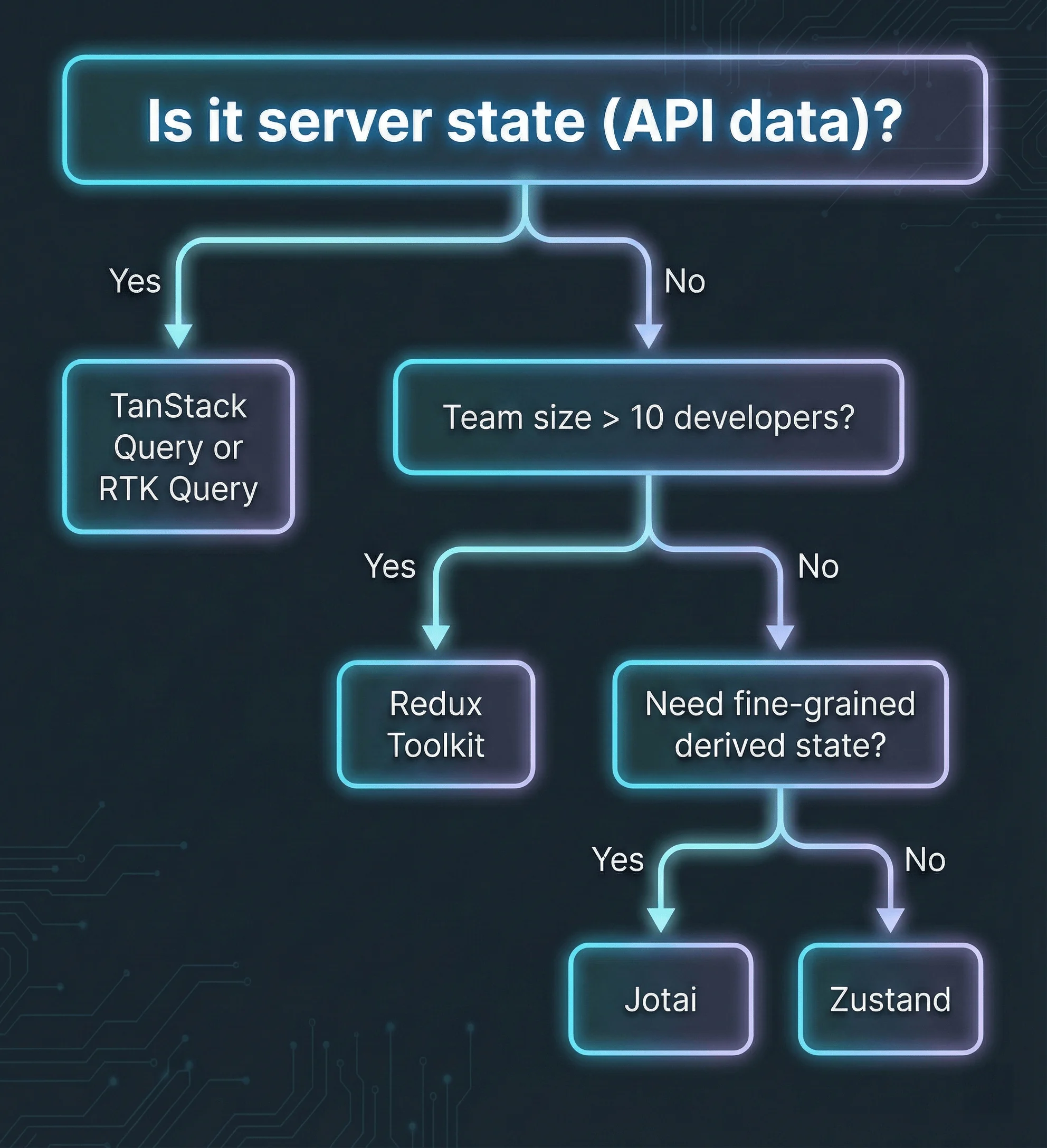
- Use Zustand for most React apps. Simple API, 1.16KB, no Provider needed.
- Use Redux Toolkit for large enterprise teams (10+ devs) needing strict patterns and time-travel debugging.
- Use Jotai when you need fine-grained reactivity with lots of derived/computed state.
- Use TanStack Query for server state (API data). Don’t mix it with client state.
- Skip Context API for frequently updating state. It causes unnecessary re-renders.
For most React apps in 2026, Zustand offers the best balance of simplicity and power. Use Redux Toolkit for large teams needing strict patterns; use Jotai for atomic, bottom-up state.
After migrating three enterprise applications from Redux to Zustand and building two greenfield projects with Jotai, I’ve developed a clear framework for choosing between these libraries. The “best” choice depends on your project’s complexity, team size, and what kind of state you’re managing.
Quick Comparison
Before diving deep, here’s the data you need to make a decision:
Bundle Size and Adoption (March 2026)
| Library | Minified | Gzipped | Weekly npm Downloads | GitHub Stars |
|---|---|---|---|---|
| Redux Toolkit | 43.2KB | 13.8KB | 4.2M | 10.5K |
| Zustand | 3.8KB | 1.16KB | 5.1M | 48K |
| Jotai | 5.2KB | 2.1KB | 1.8M | 19K |
Feature Comparison
| Feature | Redux Toolkit | Zustand | Jotai |
|---|---|---|---|
| Provider Required | Yes | No | Optional |
| Boilerplate | Medium | Minimal | Minimal |
| Learning Curve | Moderate | Easy | Easy |
| DevTools | Excellent | Good | Good |
| TypeScript | Excellent | Excellent | Excellent |
| Derived State | Manual selectors | Manual selectors | Built-in atoms |
| Async Support | Thunks/RTK Query | Middleware | Native Suspense |
| SSR/Next.js | Supported | Supported | Supported |
| React 19 Compatible | Yes | Yes | Yes |
| Best For | Enterprise apps | Most apps | Fine-grained reactivity |
All three libraries provide excellent TypeScript support for typing stores, actions, and selectors. For patterns on typing component props, hooks, and state, see my TypeScript for React developers guide.
Note: Bundle sizes should be verified against the latest package versions. npm download statistics cited above are as of March 2026.
Decision Flowchart
What is Zustand?
Zustand is a lightweight React state management library that provides global state with a hook-based API. Created by the pmndrs collective (the team behind React Three Fiber and Drei), Zustand requires no Provider wrapper, uses selectors for optimized re-renders, and supports middleware for persistence and DevTools integration.
The name comes from German, meaning “state.”
Why Zustand Wins for Most Projects
Zustand’s philosophy is “just enough structure.” You get a centralized store with hooks, but without providers, reducers, or action types:
// store/useCartStore.ts
import { create } from "zustand";

interface CartItem {
  id: string;
  name: string;
  price: number;
  quantity: number;
}

interface CartStore {
  items: CartItem[];
  addItem: (item: Omit<CartItem, "quantity">) => void;
  removeItem: (id: string) => void;
  total: () => number;
}

export const useCartStore = create<CartStore>((set, get) => ({
  items: [],

  addItem: (item) =>
    set((state) => {
      const existing = state.items.find((i) => i.id === item.id);
      return {
        items: existing
          ? state.items.map((i) =>
              i.id === item.id ? { ...i, quantity: i.quantity + 1 } : i,
            )
          : [...state.items, { ...item, quantity: 1 }],
      };
    }),

  removeItem: (id) =>
    set((state) => ({
      items: state.items.filter((i) => i.id !== id),
    })),

  total: () => get().items.reduce((sum, i) => sum + i.price * i.quantity, 0),
}));
// Usage: No Provider needed
import { useCartStore } from "../store/useCartStore";
function Cart() {
const { items, removeItem, total } = useCartStore();
return (
<div>
{items.map((item) => (
<div key={item.id}>
{item.name} x {item.quantity}
<button onClick={() => removeItem(item.id)}>Remove</button>
</div>
))}
<p>Total: ${total().toFixed(2)}</p>
</div>
);
}That’s it. No Provider wrapper, no configureStore, no useDispatch.
Zustand Selectors Prevent Re-renders
Zustand re-renders components only when selected state changes. This selector pattern is key to React performance optimization:
// Only re-renders when items.length changes
const itemCount = useCartStore((state) => state.items.length);

// Only re-renders when specific item changes
const firstItem = useCartStore((state) => state.items[0]);

// Re-renders on any store change (avoid this)
const store = useCartStore();
Zustand Middleware
Add persistence, DevTools, and more with middleware:
import { create } from "zustand";
import { devtools, persist } from "zustand/middleware";

export const useCartStore = create<CartStore>()(
  devtools(
    persist(
      (set, get) => ({
        // ... store implementation
      }),
      { name: "cart-storage" },
    ),
    { name: "CartStore" },
  ),
);
Zustand Trade-offs
| Pros | Cons |
|---|---|
| 90% less code than classic Redux | Less structure can lead to inconsistent patterns |
| 1.16KB gzipped | No built-in data fetching |
| No Provider required | Fewer guardrails for large codebases |
| Built-in selector optimization | |
| Works outside React (vanilla JS) |
What is Redux Toolkit?
Redux Toolkit (RTK) is the official, modern way to write Redux. It eliminates boilerplate with createSlice and configureStore, includes RTK Query for data fetching, and provides time-travel debugging via Redux DevTools.
When Redux Toolkit Shines
RTK is the right choice when you need:
- Strict architectural patterns that scale across 10+ developers
- Time-travel debugging for complex state interactions
- Extensive middleware ecosystem for logging, persistence, and side effects
- RTK Query for integrated data fetching with caching
// store/slices/cartSlice.ts
import { createSlice, PayloadAction } from "@reduxjs/toolkit";

interface CartState {
  items: CartItem[];
}

const cartSlice = createSlice({
  name: "cart",
  initialState: { items: [] } as CartState,
  reducers: {
    addItem: (state, action: PayloadAction<Omit<CartItem, "quantity">>) => {
      const existing = state.items.find(
        (item) => item.id === action.payload.id,
      );
      if (existing) {
        existing.quantity += 1;
      } else {
        state.items.push({ ...action.payload, quantity: 1 });
      }
    },
    removeItem: (state, action: PayloadAction<string>) => {
      state.items = state.items.filter((item) => item.id !== action.payload);
    },
  },
});

export const { addItem, removeItem } = cartSlice.actions;
export default cartSlice.reducer;
// Usage: Requires Provider and hooks
import { useSelector, useDispatch } from "react-redux";
import { removeItem } from "../store/slices/cartSlice";
function Cart() {
const items = useSelector((state: RootState) => state.cart.items);
const dispatch = useDispatch();
return (
<div>
{items.map((item) => (
<button key={item.id} onClick={() => dispatch(removeItem(item.id))}>
Remove {item.name}
</button>
))}
</div>
);
}RTK Query for Data Fetching
If you’re using Redux, RTK Query provides TanStack Query-like features:
import { createApi, fetchBaseQuery } from "@reduxjs/toolkit/query/react";

export const productsApi = createApi({
  reducerPath: "productsApi",
  baseQuery: fetchBaseQuery({ baseUrl: "/api" }),
  tagTypes: ["Products"],
  endpoints: (builder) => ({
    getProducts: builder.query<Product[], void>({
      query: () => "products",
      providesTags: ["Products"],
    }),
  }),
});

export const { useGetProductsQuery } = productsApi;
Redux Toolkit Trade-offs
| Pros | Cons |
|---|---|
| Battle-tested at massive scale | More boilerplate than alternatives |
| Excellent time-travel debugging | 13.8KB gzipped |
| Strong TypeScript support | Learning curve for new developers |
| RTK Query for data fetching | Overkill for simple applications |
| Enforced patterns prevent drift | Requires Provider wrapper |
What is Jotai?
Jotai is an atomic React state management library where state is broken into independent “atoms.” Components subscribe to specific atoms and only re-render when those atoms change. Created by the same team behind Zustand (pmndrs), Jotai excels at derived state and integrates natively with React Suspense for async operations.
The name comes from Japanese (状態), meaning “state.”
The Atomic Mental Model
Think of atoms as the smallest units of state. Each atom is independent, and derived atoms automatically track dependencies:
// atoms/cartAtoms.ts
import { atom } from "jotai";

// Primitive atom
export const cartItemsAtom = atom<CartItem[]>([]);

// Derived atom (read-only, auto-updates)
export const cartTotalAtom = atom((get) => {
  const items = get(cartItemsAtom);
  return items.reduce((sum, item) => sum + item.price * item.quantity, 0);
});

// Derived atom (computed count)
export const cartCountAtom = atom((get) => {
  return get(cartItemsAtom).reduce((sum, item) => sum + item.quantity, 0);
});

// Write-only atom (action)
export const addItemAtom = atom(
  null,
  (get, set, item: Omit<CartItem, "quantity">) => {
    const items = get(cartItemsAtom);
    const existing = items.find((i) => i.id === item.id);

    set(
      cartItemsAtom,
      existing
        ? items.map((i) =>
            i.id === item.id ? { ...i, quantity: i.quantity + 1 } : i,
          )
        : [...items, { ...item, quantity: 1 }],
    );
  },
);
// Usage: Granular subscriptions
import { useAtomValue, useSetAtom } from "jotai";
import { cartItemsAtom, cartTotalAtom, addItemAtom } from "../atoms/cartAtoms";
function CartTotal() {
// Only re-renders when total changes
const total = useAtomValue(cartTotalAtom);
return <p>Total: ${total.toFixed(2)}</p>;
}
function AddToCart({ product }) {
// Never re-renders from cart changes
const addItem = useSetAtom(addItemAtom);
return <button onClick={() => addItem(product)}>Add</button>;
}Jotai Async Atoms with Suspense
Jotai handles async state elegantly with React Suspense. This pattern works seamlessly with React Server Components:
const userIdAtom = atom(1);

// Async derived atom
const userDataAtom = atom(async (get) => {
  const id = get(userIdAtom);
  const response = await fetch(`/api/users/${id}`);
  return response.json();
});

// Usage with Suspense
<Suspense fallback={<Loading />}>
  <UserProfile /> {/* useAtomValue(userDataAtom) inside */}
</Suspense>
Jotai Trade-offs
| Pros | Cons |
|---|---|
| Minimal re-renders (atomic subscriptions) | Requires different mental model |
| Built-in derived state | Atoms can scatter across files |
| 2.1KB gzipped | Less obvious data flow |
| Native Suspense integration | DevTools less mature than Redux |
| No Provider required |
React Context API: When It’s Enough
When should you use Context API instead of a state library? Context API works for state that changes infrequently and doesn’t require optimized re-renders.
Context API vs State Libraries
| Use Context API | Use Zustand/Redux/Jotai |
|---|---|
| Theme (light/dark mode) | Shopping cart state |
| User locale/language | Form data |
| Auth status (logged in/out) | Real-time updates |
| Feature flags | Frequently changing UI state |
Why Context Causes Performance Issues
Context API triggers re-renders in all consuming components when any value changes. There’s no built-in way to subscribe to just part of the context.
// Problem: Every consumer re-renders when ANY value changes
const AppContext = createContext({
  user: null,
  theme: "light",
  notifications: [],
});

function Header() {
  const { theme } = useContext(AppContext); // Re-renders when notifications change!
  return <header className={theme}>...</header>;
}
State management libraries solve this with selectors (Zustand), atoms (Jotai), or memoized selectors (Redux). When building interactive UI components, choosing the right state approach directly impacts user experience.
Server State: Use TanStack Query
What is server state? Server state is data that originates from an external source (APIs, databases) and needs synchronization between client and server.
None of the client state libraries (Zustand, Redux, Jotai) are ideal for server state. Data from APIs needs:
- Caching with configurable stale times
- Background refetching
- Optimistic updates
- Request deduplication
- Loading and error states
TanStack Query Example
import { useQuery, useMutation, useQueryClient } from '@tanstack/react-query';

function Products() {
  const { data, isLoading, error } = useQuery({
    queryKey: ['products'],
    queryFn: () => fetch('/api/products').then(r => r.json()),
    staleTime: 5 * 60 * 1000, // 5 minutes
  });

  if (isLoading) return <Spinner />;
  if (error) return <Error message={error.message} />;

  return <ProductList products={data} />;
}
Best practice: Use TanStack Query (or RTK Query) for server state, and Zustand/Jotai for client state. They complement each other.
Migration Guide: Redux to Zustand
Many teams are migrating from Redux to Zustand. Here’s the incremental approach:
Step 1: Install Zustand Alongside Redux
npm install zustandStep 2: Convert One Slice at a Time
// Before: Redux slice
const userSlice = createSlice({
  name: "user",
  initialState: { user: null, loading: false },
  reducers: {
    setUser: (state, action) => {
      state.user = action.payload;
    },
    setLoading: (state, action) => {
      state.loading = action.payload;
    },
  },
});

// After: Zustand store
const useUserStore = create((set) => ({
  user: null,
  loading: false,
  setUser: (user) => set({ user }),
  setLoading: (loading) => set({ loading }),
}));
Step 3: Update Components
// Before
const user = useSelector((state) => state.user.user);
const dispatch = useDispatch();
dispatch(setUser(newUser));

// After
const user = useUserStore((state) => state.user);
const setUser = useUserStore((state) => state.setUser);
setUser(newUser);
Step 4: Remove Redux Slice
Once all components are migrated, remove the Redux slice and its references.
Typical results: 70-90% code reduction, simpler mental model, faster onboarding for new developers.
SSR and Next.js Compatibility
All three libraries work with Next.js App Router and React Server Components, but require different patterns for SSR hydration.
Zustand with Next.js
// For SSR, use createStore + context pattern
import { createStore } from 'zustand';
import { createContext, useContext, useRef } from 'react';

const StoreContext = createContext(null);

export function StoreProvider({ children, initialState }) {
  const storeRef = useRef();
  if (!storeRef.current) {
    storeRef.current = createStore((set) => ({
      ...initialState,
      // ... actions
    }));
  }
  return (
    <StoreContext.Provider value={storeRef.current}>
      {children}
    </StoreContext.Provider>
  );
}
Jotai with Next.js
// Jotai has built-in SSR support
import { Provider } from 'jotai';
import { useHydrateAtoms } from 'jotai/utils';

function HydrateAtoms({ initialValues, children }) {
  useHydrateAtoms(initialValues);
  return children;
}

export function Providers({ children, initialState }) {
  return (
    <Provider>
      <HydrateAtoms initialValues={[[cartAtom, initialState.cart]]}>
        {children}
      </HydrateAtoms>
    </Provider>
  );
}
React 19 and React Compiler Compatibility
All three libraries are compatible with React 19 and the React Compiler (formerly React Forget).
React Compiler impact:
- Zustand: Selectors continue to work; compiler may optimize component re-renders further
- Redux: Selectors and memoization patterns remain valid
- Jotai: Atomic subscriptions already minimize re-renders; compiler provides additional optimization
React 19’s use() Hook: Native Suspense Integration
React 19 introduces the use() hook for reading resources during render, which affects state management patterns:
import { use } from "react";

function UserProfile({ userPromise }: { userPromise: Promise<User> }) {
  const user = use(userPromise); // Suspends until resolved
  return <h1>{user.name}</h1>;
}

// Parent provides the promise
function Page({ id }: { id: string }) {
  const userPromise = fetchUser(id); // Starts fetching immediately
  return (
    <Suspense fallback={<Skeleton />}>
      <UserProfile userPromise={userPromise} />
    </Suspense>
  );
}
This changes the calculus for server state: simple data fetching may not need TanStack Query or SWR if you’re already using Suspense boundaries. However, those libraries still add caching, refetching, and optimistic updates that use() alone doesn’t provide.
For more on how React Server Components interact with data fetching and state, see my React Server Components practical guide. If you’re still building with useState and useReducer for local state, my guide to mastering React hooks covers when to reach for a state management library instead.
Next Steps
-
Starting a new project? Begin with Zustand. It covers 90% of use cases with minimal complexity.
-
On a large enterprise team? Evaluate Redux Toolkit for its enforced patterns and time-travel debugging.
-
Need fine-grained reactivity? Try Jotai for components with complex derived state.
-
Managing API data? Add TanStack Query regardless of which client state library you choose.
-
Migrating from Redux? Follow the incremental migration guide above. Start with one slice.
-
Building interactive components? Pair your state management with Framer Motion for smooth animations.
-
Working with designers? Learn how to bridge design and code for better component architecture.
Additional Resources
- Zustand Documentation
- Redux Toolkit Documentation
- Jotai Documentation
- TanStack Query Documentation
- Valtio Documentation (proxy-based alternative)
- pmndrs GitHub (creators of Zustand, Jotai, Valtio)