

Choosing an app stack for a content site costs you 200ms in Time to Interactive and bloated JavaScript bundles. Choosing a content stack for an app costs you weeks fighting state management and authentication flows. This guide shows you how to choose correctly in 2026.
This comparison reflects the current stable versions as of March 2026: Astro 5.16.11, Next.js 16.1.4, and React 19.2.3. I’ve shipped this production Astro site with 109 pages, 32.5s build times, and Lighthouse scores of 90+ performance / 100 accessibility—so these tradeoffs come from live usage, not theory.
Quick Answer: Which Framework Should I Choose?
- Astro if 60%+ of pages are static content (blogs, docs, marketing)
- Next.js if 60%+ of pages are interactive apps (dashboards, SaaS, e-commerce)
- React + Vite if you’re building a SPA behind authentication with no SEO needs
- Astro ships the least JavaScript by default (0-20kb)
- Next.js gives you the most app scaffolding with RSC and Server Actions
- React keeps maximum freedom but requires you to assemble the stack
Market Context
Astro is now backed by Cloudflare (announcement), while Next.js remains Vercel’s flagship framework. Astro assumes content-first; Next.js assumes app-first.
Latest Ecosystem Updates (March 2026)
- React 19.2 adds Activity, performance tracks, and
useEffectEvent, while React Compiler v1.0 is now stable. - Next.js 16 stabilizes Turbopack, adds Cache Components, and integrates the React Compiler by default - see the Next.js 16 release.
- Next.js 16.1 adds Turbopack file system caching, a bundle analyzer, and better debugging with
next dev --inspectin the Next.js 16.1 release. - Astro 5.16 ships SVGO optimization,
ActionInputSchemafor typed actions, and CLI shortcuts for preview in the Astro 5.16 release.
Technical Glossary
| Term | Definition | Why It Matters |
|---|---|---|
| SSR (Server-Side Rendering) | Generates HTML on the server for each request | Improves Time to First Byte (TTFB) and ensures search engines receive fully rendered content |
| SSG (Static Site Generation) | Builds HTML at build time | Ideal for content pages that rarely change; fastest delivery possible |
| RSC (React Server Components) | React components that run only on the server and stream serialized UI | Ships less JavaScript to the browser; data fetching happens server-side |
| ISR (Incremental Static Regeneration) | Rebuilds static pages on-demand after deployment | Combines static speed with dynamic data freshness (Next.js feature) |
| PPR (Partial Prerendering) | Mixes static HTML with dynamic server rendering in the same page | Fast pages stay fast while data stays fresh (Next.js 16 feature) |
| Islands Architecture | Renders static HTML by default and hydrates only interactive components | Keeps JavaScript payloads low; each island loads independently |
| Hydration | Process of attaching JavaScript event handlers to server-rendered HTML | Required for interactivity; expensive if done for entire page |
| Partial Hydration | Hydrating only specific interactive components instead of the full page | Core advantage of Astro islands; reduces JavaScript execution time |
| Server Islands | Server-rendered components that update independently without full page SSR | Astro 5 feature for dynamic content without turning entire page into SSR |
| Turbopack | Rust-based bundler replacing Webpack in Next.js 16 | 10x faster dev server startup and Hot Module Replacement (HMR) |
| Edge Functions | Serverless functions that run on CDN edge nodes close to users | Lower latency for dynamic content; supported by Vercel, Cloudflare, Netlify |
| Streaming SSR | Sends HTML to browser progressively as it’s generated | Improves perceived performance; user sees content before full page renders |
The Content-to-Interaction Ratio (CIR) Decision Framework
What is CIR?
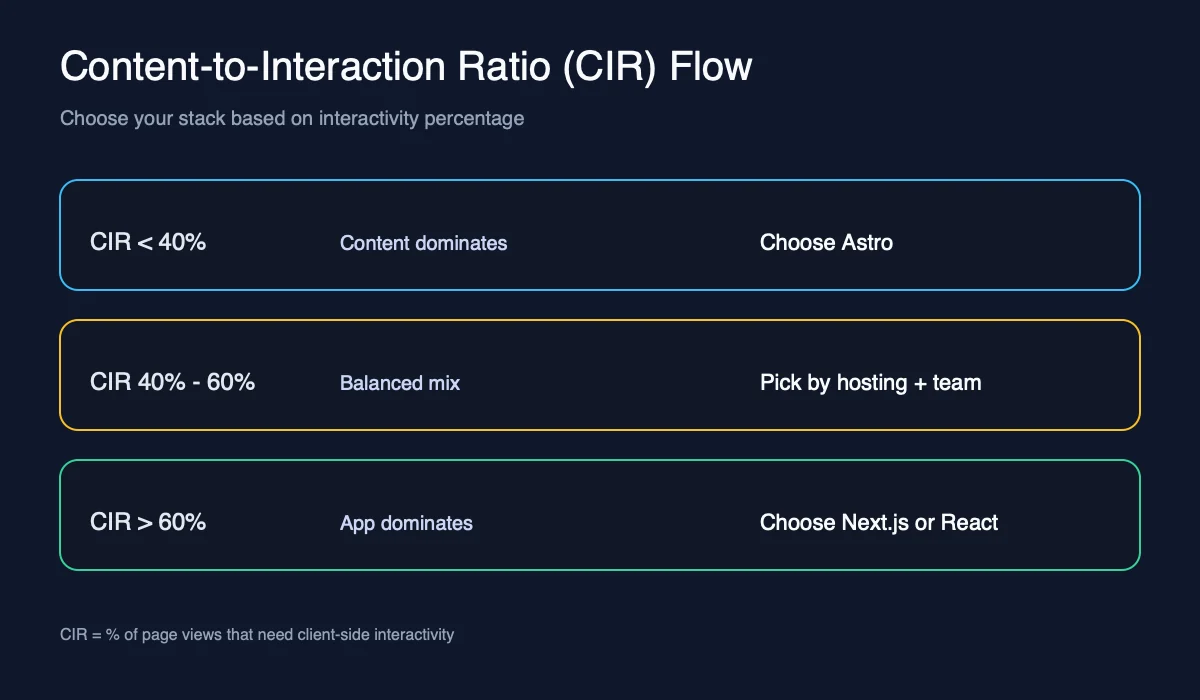
Content-to-Interaction Ratio (CIR) is the percentage of page views that are primarily content consumption versus interactive application usage. This single metric determines whether you should choose a static-first stack (Astro) or an app-first stack (Next.js or React).
How to Calculate CIR:
- Low CIR (0-40%): Most pages are interactive—dashboards, forms, real-time data, authenticated flows
- Medium CIR (40-60%): Mixed content and interactivity—e-commerce, documentation with live demos
- High CIR (60-100%): Most pages are content—blogs, marketing sites, documentation, SEO landing pages
Decision Rules:
- CIR > 60%: Choose Astro for minimal JavaScript and fast static delivery
- CIR < 40%: Choose Next.js for app scaffolding and server-side features
- CIR 40-60%: Choose Next.js if you need SSR/auth, Astro if performance is critical
- Behind auth + no SEO: Choose React + Vite regardless of CIR
Real-World CIR Examples:
| Site Type | Typical CIR | Best Choice | Why |
|---|---|---|---|
| Marketing site + blog | 80-95% | Astro | Static HTML, minimal JS, fast builds |
| SaaS dashboard | 5-20% | Next.js | SSR, server actions, routing, auth |
| Internal admin tool | 10-30% | React + Vite | Simple SPA with custom APIs |
| Docs with interactive widgets | 70-85% | Astro | Islands for widgets, static docs |
| E-commerce marketplace | 30-50% | Next.js | SEO plus app-like interactivity |
| Portfolio with contact form | 90-95% | Astro | One island for form, rest is static |
What Each Stack Optimizes For
React is a UI library that renders in the browser by default, so you supply routing, data fetching, and SSR if you need it. Start with the React docs if you need the core API surface.
Next.js is a full-stack React framework with App Router, Server Actions, and React Server Components. It is optimized for product apps that need SSR, caching, and edge deployment. The Next.js documentation is the best place to understand App Router and caching.
Astro is a content-first framework that renders static HTML and hydrates only islands. It is optimized for content sites and minimal JavaScript payloads. See the Astro docs for islands, server islands, and content collections.
Quick Comparison: For marketing sites with blogs, Astro wins because it ships static HTML with minimal JavaScript (0-20kb). For SaaS dashboards, Next.js wins because it provides SSR, Server Actions, and built-in routing. For internal tools behind authentication, React + Vite wins because you don’t need SSR or SEO optimization.
| Question | React | Next.js | Astro |
|---|---|---|---|
| Current stable version | 19.2.3 | 16.1.4 | 5.16.11 |
| Default rendering | Client-side | Server and client | Static HTML |
| Best for | SPAs, custom stacks | Product apps | Content-heavy sites |
| JS shipped by default | High (150kb+) | Medium (50-150kb) | Low (0-20kb) |
| Data fetching model | Client or custom | Server components and actions | Static or server islands |
| Hosting | Static + APIs | Node or edge runtime | Static or hybrid |
If you are coming from a framework comparison mindset, the Angular vs React deep dive covers why “library vs framework” matters for long-term maintenance.
Framework Deep Dive with Code Examples
React: Client-First by Default
React renders on the client unless you pair it with a framework that supports SSR or RSC. React 19.2 adds Activity and useEffectEvent, and the React Compiler is now stable, but you still assemble the full stack.
Key mechanics: Virtual DOM, Fiber reconciliation, CSR, hydration, Suspense, and client-side routing with Vite or a custom stack.
Use React when:
- You’re building an authenticated internal dashboard
- SEO doesn’t matter
- You need a bespoke backend or a non-Node runtime
Code Example: React SPA with Client-Side Routing
// App.tsx - React 19 with Vite
import { useState, useEffect } from "react";
import { BrowserRouter, Routes, Route, Link } from "react-router-dom";

function Dashboard() {
  const [data, setData] = useState(null);

  useEffect(() => {
    // Client-side data fetching
    fetch("/api/dashboard")
      .then((res) => res.json())
      .then(setData);
  }, []);

  return (
    <div>
      <h1>Dashboard</h1>
      {data ? <DataTable data={data} /> : <Spinner />}
    </div>
  );
}

function App() {
  return (
    <BrowserRouter>
      <nav>
        <Link to="/">Home</Link>
        <Link to="/dashboard">Dashboard</Link>
      </nav>
      <Routes>
        <Route path="/" element={<Home />} />
        <Route path="/dashboard" element={<Dashboard />} />
      </Routes>
    </BrowserRouter>
  );
}

export default App;
Bundle output: ~150kb+ (React + React DOM + Router + your code). All JavaScript must download before the app is interactive.
If your team leans on strong types and custom patterns, pair it with TypeScript for React and a focused state solution like Zustand or Jotai.
Next.js: Server-First with React Server Components
Next.js 16 aligns with React 19 and formalizes a server-first rendering model with Server Components and Server Actions. It adds Cache Components, Partial Prerendering, and a stable Turbopack pipeline to keep SSR fast while reducing client bundles. The Next.js 16 release notes and React 19.2 release notes explain how server features stabilized.
Key mechanics: App Router, Route Handlers, Middleware, SSR, SSG, RSC, Server Actions, PPR, ISR, and Turbopack.
Turbopack is a Rust-based bundler that replaces Webpack in Next.js 16. It provides 10x faster dev server startup and Hot Module Replacement (HMR), making large codebases more manageable.
Incremental Static Regeneration (ISR) allows you to rebuild static pages on-demand after deployment. This combines the speed of static generation with the freshness of server rendering—ideal for e-commerce product pages or news sites.
Use Next.js when:
- You need SSR for SEO or time-to-content
- Your app is mostly dynamic and authenticated
- You want routing, caching, and data fetching in one framework
Code Example: Next.js App Router with Server Components
// app/blog/page.tsx - Next.js 16 Server Component
import { Suspense } from "react";
import { BlogList } from "@/components/BlogList";
import { Skeleton } from "@/components/Skeleton";

// This runs on the server only
async function getBlogPosts() {
  const res = await fetch("https://api.example.com/posts", {
    next: { revalidate: 3600 }, // ISR: revalidate every hour
  });
  return res.json();
}

// Server Component - no JavaScript shipped to client
export default async function BlogPage() {
  const posts = await getBlogPosts();

  return (
    <div>
      <h1>Blog</h1>
      <Suspense fallback={<Skeleton />}>
        <BlogList posts={posts} />
      </Suspense>
    </div>
  );
}

// app/blog/[slug]/page.tsx - Dynamic route with ISR
export async function generateStaticParams() {
  const posts = await getBlogPosts();
  return posts.map((post) => ({ slug: post.slug }));
}

async function getPost(slug: string) {
  const res = await fetch(`https://api.example.com/posts/${slug}`, {
    next: { revalidate: 3600 },
  });
  return res.json();
}

export default async function PostPage({
  params,
}: {
  params: { slug: string };
}) {
  const post = await getPost(params.slug);

  return (
    <article>
      <h1>{post.title}</h1>
      <div dangerouslySetInnerHTML={{ __html: post.content }} />
    </article>
  );
}
Bundle output: ~50-150kb depending on client components. Server Components ship zero JavaScript. Data fetching happens on the server, so the HTML arrives pre-rendered.
Next.js is the best option when you want a product app with frontends and APIs in one place. For performance, use the same profiling principles from the React performance guide.
Astro: Static-First with Islands Architecture
Astro 5.16 is built around static HTML output and islands architecture for interactivity. The islands model keeps JavaScript off the page until you explicitly opt in. The Astro 5.16 release covers the latest DX improvements and build optimizations.
Key mechanics: Islands, hydration directives (client:load, client:visible, client:idle), server islands, content collections, and adapters for static or hybrid output.
Partial Hydration is the core advantage of Astro islands. Instead of hydrating the entire page (like React SPAs), Astro hydrates only the interactive components you specify. This reduces JavaScript execution time and improves Time to Interactive.
Server Islands (Astro 5 feature) allow you to render dynamic components on the server without turning the entire page into SSR. For example, a “Latest Posts” widget can fetch fresh data on each request while the rest of the page remains static.
Use Astro when:
- The majority of your pages are content, not stateful UI
- You want very low JavaScript payloads by default
- You plan to mix multiple frameworks or migrate gradually
Code Example: Astro with React Islands
---
// src/pages/blog/[slug].astro - Astro static page with islands
import { getCollection } from "astro:content";
import Layout from "@/layouts/Layout.astro";
import TableOfContents from "@/components/TableOfContents.astro";
import CommentSection from "@/components/CommentSection.jsx"; // React component
import ShareButtons from "@/components/ShareButtons.jsx"; // React component

export async function getStaticPaths() {
  const posts = await getCollection("blog");
  return posts.map((post) => ({
    params: { slug: post.slug },
    props: { post },
  }));
}

const { post } = Astro.props;
const { Content, headings } = await post.render();
---

<Layout title={post.data.title}>
  <article>
    <h1>{post.data.title}</h1>
    <p>Published: {post.data.pubDate}</p>

    <!-- Static HTML - no JavaScript -->
    <TableOfContents headings={headings} />

    <!-- Static content - no JavaScript -->
    <Content />

    <!-- Island 1: Hydrates only when visible -->
    <ShareButtons client:visible title={post.data.title} url={Astro.url.href} />

    <!-- Island 2: Hydrates on page load -->
    <CommentSection client:load postId={post.slug} />
  </article>
</Layout>
Bundle output: ~8-20kb for the two islands only. The article content, layout, and table of contents ship as static HTML with zero JavaScript.
Hydration Directives Explained:
client:load- Hydrates immediately on page load (use for above-the-fold interactivity)client:visible- Hydrates when component enters viewport (use for below-the-fold widgets)client:idle- Hydrates when browser is idle (use for non-critical features)client:only- Skips server rendering, renders only on client (use for browser-only APIs)
If you are already invested in Astro content collections, see the Astro Content Collections guide.
Why Islands Architecture Feels Faster:
Astro renders most of the page as static HTML and hydrates only the widgets that need interactivity. This avoids full-page hydration, reduces JavaScript work, and lets each island load independently. For large content sites, this often improves Time to Interactive by 40-60% compared to full-page hydration.
Team-Based Defaults
- Content teams and marketing orgs: choose Astro for fast publishing, minimal JS, and predictable performance.
- Product teams shipping authenticated apps: choose Next.js for App Router + Server Actions + server-first rendering.
- Internal tools and dashboards: choose React + Vite when the app is behind auth and SSR/SEO is not required.
- WordPress editorial workflow required: choose Headless WordPress + Astro for familiar authoring with a fast frontend.
Feature Comparison (2026)
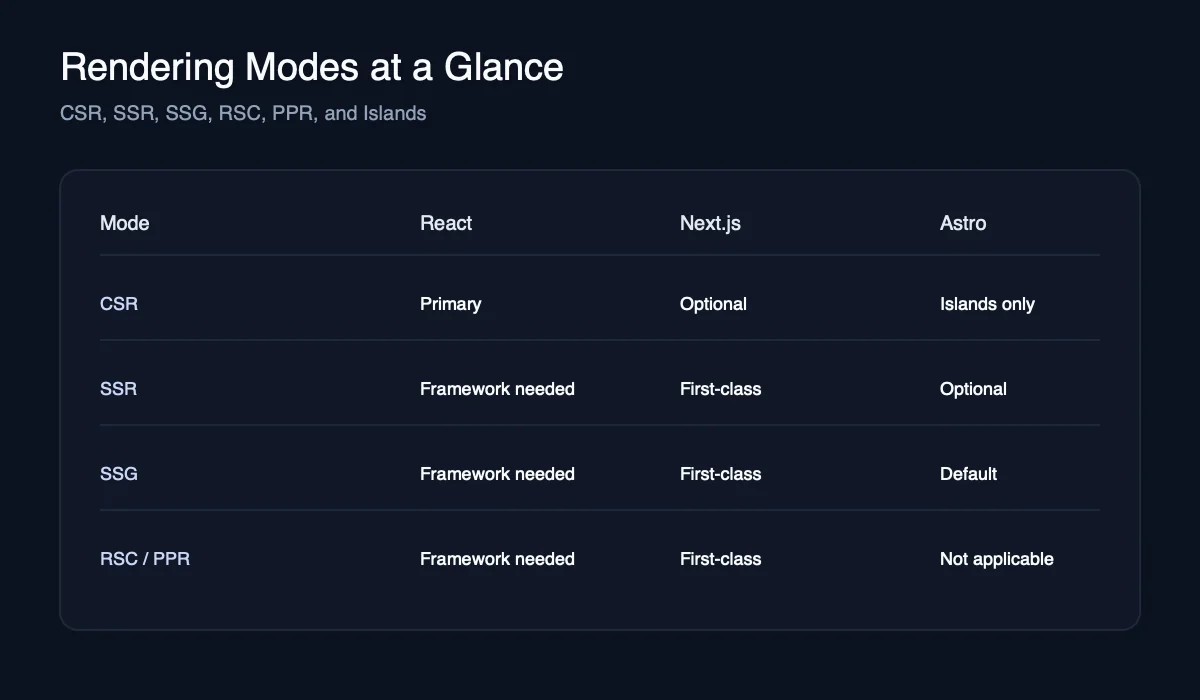
Quick Summary: Next.js 16 provides first-class Server Components and Server Actions with integrated Turbopack. Astro 5.16 focuses on content tooling with the Content Layer and islands architecture. React 19.2 requires external solutions for routing, SSR, and content management.
| Capability | React 19.2.3 | Next.js 16.1.4 | Astro 5.16.11 |
|---|---|---|---|
| Server Components | Framework-dependent | First-class | Islands (not RSC) |
| Compiler support | React Compiler v1.0 | Integrated by default | Not applicable |
| Server Actions | Framework-dependent | First-class | Actions via adapters |
| Content tooling | External | External | Content Layer |
| Default JS payload | High | Medium | Low |
| Rendering modes | CSR only | SSR, SSG, RSC | SSG, SSR, islands |
| Edge integration | Host-dependent | Edge runtime | Adapters for edge |
| Best hosting match | Static + API | Vercel, Node, Edge | Static, Cloudflare, Node |
Performance and JavaScript Payloads
Astro ships the least JavaScript because it is static by default. Next.js can be very fast, but only when heavy UI stays in Server Components. React SPAs ship the most JavaScript unless you aggressively code split.
When you evaluate performance, watch three things: TTFB (server speed), LCP (largest contentful paint), and INP (interaction latency). Most “framework wins” come from reducing hydration work and avoiding client-server waterfalls.
Use this rule of thumb:
- Astro when the page should load and read like a document.
- Next.js when the page behaves like an application.
- React when the page is an application and you control the entire architecture.
Here is an example of a real build output pattern you should see in content-first Astro projects:
dist/ (static)
├── index.html
├── blog/
│   ├── getting-started/index.html
│   └── design-systems/index.html
└── assets/
    ├── chunk-1.js  8.4kb
    └── chunk-2.js  5.2kb
If your Astro output contains large client bundles, you likely hydrated too much. The interactive UI components guide explains how to scope interactivity for smaller bundles.
SEO and Content Workflow
Astro ships HTML with minimal JS, which is ideal for SEO on content-heavy sites. Next.js gives you server rendering and streaming, which is strong for content inside product flows. React alone can do SEO, but it requires pre-rendering or a framework.
If SEO is a primary KPI, treat Astro as the baseline and Next.js as the hybrid option. Use React only when the app is fully authenticated or SEO does not matter. Validate with Core Web Vitals.
For content teams, Astro has a strong edge. The Content Layer introduced in Astro 5 simplifies schema-driven content workflows. It also maps cleanly to design system handoff, especially if you are already using a Figma-to-code workflow.
DX Tradeoffs and How to Mitigate Them
| Framework | Pain Point | How to Mitigate |
|---|---|---|
| React | No routing out of the box | Use React Router or TanStack Router; establish team conventions early |
| React | SEO requires manual setup | Add React Helmet for meta tags or use a framework like Next.js |
| React | Inconsistent patterns across team | Create a shared component library and document architecture decisions |
| Next.js | Server/client boundary confusion | Use clear naming (*.server.tsx, *.client.tsx); lint for 'use client' placement |
| Next.js | Caching can cause stale data | Use revalidatePath() and revalidateTag(); monitor cache behavior in dev |
| Next.js | Edge vs Node runtime differences | Test both runtimes; use feature detection for platform-specific APIs |
| Astro | Under-shipping interactivity | Start with client:visible for most islands; upgrade to client:load only when needed |
| Astro | App-scale state management | Use Nanostores for global state; consider Next.js if auth/state dominates |
| Astro | Over-hydrating defeats the purpose | Audit bundle sizes regularly; aim for under 20kb JS per page |
If your team is design-forward, Astro plus a strong component system can be a strong match. The design systems guide and the accessibility guide map well here.
Hosting and Cost
Quick Summary: React SPAs work on any static host (Netlify, Vercel, S3). Next.js needs Node or edge runtimes for SSR (Vercel, self-hosted). Astro can be fully static (any host) or hybrid with adapters (Cloudflare, Netlify, Vercel).
React SPAs deploy to any static host and use your own API backend. This is usually the simplest to operate.
Next.js often requires a server runtime for SSR, server actions, and caching. That can increase hosting cost and operational complexity, but it pays off for app performance. Vercel is the most integrated platform for Next.js, while self-hosting gives maximum control.
Astro can be static or hybrid. You can deploy static output anywhere, and add server rendering only for specific routes. This keeps costs low for content sites that only need minimal dynamic behavior, and Cloudflare Workers or Pages are a common fit for edge rendering.
If you need to compare rendering models more deeply, the React Server Components guide explains where server rendering reduces client payloads.
| Platform | Best Fit | Why |
|---|---|---|
| Vercel | Next.js | Native App Router, RSC, caching, server actions |
| Cloudflare Workers or Pages | Astro | Edge-first, static plus islands, low latency delivery |
| Netlify | Astro or React | Strong static hosting and functions for small apps |
| Self-hosted Node | Next.js or Astro | Full control and custom infrastructure requirements |
Headless CMS Option: WordPress + Astro
Headless WordPress + Astro means WordPress manages content while Astro renders the frontend. Use it when you need WordPress editorial workflows (roles, revisions, plugins) but want Astro performance.
Implementation options:
- REST API for simple posts/pages.
- WPGraphQL when you need flexible querying (common on ACF-heavy sites).
Tradeoffs to plan for:
- Preview workflows (draft previews usually need SSR or a preview build pipeline).
- Authentication and rate limiting on APIs.
- Build-time scaling for large archives (webhooks and smart invalidation help).
Astro’s official guide covers Headless WordPress + Astro.
Migration Paths That Actually Work
- React to Next.js: easiest path. Move routes into the App Router and keep most UI components intact.
- Next.js to Astro: common for content-heavy marketing sites. Keep React components as islands in Astro pages.
- React to Astro: use Astro for pages and keep React for highly interactive widgets.
Astro supports React components directly, which makes migration less risky than a full rewrite. Plan on a hybrid period where only some pages move at a time.
Alternatives Worth Considering
- Remix if you want a React framework with web-standard forms and nested routing that feels closer to traditional server apps.
- SvelteKit if you want low client JavaScript without giving up full app capabilities.
- Nuxt if your team is Vue-first but needs SSR, content routes, and server actions.
Common Pitfalls
- Over-hydrating Astro: using
client:loadeverywhere turns Astro into a SPA and removes its advantage. - Client-only Next.js: treating Next.js as a SPA and ignoring Server Components leads to heavier bundles than necessary.
- React without conventions: no routing standards, no data layer, and ad-hoc state management create fragile codebases.
- SEO assumptions: client-rendered React without pre-rendering often underperforms for SEO and link previews.
Decision Checklist
Use this checklist before you commit:
- Are most page views content or application interactions?
- Do you need SSR for SEO or speed?
- Will your data layer live in the same repo as the UI?
- Is the team comfortable with framework conventions?
- How much JavaScript do you want shipped by default?
If you answer “content” to questions 1 and 5, Astro wins. If you answer “app” to 1 and “yes” to 2 and 3, Next.js wins. If you need maximum freedom or non-Node backends, React is the safest foundation.
Performance Metrics: Real Numbers
What are the actual performance differences? Here’s data from production sites and framework benchmarks (as of March 2026):
| Metric | React SPA | Next.js (RSC) | Astro (Islands) |
|---|---|---|---|
| Initial JS Bundle | 150-300kb | 50-150kb | 0-20kb |
| Time to Interactive (TTI) | 3-5s | 1.5-3s | 0.5-1.5s |
| Largest Contentful Paint (LCP) | 2.5-4s | 1.5-2.5s | 0.8-1.5s |
| First Input Delay (FID) | 100-300ms | 50-100ms | under 50ms |
| Cumulative Layout Shift (CLS) | 0.1-0.25 | 0.05-0.15 | under 0.05 |
| Lighthouse Performance | 60-80 | 80-95 | 90-100 |
Real-world example from this site (Astro, measured March 2026):
- Build time: 32.5s for 109 pages
- JavaScript shipped: 12-18kb per page (islands only)
- Lighthouse: 90+ performance, 100 accessibility/SEO
- LCP: 0.9s average
- TTI: 1.2s average
Next Steps: Implementation Resources
Ready to start? Use these resources:
Astro Starters:
- Astro Blog Template - Official blog starter
- Astro Docs Template - Documentation site starter
- Astro + Tailwind - Styled starter
Next.js Starters:
- Next.js App Router Template - Official App Router starter
- Next.js Commerce - E-commerce starter
React Starters:
- Vite + React - Fast dev environment
- Create React App - Traditional React setup
- React + TypeScript - Typed React starter
Migration Guides:
Performance Audit Tools:
- Lighthouse CI - Automated performance testing
- WebPageTest - Real-world performance analysis
- Chrome User Experience Report - Field data from real users
Related Articles:
- React Server Components Guide - Understand RSC architecture for Next.js
- React Performance Optimization - Optimize React applications
- Building Design Systems - Component architecture for any framework
- Astro Content Collections - Master Astro’s content layer
- Angular vs React Comparison - Framework decision guide